

Subcontractors in the construction industry are currently waiting an average of 96 days to see their invoices paid. This staggering delay often stems from a single, frustrating question: why are my pay applications being rejected? You know the routine. You spend hours wrestling with manual Excel sheets and complex retainage calculations, only for a general contractor to send back your AIA G702 and G703 forms because of a minor math error or a missing lien waiver. It’s a cycle that blocks your cash flow and puts unnecessary strain on your professional relationships.
You shouldn’t have to guess why your money is stuck in administrative limbo. This guide identifies the exact reasons your billing documents are getting flagged and shows you how to secure approval on the first try. We will break down seven common construction billing errors, from inconsistent project history to unapproved change orders, so you can create error-free documents and get paid faster.
Key Takeaways
- Identify the specific mathematical discrepancies between G702 summaries and G703 continuation sheets that trigger automatic rejections.
- Understand the primary reasons behind the question, “why are my pay applications being rejected,” to prevent future cash flow bottlenecks.
- Learn why including unapproved change orders or missing lien waivers can stall your progress billing for weeks.
- Discover how automated AIA-style billing eliminates manual entry errors and ensures complex retainage calculations are accurate every time.
Common Mathematical and Technical Errors on G702 and G703 Forms
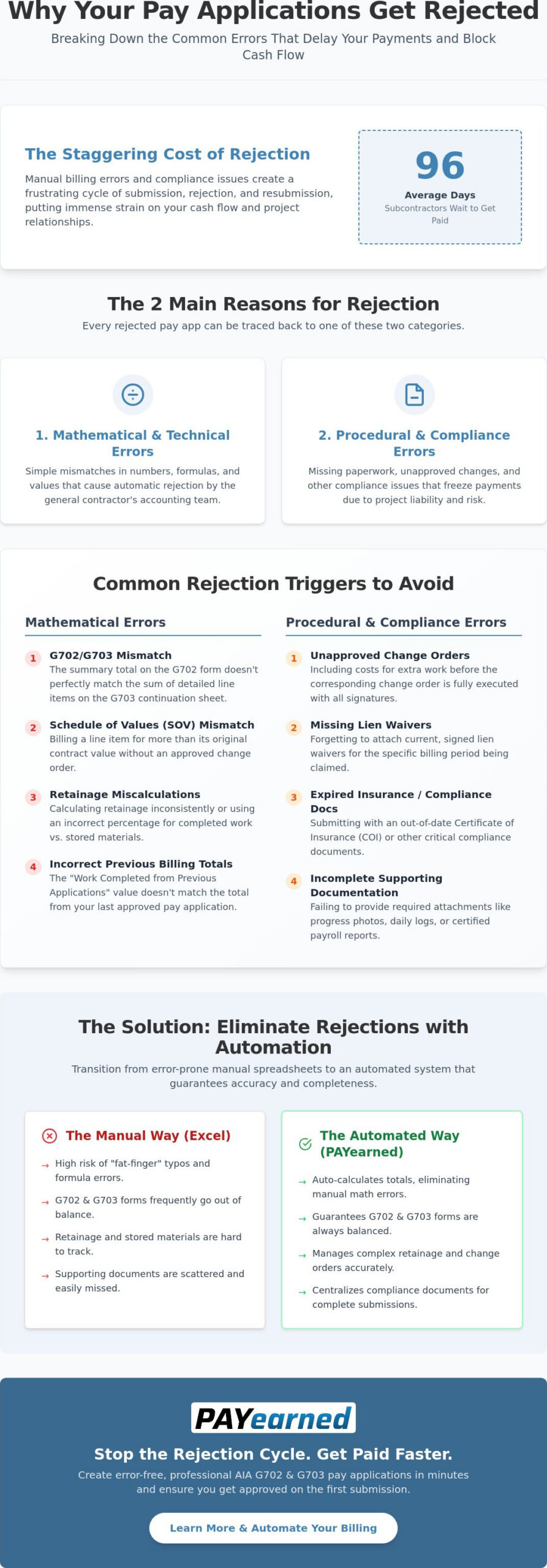
Precision is the foundation of construction finance. When you ask, “why are my pay applications being rejected,” the answer often lies in a simple mathematical mismatch between your summary sheet and your continuation sheet. A general contractor’s accounting team will flag any discrepancy between the G702 summary and the G703 detail lines. If your “Total Completed and Stored to Date” on the G702 doesn’t align perfectly with the sum of column G on your G703, the document is dead on arrival.
The Schedule of Values (SOV) Mismatch
A single typo in a line item can trigger a full rejection. Your billing must strictly adhere to the approved Schedule of Values (SOV). If you accidentally over-bill a specific line item beyond its original contract value without an approved change order, the system halts. It’s vital to ensure the total of the G703 always matches the contract sum on the G702. Even a one-cent rounding error in your Excel formulas can cause a payment delay that lasts weeks.
Retainage and Stored Materials Errors
General contractors are particularly sensitive to how you report materials. They often reject applications that don’t clearly distinguish between work completed and materials currently on-site but not yet installed. Retainage must be calculated consistently across all billing cycles as a fixed percentage of the total work completed and materials stored to maintain financial transparency and avoid compliance red flags. When dealing with variable percentages, manual calculations often fail, which is why reviewing billing tutorials can help you identify where your spreadsheet formulas are breaking down.
Mismatched “Balance to Finish” figures frequently occur when you don’t account for previous payments or current retainage correctly. To keep your cash flow moving, verify these technical details before submission:
- Mismatched Totals: Ensure column I (Balance to Finish) on the G703 correctly subtracts current billing and retainage from the total contract sum.
- Stored Materials: Only bill for materials actually on-site or in a bonded warehouse, and provide the necessary backup documentation.
- Previous Billing: Verify that “Work Completed from Previous Applications” matches the “Total Completed and Stored to Date” from your last approved pay app.
Procedural and Compliance Red Flags That Stall Approval
Mathematical accuracy is only half the battle. If you find yourself asking, “why are my pay applications being rejected,” even when the numbers add up, the issue is likely procedural. General contractors operate under strict risk management protocols. A missing lien waiver or an expired insurance certificate creates a liability they cannot ignore. If your insurance has lapsed or your project information doesn’t match the GC’s internal tracking, your payment remains frozen until the paperwork catches up.
The Change Order Bottleneck
One of the most frequent causes of rejection is “jumping the gun” on billing. You might have finished the extra work, but if the change order isn’t fully executed with all required signatures, it shouldn’t appear in your progress billing total. Including unapproved costs creates a mismatch that forces the GC to send the entire application back. Managing these additions requires a systematic approach, as detailed in The 2026 Evolution of Change Order Management Software for Contractors, to ensure every dollar billed is legally backed.
Missing Supporting Documentation
A “proper invoice” in the construction world involves more than just a summary of costs. Under standards like Prompt Payment for Construction Contracts, documentation must be complete and timely to trigger payment deadlines. GCs typically expect a comprehensive package for every pay app submission, including:
- Current, signed lien waivers for the billing period.
- Updated project schedules or progress photos.
- Certified payroll reports for government-funded projects.
- Daily logs or field reports that verify work completed.
Keeping these attachments organized is a massive administrative burden. Using cloud-based billing solutions allows you to store and retrieve these compliance documents instantly, ensuring your submission package is complete every single month. Without a centralized system, it’s too easy for a critical insurance certificate to slip through the cracks, leading to another avoidable rejection.
Eliminating Rejections with Automated AIA-Style Billing
The transition from manual spreadsheets to automated systems is the most effective way to stop asking, “why are my pay applications being rejected.” While manual entry relies on human perfection, automation relies on mathematical logic. By using a system that auto-calculates totals, retainage, and progress billing, you remove the risk of “fat-finger” typos that lead to immediate G702 and G703 rejections. These systems ensure that every line item on your continuation sheet balances perfectly with your summary document before you ever hit the submit button.
Manual Excel vs. Automated PAYearned
Managing AIA Billing Software vs. Excel reveals a massive gap in administrative efficiency. A manual spreadsheet requires you to double-check every formula, previous payment, and retainage percentage for every billing cycle. In contrast, PAYearned provides one-click document generation that pulls from previous data instantly. You don’t have to spend hours hunting for the last approved application or re-entering project details; the cloud-based storage keeps your billing history organized and accessible for every new submission.
Securing Faster Cash Flow
Submitting error-free documents on the first try can reduce your payment cycle by days or even weeks. When a GC receives a clean, professionally formatted AIA-style pay app, it moves through their accounting department without friction. This precision builds trust and ensures you aren’t stuck in a loop of re-doing paperwork while your cash flow remains blocked. PAYearned offers a specialized, “Easy for Less” alternative to complex accounting suites, providing the exact tools you need to generate professional payment certificates without the high cost of manual expertise.
Don’t let avoidable administrative errors delay your hard-earned revenue. You can streamline your billing with PAYearned’s AIA-style document generation and ensure your next payment application is approved on the first try.
Secure Your Project Cash Flow with Accurate Billing
Construction finance doesn’t have to be a guessing game. You’ve seen how minor math discrepancies and missing compliance documents stall your revenue. By addressing the technical errors on your G702 and G703 forms and managing change orders proactively, you eliminate the friction that keeps your money in the general contractor’s bank account. Precision is your best tool for maintaining healthy project relationships and consistent liquidity.
Solving the persistent question of why are my pay applications being rejected requires a shift from manual, error-prone spreadsheets to a dedicated, automated workflow. Transitioning to a professional system ensures your retainage calculations and balance-to-finish figures are accurate for every billing cycle. It removes the stress of administrative back-and-forth and lets you focus on your trade.
Start creating error-free pay applications today with PAYearned. Our platform provides automated AIA-style document generation, built-in change order management, and cloud-based access for your entire team. Take control of your progress billing and secure the cash flow your business deserves.
Frequently Asked Questions
What is the most common reason a pay application is rejected?
Mathematical discrepancies between the G702 summary and the G703 continuation sheet are the most frequent cause for rejection. General contractors require exact alignment between these documents. If the “Total Completed and Stored to Date” on your summary doesn’t match the sum of your individual line items, the application is flagged. This is a primary reason why are my pay applications being rejected, as even a minor rounding error in a manual spreadsheet can halt the entire payment process.
Can I bill for change orders that haven’t been signed yet?
No, you should not bill for unapproved change orders. Most construction contracts require a fully executed document before any extra work can be included in your progress billing. Including unsigned changes creates a mismatch with the GC’s records, which usually results in the entire submission being sent back. Wait until you have the signed paperwork to update your Schedule of Values and ensure your payment certificates remain accurate and undisputed.
How do I calculate retainage correctly on my G702 form?
Retainage is calculated as a fixed percentage of the “Total Completed and Stored to Date” found on line 4 of the G702 summary. You must apply the contractually agreed rate, such as 5% or 10%, to both the work completed and any materials currently stored on-site. Consistent calculation across every billing cycle is essential for approval. Automated software helps maintain this precision, especially when dealing with variable rates or materials that haven’t been installed yet.
What should I do if my pay application is rejected for a mathematical error?
Identify the specific line item mismatch and resubmit a corrected version as quickly as possible. Start by auditing your G703 continuation sheet against your last approved application to find where the numbers diverged. Once you find the error, ensure the new G702 summary reflects these corrections perfectly. To prevent future issues, many contractors move away from manual Excel templates to automated systems that handle these complex calculations without the risk of human error.
PAYearned is an agnostic workflow platform that helps teams manage pay applications
PAYearned is an independent software product and is not developed, endorsed, approved, sponsored or affiliated with the American Institute of Architects (AIA). AIA®, G702®, G703®