

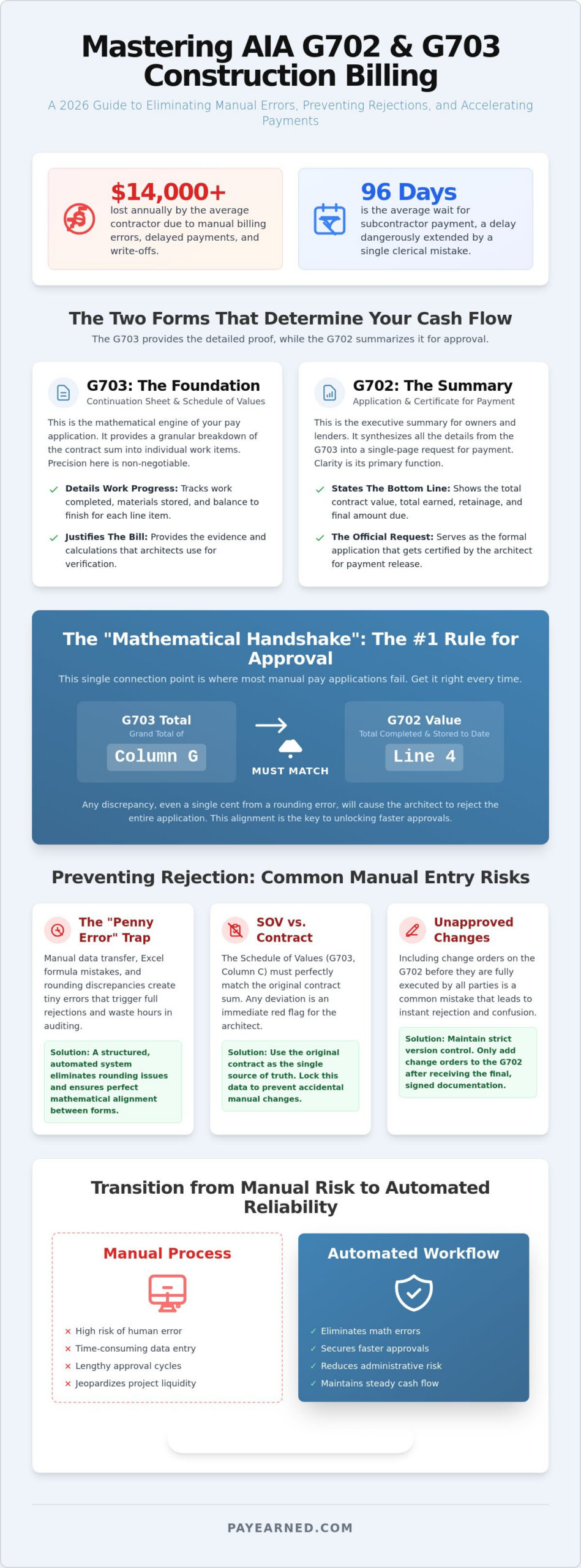
Manual billing errors cost the average commercial contractor over $14,000 every year in delayed payments and unnecessary write-offs. With the average wait for subcontractor payment now stretching to 96 days, a single clerical mistake on your pay application can jeopardize your entire project’s liquidity. To protect your firm’s bottom line, you must simplify aia g702 and g703 workflows by replacing manual data entry with a disciplined, systematic approach.
It’s frustrating to spend hours auditing Excel formulas only to have an architect reject your submission because the retainage calculations don’t perfectly align. We know the stress of managing complex progress billing while fearing that a simple math error will lead to weeks of non-payment. This 2026 guide provides a precise roadmap to help you master the mechanics of construction billing. You’ll learn how to complete G702 and G703 forms with total mathematical accuracy. We’ll explain the vital relationship between the Schedule of Values and the Summary sheet, giving you the tools to secure faster approvals and maintain a steady cash flow.
Key Takeaways
- Align your Schedule of Values (SOV) exactly with the original contract in G703 Column C to prevent immediate rejection.
- Execute the “mathematical handshake” by ensuring G702 Line 4 matches the grand total of G703 Column G every time.
- Discover how to simplify aia g702 and g703 workflows to eliminate “penny errors” and rounding discrepancies that trigger payment delays.
- Protect your project’s liquidity by maintaining strict version control over previous application numbers and stored material totals.
- Transition from manual data entry to a structured, automated billing process to secure faster architect approvals and reduce administrative risk.
Table of Contents
-
Mastering the G703 Continuation Sheet: The Foundation of Your Bill
-
Completing the G702 Application for Payment: The Executive Summary
-
Preventing Rejections: Why Manual G702/G703 Entry is a Risk in 2026
Mastering the G703 Continuation Sheet: The Foundation of Your Bill
The G703 Continuation Sheet serves as the mathematical engine of your pay application. It functions as your Schedule of Values; it breaks the total contract sum into granular, manageable work items. To simplify aia g702 and g703 workflows, you must ensure Column C (Scheduled Value) matches your original contract exactly. Architects use this column as their primary reference point. Even a one-cent discrepancy will trigger an immediate rejection. Precision here is the only way to avoid administrative delays.
Accurate progress tracking requires a disciplined approach to Columns D and E. Column D tracks work completed from all previous applications. Column E records progress made during the current billing period. Errors often occur when contractors manually transfer numbers from the previous month. Don’t fall into the "Stored Materials" trap in Column F. If you’re billing for off-site inventory, you must provide detailed receipts and insurance certificates. Auditors watch this column closely because it represents a high risk for the owner.
To better understand this concept, watch this helpful video:
Calculating Columns G and H: Total Completed and Stored
Column G is the cumulative value of all work through the date. It is the mathematical sum of Columns D, E, and F. This specific figure drives your total billing amount and must be transferred to the G702 summary sheet without error. Column H, the Balance to Finish, represents the remaining financial obligation for each line item. Calculate it by subtracting Column G from Column C. If Column H ever shows a negative number, your billing exceeds the contract sum. This is a red flag that will halt your payment immediately.
Column I: Managing Variable Retainage
Column I handles percentage-based retainage for each line item. Consistency is the primary goal. You may face different retention rates for work completed versus materials stored, depending on the specific terms of your agreement. Understanding what is retention and its role in project liquidity is critical for any contractor. Apply these percentages line by line. When you simplify aia g702 and g703 data entry, you ensure that the total retainage on your G703 matches the summary on your G702 perfectly. This alignment is the "mathematical handshake" that secures architect approval.
Completing the G702 Application for Payment: The Executive Summary
While the G703 provides the granular detail, the G702 Application for Payment serves as the executive summary that owners and lenders prioritize. Lines 1 through 3 establish your financial baseline. Line 1 represents the original contract sum, while Line 2 accounts for the net change by change orders. To simplify aia g702 and g703 processing, ensure Line 3 correctly totals these figures to reflect the adjusted contract sum to date. Accuracy in these early lines prevents a domino effect of errors throughout the rest of the document.
The "Mathematical Handshake" occurs at Line 4. This figure represents the total completed and stored to date, and it must match the grand total of G703 Column G exactly. If these numbers don’t align, your application is mathematically unsound. Line 5 then breaks down retainage into 5a (work completed) and 5b (stored materials). The combined total of these sub-lines must match the G703 Column I total. Finally, Line 8 reveals the current payment due. This is the most critical number for your project’s cash flow, representing the net amount you expect to receive after subtracting previous payments and current retainage.
Line 3: Tracking Net Change by Change Orders
Line 3 requires you to distinguish between additive and deductive change orders. An additive order increases the contract sum, while a deductive order reduces it. Never include a change order on the G702 until it’s fully executed by all parties. Including verbal agreements or pending items leads to immediate rejection by the owner. You can explore the 2026 evolution of change order management software for contractors to see how digital workflows prevent these clerical oversights and keep your summary sheet synchronized.
The Architect’s Certification: Part III of G702
The Architect’s Certification is the final hurdle in the billing cycle. When an architect signs Part III, they’re certifying that the quality of work and the progress in the field match your documentation. They’ll refuse to certify for simple math errors, unapproved materials, or evidence of front-loading. Following a contractor’s guide to error-free billing in 2026 ensures your submission is audit-ready. Using a cloud-based pay app solution can automate these complex calculations to ensure your summary and continuation sheets always remain in perfect harmony.
Preventing Rejections: Why Manual G702/G703 Entry is a Risk in 2026
Manual entry is no longer a viable standard for commercial contractors. The most persistent threat to your payment cycle is the "Penny Error." This occurs when rounding discrepancies between the G703 line items and the G702 summary trigger an automatic rejection from the owner’s accounting system. Even a one-cent mismatch forces a complete resubmission, adding weeks to your wait time. To truly simplify aia g702 and g703 workflows, you must eliminate the possibility of human calculation errors at the source.
Version control poses another significant risk to your project’s cash flow. Many contractors inadvertently use incorrect "Previous Application" figures in Column D because they’re working from static Excel templates. This creates a compounding error that affects every subsequent billing cycle. PAYearned automates the relationship between these forms, ensuring that every total, tax calculation, and retainage figure is mathematically locked. This system autonomy protects your project’s financial liquidity from the hazards of manual data entry and outdated spreadsheets.
The ROI of Automated Document Generation
Automation transforms your administrative overhead from a bottleneck into a competitive advantage. Cloud-based platforms can reduce a traditional four-hour billing process to just 15 minutes. This efficiency allows your team to focus on project execution rather than clerical auditing. By removing human error from complex retainage and change order calculations, you mitigate the risk of payment disputes and project delays. You can compare these modern methods in our guide on AIA Billing Software vs. Excel: The Best Solutions for 2026.
Moving Beyond Manual Forms
Modern solutions like PAYearned manage your Schedule of Values dynamically. This means your data flows seamlessly across billing cycles without the need for manual re-entry or repetitive formatting. The platform includes built-in search capabilities that allow for instant retrieval of past pay apps and change order history, providing a level of cost transparency that manual forms can’t match. It’s time to move past error-prone spreadsheets and adopt a system designed for precision. Streamline your billing with PAYearned today and secure your cash flow with automated accuracy.
Secure Your Project Liquidity with Precision Billing
Mastering the relationship between your Schedule of Values and the executive summary is the only way to protect your firm’s cash flow. You’ve seen how a single rounding error or an unexecuted change order can halt payments for weeks. Accuracy in Column G and Line 4 isn’t just about administrative compliance. It’s about maintaining the financial health of your entire project. By aligning your G703 continuation sheet perfectly with your G702 summary, you eliminate the friction that leads to architect rejections.
You can simplify aia g702 and g703 workflows by moving away from error-prone manual entry and static templates. PAYearned provides a stabilizing force in your administrative environment through automated math that eliminates rounding discrepancies. With cloud-based change order tracking and dedicated retainage management, you ensure every pay app is audit-ready and architect-approved. Generate your AIA-style G702 and G703 documents with PAYearned today to gain peace of mind and secure faster approvals. Your firm’s financial stability depends on the precision of your documentation. Take control of your billing cycle and focus on what you build best.
Frequently Asked Questions
What is the difference between AIA G702 and G703?
The AIA G702 is the summary document that establishes the total contract sum and current payment due, while the G703 is the detailed continuation sheet that breaks down work by line item. Think of the G702 as the executive cover page and the G703 as the mathematical foundation. You must submit both together to provide the owner with a complete view of project progress and financial status.
How do I calculate retainage on a G702 form?
Calculate retainage on the G702 by applying the contract’s specified percentage to the total work completed in Line 5a and materials stored in Line 5b. These two figures are then summed to reach the total retainage amount shown on the summary. To simplify aia g702 and g703 management, you should apply these percentages line by line on the G703 so the cumulative totals match your summary exactly.
What happens if Line 4 of my G702 does not match my G703 total?
If Line 4 of your G702 does not match the grand total of Column G on your G703, the architect or owner will likely reject the application immediately. This discrepancy indicates a fundamental mathematical error in your progress billing that must be corrected before any certification occurs. Automated systems prevent this by synchronizing both forms in real time, eliminating the risk of clerical mismatches that delay your payment.
Do I need a notary for the AIA G702 form?
Yes, the industry standard AIA G702 form requires a notary’s signature and seal to verify the contractor’s sworn statement regarding work completion and payment distribution. This legal requirement confirms the authenticity of the document before it reaches the architect for final certification. Always check your specific contract terms, as some modern digital workflows or subcontractor specific forms may have different verification protocols depending on the project requirements.
PAYearned is an agnostic workflow platform that helps teams manage pay applications
PAYearned is an independent software product and is not developed, endorsed, approved, sponsored or affiliated with the American Institute of Architects (AIA). AIA®, G702®, G703®