

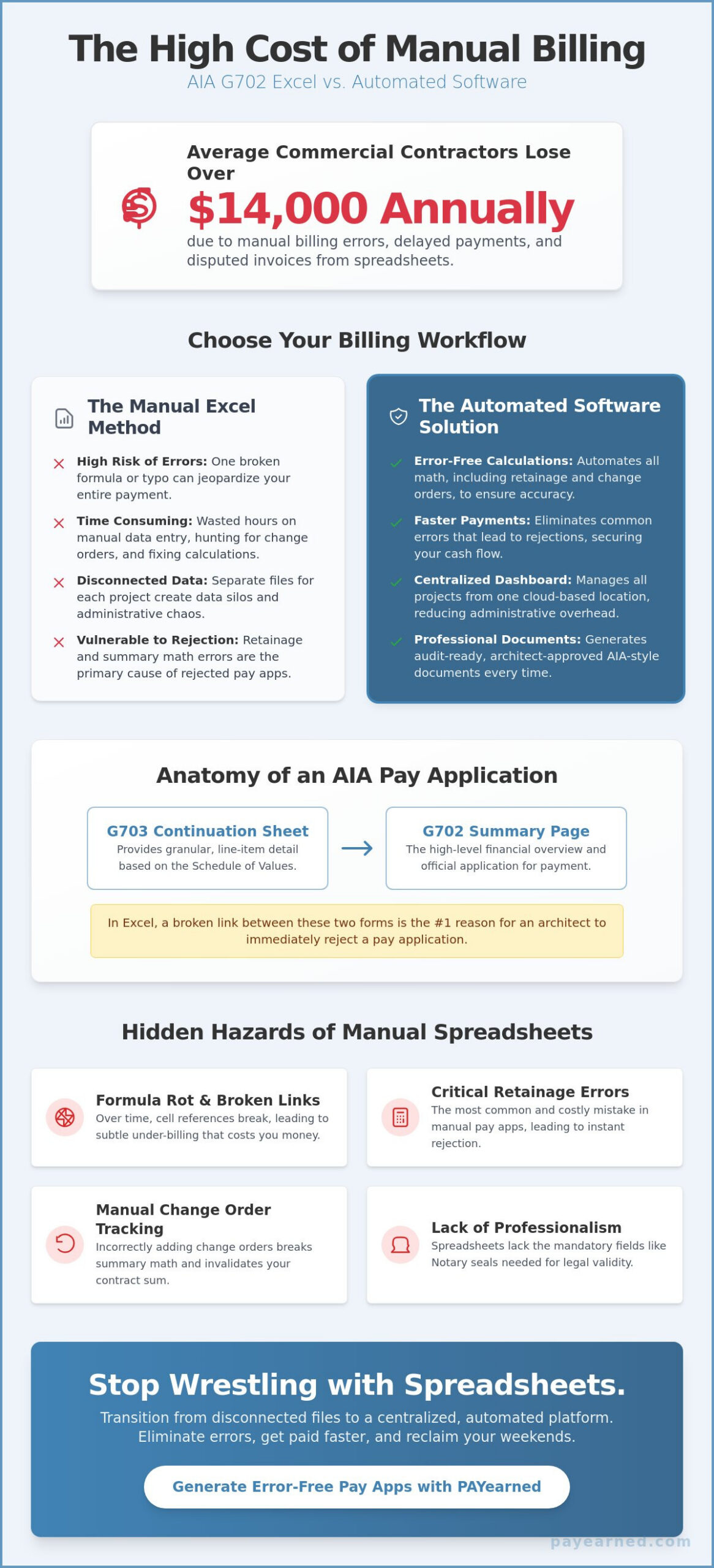
Manual billing errors cost the average commercial contractor over $14,000 annually in delayed payments and disputed invoices. When you’re evaluating aia g702 software vs excel, that figure represents the very real price of a single broken formula or a typo in your retainage column. You likely spend your Sunday nights wrestling with spreadsheet cells and hunting through email chains for missing change orders just to get a pay app submitted by Monday. It’s a high-stakes administrative burden that drains your time and threatens your cash flow.
You deserve a billing process that works as hard as you do on the job site. This guide will show you how to effectively use an AIA G702 Excel template while avoiding the common manual calculation errors that delay construction payments. We’ll explore the critical steps for tracking retainage across multiple months, managing continuation sheets with precision, and ensuring your documents look professional enough for any architect’s approval. You’ll learn how to secure your payments faster and finally reclaim your weekends from the chaos of manual math.
Key Takeaways
- Master the relationship between the G702 summary page and G703 continuation sheet to ensure project totals remain synchronized and audit-ready.
- Establish an accurate contract baseline by correctly inputting original sums and approved change orders before transferring data from your worksheets.
- Evaluate the critical trade-offs between aia g702 software vs excel to determine which method best protects your project’s financial liquidity and mathematical precision.
- Reduce administrative overhead by transitioning from disconnected spreadsheet files to a centralized, cloud-based dashboard for all progress billing.
- Leverage specialized tools like the PAYearned SaaS platform to automate AIA-style document generation and eliminate the manual errors that lead to payment rejections.
Understanding the AIA G702 Template Excel Structure
The AIA Document G702 serves as the industry standard for progress billing, acting as the official Application and Certificate for Payment. For many subcontractors, an Excel template is the first step away from manual paper forms. It offers basic calculation capabilities without a high upfront cost. However, when you evaluate aia g702 software vs excel, you must recognize that a spreadsheet is only as reliable as the person who built the formulas. One incorrect cell reference can jeopardize your entire payment cycle.
To better understand how these forms function in a real-world project, watch this helpful video:
Key Components of a Standard G702 Spreadsheet
Every professional pay app starts with accurate header data. You must include the project name, application number, and the specific billing period. The core of the document is the 9-line summary. This section tracks everything from the Original Contract Sum to the current Balance to Finish. It provides a critical snapshot of project liquidity. Without a Notary seal and the Architect’s certification, the document lacks legal validity. These fields are mandatory for professional submission. They ensure the owner has a verified obligation to release funds.
AIA G702 vs. G703: Why You Need Both
You cannot submit a G702 in isolation. While the G702 provides the high-level financial overview, the G703 Continuation Sheet provides the granular line-item detail. This detail is based on the Schedule of Values, which breaks the contract into measurable work segments. Data must flow seamlessly from the G703 to the G702 summary sheet. In the debate of aia g702 software vs excel, the biggest risk is a broken cell reference. If the totals on your continuation sheet don’t match the summary on your cover page, the architect will reject the application immediately.
How to Fill Out a G702 Excel Template Correctly
Executing a payment application in Excel requires a disciplined, step-by-step approach. You must ensure every figure aligns with your project’s financial reality to avoid delays. Start by establishing your baseline. Input the Original Contract Sum in Line 1. Add any approved Change Orders in Line 2 to calculate the current contract total. This sequence mirrors the rigorous standards found in the Federal Transit Administration’s Guide to Progress Payments.
Once your baseline is set, follow these specific steps to complete the summary:
- Transfer G703 Totals: Pull the total work completed and materials stored directly from your continuation sheet.
- Calculate Retainage: Apply your specific contract percentage, typically 5% or 10%, to your total earned.
- Determine Current Due: Subtract all previous certificates for payment from your current total earned (less retainage).
The Hidden Hazards of Manual Formula Entry
Spreadsheets are vulnerable to “formula rot” over long project durations. Circular references in Excel often lead to subtle under-billing or over-billing errors that go unnoticed until an audit. Many users make the mistake of hard-coding values into Line 5 or Line 8. This breaks the dynamic link between the G702 and G703. Errors in retainage math are the primary cause of rejected applications in manual spreadsheets. If you want to eliminate these calculation risks, you can generate error-free pay apps using automated tools instead.
Managing Change Orders within the Template
Updating Line 2 requires precision. You must track the net change by Change Orders without disrupting the summary math. This is a common point of failure when comparing aia g702 software vs excel. Software handles these updates automatically; Excel requires manual verification. Maintain a dedicated log to track pending versus approved change orders. Only move executed orders into your template to ensure your billing remains legally defensible and architect-approved.
Beyond Excel: Automating Your AIA-Style Billing in 2026
Managing ten separate Excel files for ten different projects is an administrative liability. Each file is a silo where data entry errors hide until they cause a payment rejection. When you analyze aia g702 software vs excel, the real cost isn’t just the software subscription; it’s the hours lost to manual reconciliation. A centralized dashboard provides a single source of truth. It allows you to track project health at a glance rather than opening dozens of spreadsheets every Sunday night. The debate over aia g702 software vs excel usually ends once a contractor realizes how much time they save with a dashboard.
Cloud-based solutions eliminate the version control nightmare that plagues shared spreadsheets. You no longer have to worry if you’re looking at the most recent file or an outdated draft. The PAYearned SaaS platform ensures that every stakeholder accesses the same real-time data. Built-in search engines allow you to retrieve historical project data instantly. This turns weeks of archived documentation into an accessible, organized asset that protects your firm during audits.
Protecting Cash Flow with Automated Retainage Tracking
Precision is the foundation of financial liquidity. Automated systems calculate retainage to the penny every time, removing the risk of math rot that often occurs in manual templates. Clean, standardized formatting reduces payment friction with architects who expect professional submissions. Understanding What is Retention? is vital for profit protection; automation ensures those funds are tracked accurately until the final release. This consistency builds trust with owners and accelerates your payment cycle.
Why 2026 Contractors are Switching to PAYearned
The transition to specialized AIA billing software is a strategic move for contractors who value stability. It replaces the anxiety of manual entry with the confidence of system autonomy. Automation acts as a stabilizing force in the high-stakes environment of construction finance. It allows you to focus on the build rather than the paperwork. You can sign up for a subscription to eliminate manual G702 errors today and secure your cash flow for the future.
Optimize Your 2026 Billing Workflow
Mastering the G702 and G703 structure is a prerequisite for any contractor aiming to maintain steady cash flow. While manual templates offer a low barrier to entry, they eventually introduce “formula rot” and version control issues that delay your payments. When you weigh the pros and cons of aia g702 software vs excel, the choice becomes a matter of protecting your project’s financial liquidity. You don’t have to spend your Sunday nights auditing spreadsheet cells or hunting for missing change order data.
Transitioning to a dedicated platform provides a stabilizing force for your firm’s administrative operations. The PAYearned SaaS platform auto-calculates totals and retainage with mathematical precision. It also features built-in change order management and cloud-based organization to keep your documentation audit-ready. Stop fighting with Excel formulas; generate your AIA-style G702 and G703 with PAYearned today. You can finally submit professional, error-free pay apps that architects will approve without hesitation. Take control of your financial future and get back to what you do best: building.
Frequently Asked Questions
Can I create my own AIA G702 form in Excel?
You can build a custom spreadsheet to mirror the standard layout, but you must ensure the math remains flawless across every billing cycle. Many subcontractors use templates to avoid the cost of official paper forms. However, the manual entry required in aia g702 software vs excel scenarios often leads to broken links. These errors result in payment delays that disrupt your firm’s liquidity.
What is the difference between a G702 and a G703?
The G702 acts as the cover sheet and summary of the current payment application. It provides high-level totals, including the contract sum and current payment due. In contrast, the G703 is the continuation sheet that provides a granular breakdown of work completed for each line item. You must submit both documents together to provide the architect with a complete financial overview of the project.
How do I calculate retainage on a G702 template?
Calculate retainage by multiplying the total work completed and materials stored to date by your contract’s specified percentage. If your contract mandates a 5% cap, a common figure for retainage limits, you must track this cumulative total precisely across every billing period. Automated systems reduce the risk of math errors. Manual templates require you to verify that previous retainage held is correctly subtracted from your current balance.
Why do architects prefer AIA-style billing documents?
Architects favor these documents because they provide a standardized, predictable format for auditing progress. The structured layout makes it easy to verify that the work performed matches the requested payment. Because these forms include a dedicated certification section for the architect’s signature, they provide a clear legal framework for releasing funds. Using a professional format signals that your firm prioritizes financial accuracy and project transparency.
PAYearned is an agnostic workflow platform that helps teams manage pay applications
PAYearned is an independent software product and is not developed, endorsed, approved, sponsored or affiliated with the American Institute of Architects (AIA). AIA®, G702®, G703®