

A construction invoice isn’t just a bill; it is a high-stakes financial document that dictates your project’s survival. While many contractors still reach for a basic construction invoice template in Excel, these static forms are often the primary reason pay apps get rejected. In 2026, with California retention capped at 5% and strict 30-day prompt payment deadlines, a single math error doesn’t just delay a check; it triggers a cascade of administrative headaches and potential 2% monthly penalties.
You likely understand the frustration of tracking retainage across a multi-month project or manually updating change orders on a cluttered spreadsheet. It is a chaotic way to manage professional finances that often leads to friction with owners and general contractors. This guide will show you how to move beyond manual entry and implement automated, AIA-style billing that ensures your documentation is professional and mathematically perfect. We will examine why traditional templates fail today’s standards, the importance of standardized G702 and G703 formats, and the specific steps you can take to automate your billing for immediate approval and faster payment cycles.
Key Takeaways
- Understand the critical distinction between a standard billing document and a comprehensive payment application for complex progress billing.
- Identify the five non-negotiable elements every professional construction invoice template must include to satisfy general contractors and project owners.
- Learn why manual Excel formulas are a significant financial liability and how automation eliminates the math errors that stall six-figure payments.
- Discover the importance of data continuity between G702 and G703 forms to ensure your current billing perfectly aligns with previous project data.
- Master the transition to automated AIA-style billing to remain compliant with 2026 prompt payment regulations and secure your project’s cash flow.
Construction Invoice Template vs. Payment Application: Which Do You Need?
A standard construction invoice template serves a specific, limited purpose. It acts as a professional construction invoice for one-off tasks, such as a localized electrical repair or a single delivery of materials. This document records a single transaction and expects full payment for the total amount listed. It works well for residential service calls but lacks the depth required for complex commercial projects where cash flow is managed across several months.
In contrast, a payment application is a comprehensive financial package. It doesn’t just ask for money; it provides a detailed history of the project’s financial health. With strict prompt payment regulations across the US, having an accurate pay app is the only way to trigger mandatory payment clocks. If your documentation is incomplete or formatted incorrectly, you lose your legal leverage, and your payment remains in limbo.
To better understand how basic invoicing works for small businesses, watch this helpful tutorial:
Commercial General Contractors (GCs) and architects rarely accept a simple Word document. They demand “G702 style” formatting. This industry standard ensures that every party sees the same critical data points: the original contract sum, approved change orders, total completed to date, and the current payment due. It’s a system designed to mitigate risk and provide absolute clarity on project progress for everyone involved.
When a Simple Invoice Template Works
A basic construction invoice template is ideal for short-term service work or fixed-fee standalone tasks. If you’re completing a project in a single visit and don’t need to track progress over time, a simple form is sufficient. It focuses on itemized labor and material costs without the need for complex cumulative tracking or retention management.
When to Switch to AIA-Style Billing
Switch to AIA-style billing for any multi-month project. These contracts require you to track retention accurately, which is often capped at 5% in many states to protect subcontractor liquidity. You also need this format when using a Schedule of Values (SOV) to track the percentage of completion across various project phases. This transition ensures your billing remains compliant with the high-stakes requirements of commercial construction finance.
The 5 Non-Negotiable Elements of a Professional Construction Invoice
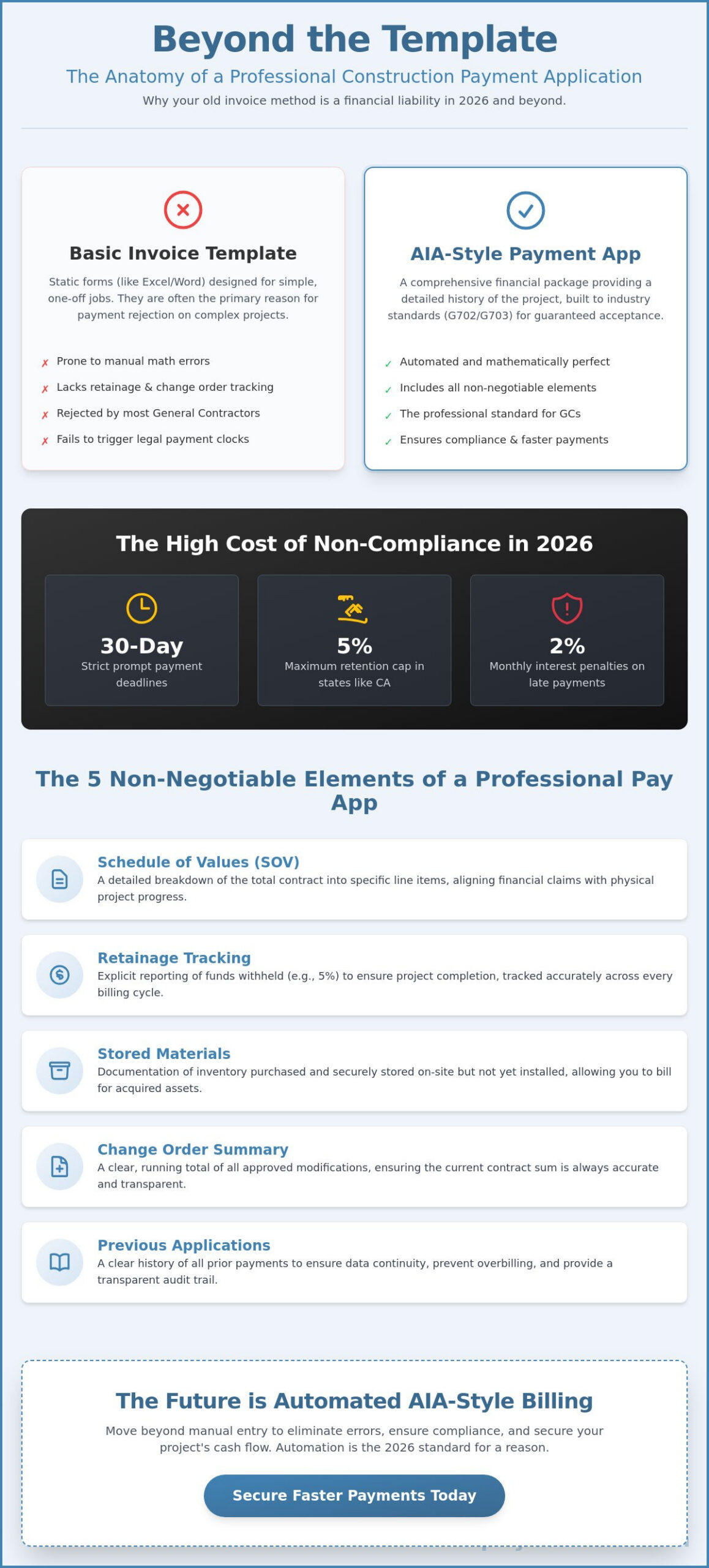
Professional billing in the commercial sector requires more than just a list of costs. To meet the Non-Negotiable Elements of a Professional Construction Invoice, your documentation must provide a transparent audit trail of the project’s financial history. A generic construction invoice template found online often lacks the structural depth needed to satisfy modern compliance standards. In 2026, where late payments trigger 2% monthly interest penalties in many jurisdictions, precision is your best defense against cash flow delays.
- Schedule of Values (SOV): A detailed breakdown of the total contract into specific, manageable line items.
- Retainage Tracking: Explicit reporting of the percentage withheld (capped at 5% in many 2026 regulations) to ensure project completion.
- Stored Materials: Documentation of inventory purchased and secured but not yet installed on the job site.
- Change Order Summary: A running total of all approved modifications to the original contract sum.
- Previous Applications: Clear accounting of all prior payments to ensure data continuity and prevent overbilling.
Mastering the Schedule of Values (G703 Style)
Your SOV must align perfectly with the project’s physical progress. This prevents disputes over “front-loading” and ensures that the architect can verify your claims during a site walk. You must distinguish between “Work Completed This Period” and “Work Completed in Previous Applications.” This continuity allows the owner to see exactly how much of the contract remains at any given moment. You can simplify this process by using tools that carry these balances forward automatically.
Calculating Retainage and Stored Materials
Retainage acts as a financial guarantee that ensures project completion while protecting the contractor’s right to final payment once the punch list is clear. To document materials stored off-site, you must provide proof of insurance and a bill of sale to the owner. This transparency allows you to invoice for these items before installation, ensuring your cash isn’t tied up in inventory that is simply waiting for its turn on the schedule. Proper tracking here is the difference between a healthy project and a liquidity crisis.
Beyond Excel: Why Automated AIA-Style Templates are the 2026 Standard
Excel is a significant financial liability in 2026. A single broken formula in a manual construction invoice template can stall a $100k payment for weeks. It’s not just a math problem; it’s a data continuity crisis. Your g702 must perfectly reference the previous month’s data to remain valid. If the cumulative numbers don’t align, the architect or GC will reject the application immediately. Adopting aia billing software signals a level of competence that lenders and GCs now require. It proves you have a reliable system to handle the complexities of commercial finance.
Compliance is also at stake. Meeting Federal Acquisition Regulation (FAR) requirements for a proper invoice is nearly impossible with static forms. Automated systems provide instant search and retrieval capabilities that spreadsheets cannot match. You can pull historical project data in seconds, which is essential for end-of-year audits or resolving project closeout disputes. This level of organization protects your reputation and your bottom line.
The Risks of Static Templates in 2026
Static files frequently suffer from “template rot.” This occurs when you rely on outdated file versions that don’t reflect current project totals or 2026 regulatory changes, such as the 5% retention cap. Manual change order management software for contractors often exists as a disconnected spreadsheet. This isolation leads to missed billings and preventable disputes over the final contract sum. It’s a fragmented approach that modern construction firms can’t afford.
The PAYearned Advantage: Precision Without the Effort
Automation removes the administrative friction from progress billing. PAYearned auto-calculates totals, retainage, and progress percentages across your entire Schedule of Values. You can generate professional AIA-style G702 and G703 documents in seconds. It’s the most efficient way to secure your cash flow and maintain professional standards without the manual effort. Stop risking your payments on fragile spreadsheets.
Start generating error-free pay apps with PAYearned today.
Secure Your Cash Flow with Automated Precision
Relying on a basic construction invoice template is no longer a viable strategy for contractors managing multi-month commercial projects. We have seen how manual Excel entries lead to template rot and broken formulas that stall six-figure payments. In 2026, the complexity of tracking 5% retention and cumulative change orders requires a system that prioritizes mathematical precision over manual effort. Static forms simply can’t maintain the data continuity required for professional pay apps.
Transitioning to professional G702 and G703 documentation isn’t just about aesthetics; it’s about establishing trust with owners and lenders. By automating your financial workflow, you eliminate the risk of rejected applications and ensure your documentation remains compliant with evolving prompt payment regulations. A specialized system provides a stabilizing force in an otherwise chaotic administrative environment.
Ditch the manual templates and automate your AIA-style billing with PAYearned. Our platform specializes in G702 and G703 document generation, featuring automated retainage tracking and a built-in project search engine. Take control of your project’s financial health and experience the relief of error-free billing today.
Frequently Asked Questions
Can I use a standard invoice for a construction project?
You can use a standard invoice for simple service calls, small residential repairs, or standalone material deliveries. However, commercial projects almost always require progress billing documents. A basic construction invoice template usually lacks the necessary fields for tracking retainage, stored materials, and cumulative contract totals. Using a standard invoice for complex work often leads to rejected payments because it doesn’t provide the level of detail required by general contractors.
What is the difference between a construction invoice and a pay app?
A construction invoice is a request for payment for a single transaction or specific service. In contrast, a payment application is a comprehensive financial package that tracks the total contract value and work completed to date. Pay apps include a Schedule of Values and continuation sheets to provide a complete financial history. This documentation is essential for multi-month projects where you need to account for previous payments and current balances.
How do I calculate retainage on a construction invoice template?
To calculate retainage on a construction invoice template, multiply the total value of work completed and materials stored by the retention percentage defined in your contract. In 2026, many regions now cap this amount at 5% of the contract price. Subtract this calculated value from your gross earnings to find the net amount currently due. Accurate tracking is critical because errors in these calculations are a primary cause of payment delays.
Why do architects require AIA-style billing forms?
Architects require AIA-style billing forms because they provide a standardized, transparent framework for verifying project progress. Documents like the G702 and G703 allow architects to certify that the work claimed matches the physical progress on the job site. This structured layout reduces the risk of overpayment and ensures all parties are looking at the same financial data. It is a protective measure that maintains financial order throughout the project’s lifecycle.
PAYearned is an agnostic workflow platform that helps teams manage pay applications
PAYearned is an independent software product and is not developed, endorsed, approved, sponsored or affiliated with the American Institute of Architects (AIA). AIA®, G702®, G703®