

A single manual math error on your AIA G703 isn’t just a minor typo; it is a direct threa
t to your firm’s financial liquidity. You’ve likely felt the frustration of a rejected pay app because a single line item didn’t square perfectly with the summary sheet. It’s a high-stakes administrative hurdle that forces busy professionals to waste valuable hours on repetitive, manual data entry. When your documentation is disconnected, your payment cycle grinds to a halt and your risk of a dispute increases.
We understand that in the construction industry, mathematical precision is the only reliable path to prompt payment. This guide provides the definitive 2026 roadmap to managing your Schedule of Values with total confidence. You will learn exactly how to align your documentation to ensure faster approval cycles and optimized cash flow. We’re going to break down every column of the continuation sheet and show you how to eliminate the formatting errors that keep your earned revenue out of reach. By the end of this article, you will have the tools to produce professional, compliant documentation every time.
Key Takeaways
- Master the relationship between the Schedule of Values and the contract sum to provide the transparency architects require for approval.
- Follow a step-by-step logic for Columns A through I to ensure 100% mathematical accuracy on every line item.
- Eliminate the common “balancing act” between your G702 and the aia g703 by leveraging automated, cloud-based document generation.
- Reduce the risk of payment delays caused by formatting mistakes and disconnected data entries.
- Secure your firm’s financial liquidity with a streamlined billing process that replaces manual, outdated spreadsheets.
Understanding the AIA G703 Continuation Sheet and the Schedule of Values
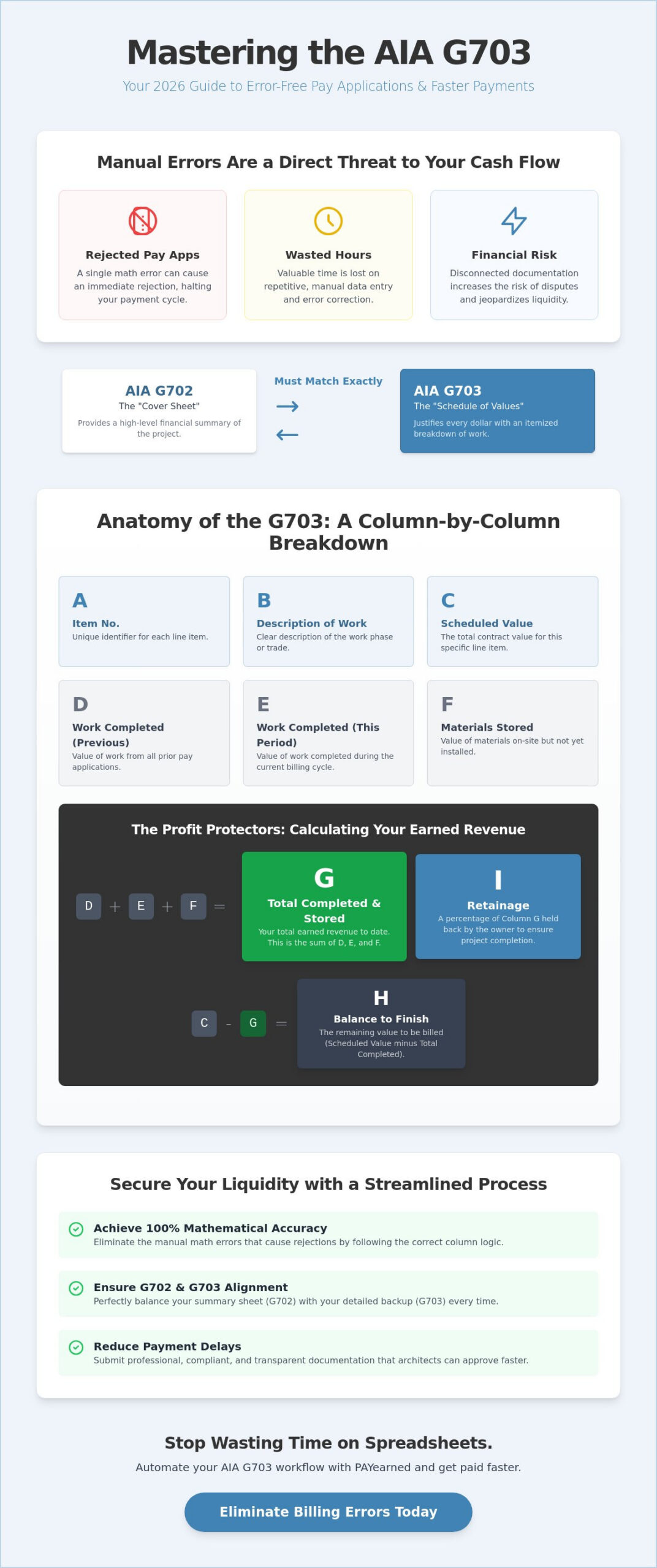
The aia g703 serves as the essential financial backbone of your construction project. While the G702 provides the high-level summary, the G703 functions as the detailed Schedule of Values that justifies every dollar requested. It breaks the total contract sum into specific work items, providing the transparency that owners and architects demand before signing off on a payment. Without this itemized breakdown, your pay application is merely a claim; with it, your request becomes a verifiable record of progress.
In 2026, the expectation for digital interoperability has reached a peak. Stakeholders no longer accept fragmented data or messy spreadsheets. They require a clear, itemized roadmap that proves work has been completed according to the agreed-upon milestones. The G703 provides the “why” behind the “how much,” transforming a simple request for funds into a professional, compliant document that protects both the contractor and the owner.
To better understand this concept, watch this helpful video:
Think of the G702 as the “cover sheet” for your billing package. It summarizes the financial status of the project, including retainage and previous payments. However, that summary is meaningless without the itemized data found in the aia g703. For a pay application to be valid, the totals from G703 Column G must match G702 Line 4 exactly. Any discrepancy here will trigger an immediate rejection. You can find more detail on the summary process in our G702 Application and Certificate for Payment: The Definitive Reference Guide.
The Anatomy of a Schedule of Values (SOV)
A well-structured SOV is your best defense against payment disputes. You must break the project down into logical phases, trades, or CSI divisions that reflect the actual workflow on-site. This level of organization allows for precise tracking of work in place and materials stored. When your SOV is logical and transparent, you eliminate the guesswork for the architect. This clarity speeds up the review process and ensures your cash flow remains steady throughout the project lifecycle.
How to Complete the G703 Columns Without Mathematical Errors
Many contractors believe math errors are inevitable when managing an aia g703 in Excel. This is a dangerous assumption. Precision in your Schedule of Values is the only way to avoid the cycle of rejections and delayed payments. By understanding the specific logic behind each column, you can transform your billing from a guessing game into a repeatable, accurate process. Professional standards, such as those found in the Northwestern University Payment Procedures, emphasize that coordination and formatting are non-negotiable for successful project delivery.
The sheet follows a strict alphabetical logic. Columns A and B identify the item number and description, while Column C establishes the total scheduled value. The real work begins with Column D, which represents work completed in previous applications, and Column E, which tracks progress made during the current billing cycle. Column F is the value of materials currently on-site but not yet installed. Finally, Column H calculates the balance to finish by subtracting your progress from the original scheduled value. Misallocating funds between these sections is the most common reason for a rejected pay app.
Calculating Column G and Column I: The Profit Protectors
Column G is the definitive total of all work completed and materials stored to date. It is the simple sum of Columns D, E, and F. This figure represents your total earned revenue before any deductions. Once you have this total, you must calculate Column I, which is your retainage. This percentage of your earnings is held back to ensure project completion. Tracking this across multiple periods is complex, but it is vital for your project’s bottom line. For a deeper dive into how this affects your cash flow, read our What is Retention? A Comprehensive Guide.
Handling Change Orders on the Continuation Sheet
Change orders cannot be buried within existing line items. You must list them as separate, individual entries at the bottom of your aia g703. This separation allows the owner to track the original contract sum independently from authorized additions. Clearly distinguishing between approved and pending change orders is essential for maintaining financial liquidity. If you find the manual balancing of these items overwhelming, you might consider cloud-based solutions for AIA-style forms that handle these calculations automatically.
Automating Your G703 Workflow with PAYearned
Buying individual forms for every billing cycle is an inefficient drain on your project budget. Official sources typically charge a high flat fee for a single-use document; this means every revision or monthly update becomes a new expense. PAYearned replaces this outdated “pay-per-form” model with an unlimited subscription approach designed for active contractors. By automating the generation of your aia g703, the platform eliminates the manual balancing act between your summary sheet and your continuation sheet. Data flows seamlessly from one period to the next. Your totals remain synchronized without the need for manual cross-referencing.
The platform also features a built-in search engine that allows you to retrieve past project data instantly. You no longer have to dig through folders to find how a specific line item was handled six months ago. This accessibility positions the platform as a stabilizing force for your firm’s financial liquidity. It ensures your billing remains consistent regardless of administrative staff changes or project complexity. When your data is organized and searchable, you spend less time on paperwork and more time on project execution.
The Benefits of Cloud-Based AIA-Style Document Generation
Storing your financial records in local Excel files is a risk you cannot afford. Hard drive failures or accidental deletions can wipe out months of billing history. PAYearned provides secure cloud storage, ensuring your aia g703 data is always backed up and accessible from any device. Beyond security, automated retainage tracking ensures you never leave money on the table by losing track of held funds over long-term projects. For a complete look at these advantages, see our guide on AIA Billing Software: The Contractor Guide to G702 & G703 Automation.
Moving from Manual Entry to High-End Automation
General-purpose accounting tools often fail to handle the specific nuances of construction progress billing. You need a specialized partner that does one thing perfectly: managing your pay applications with mathematical precision. Moving to a dedicated automation solution provides the peace of mind that comes from knowing your documentation is 100% accurate before it reaches the architect’s desk. It’s time to stop fighting with spreadsheets and start using a system designed for the high-stakes reality of construction finance. Transitioning to a high-end, automated solution is the most effective way to protect your project’s profitability.
Securing Your Project Revenue Through Precise Documentation
Mastering the Schedule of Values is about more than just administrative compliance; it is about protecting your firm’s revenue and professional reputation. By ensuring that every line item on your aia g703 is mathematically sound and logically structured, you eliminate the procedural delays that often cripple construction cash flow. You now understand how precise column logic and clear change order tracking provide the transparency architects demand before approving payments.
It’s time to move beyond the risks of manual spreadsheets. Outdated entry methods are a liability. High-end automation provides the stabilizing force your administrative workflow needs. With 100% mathematical accuracy and specialized tracking for retainage and change orders, you can submit every pay application with total confidence. PAYearned offers unlimited G702 and G703 generation through a streamlined subscription. This gives you the tools to focus on project execution rather than repetitive data entry.
Start Automating Your AIA-Style G703 Forms with PAYearned Today
Your path to faster payment cycles and error-free billing starts with a specialized solution built for the reality of construction finance. Take control of your project documentation today. Experience the relief that comes from professional, automated precision.
Frequently Asked Questions
What is the purpose of the AIA G703 form?
The aia g703 provides a detailed breakdown of the total contract sum into specific work items, known as the Schedule of Values. It serves as the critical supporting documentation for construction progress billing. By itemizing costs for each trade or phase, it allows architects and owners to verify the exact percentage of work completed. This level of transparency is essential for validating payment requests and tracking materials stored on-site.
How do I calculate Column G on the G703 continuation sheet?
You calculate Column G by adding the values in Columns D, E, and F together. This figure represents the total value of work completed and materials stored to date for each line item. Specifically, Column D covers work from previous applications, Column E tracks progress during the current period, and Column F accounts for materials currently on-site but not yet installed. Maintaining this mathematical logic is vital for ensuring your pay application remains synchronized.
Can I use the G703 without the G702?
You cannot use the aia g703 as a standalone document because it functions specifically as a continuation of the G702 summary. While the G702 provides the high-level financial summary and required certification signatures, the G703 provides the itemized proof needed to justify those totals. Most contracts require both documents to be submitted together. Without the itemized breakdown, the summary certificate lacks the necessary detail for architect approval.
How are change orders listed on a G703 continuation sheet?
Change orders must be listed as separate, individual line items at the bottom of the Schedule of Values, following the original contract items. You should clearly label each change order with its respective number and description to maintain a clear audit trail. This prevents the blending of original contract funds with authorized additions. Separating these items ensures that the owner can track the adjusted contract sum independently and prevents confusion during the review process.
PAYearned is an agnostic workflow platform that helps teams manage pay applications
PAYearned is an independent software product and is not developed, endorsed, approved, sponsored or affiliated with the American Institute of Architects (AIA). AIA®, G702®, G703®