

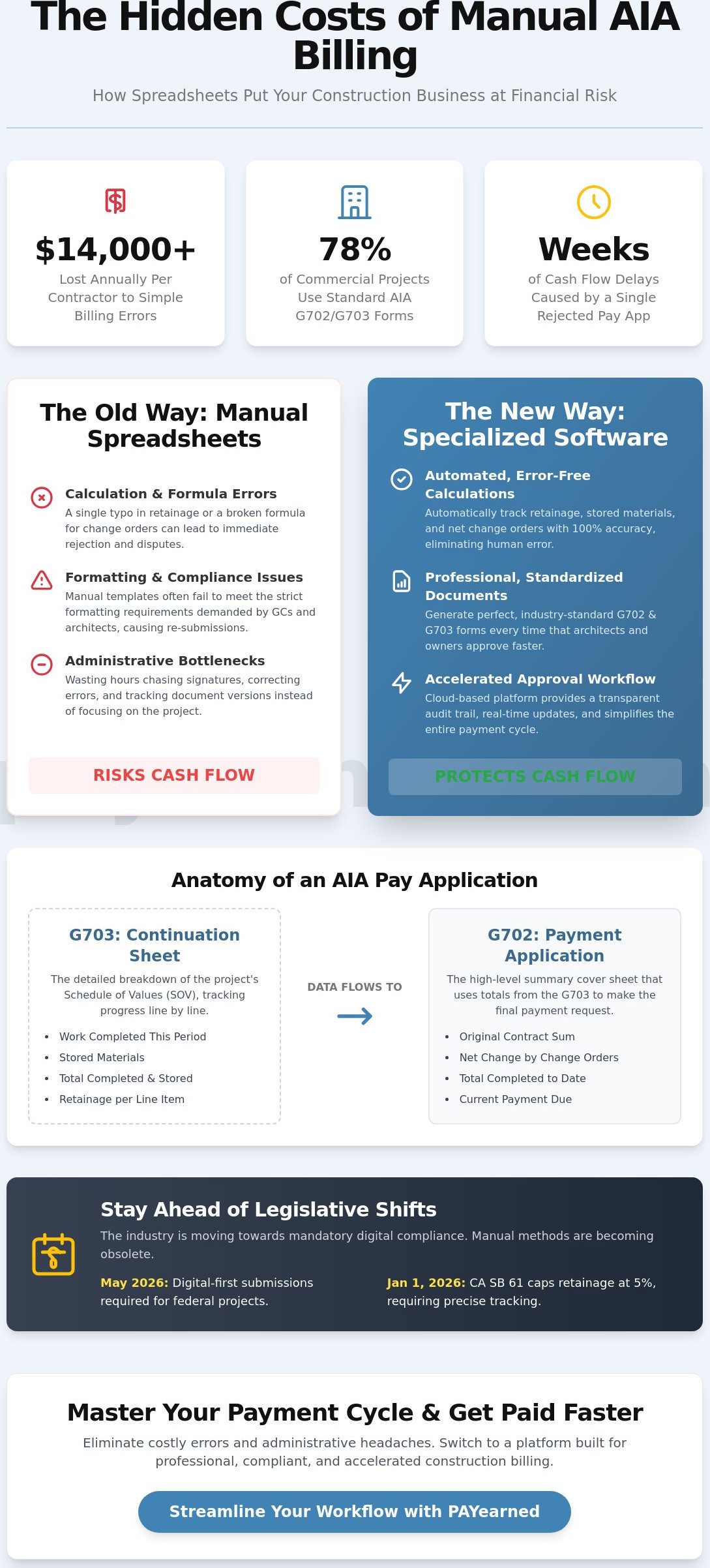
The average commercial contractor loses over $14,000 every year to simple aia billing errors born from manual, risky spreadsheets. With AIA G702 and G703 forms used on 78% of all commercial projects, even a minor typo in your unbilled retainage or a miscalculated change order can halt your cash flow for weeks. You’ve likely felt the frustration of having a payment application rejected because of a formatting quirk or a math error on a continuation sheet. It’s an administrative bottleneck that keeps your hard-earned money out of your bank account while you’re left chasing signatures.
This guide will show you how to master your payment cycle by eliminating manual calculation risks and streamlining your documentation for faster approvals. You’ll learn how to navigate the complexities of progress billing without the headache of broken Excel formulas. We’ll break down the latest legislative shifts impacting retainage and payment terms, and provide a clear roadmap for generating professional, error-free pay apps that secure your project’s financial stability and peace of mind.
Key Takeaways
- Standardize your payment cycle using industry-standard G702 and G703 formats to ensure transparency and audit-ready documentation.
- Navigate the relationship between cover sheets and continuation sheets to provide clear, detailed evidence for every dollar requested.
- Eliminate calculation errors in aia billing by automating complex tracking for retainage, stored materials, and net change orders.
- Protect your cash flow from the hidden risks of manual spreadsheet templates and broken formulas that lead to rejected pay apps.
- Accelerate your approval process with professional, cloud-based tools designed specifically for construction pay applications.
What is AIA Billing? Standardizing the Construction Payment Cycle
AIA billing is the industry-standard progress billing method that utilizes the G702 Application and Certificate for Payment and the G703 Continuation Sheet. Originally developed by the American Institute of Architects (AIA), this format provides a structured way for contractors to request payment based on the percentage of work completed. In a market where 78% of commercial projects demand these specific forms, mastering this workflow isn’t optional. It’s the gatekeeper to your cash flow.
General contractors and owners insist on this format because it creates a transparent audit trail. It prevents “front-loading” and ensures that the money leaving the owner’s account matches the value added to the site. As of May 2026, we’re seeing a massive shift toward digital-first billing requirements. Federal and large-scale commercial projects now mandate standardized digital submissions to ensure compliance with new transparency laws and to accelerate the verification process.
To better understand the mechanics of these forms, watch this helpful video:
Standardized aia billing reduces financial disputes between tiers by removing ambiguity. When everyone uses the same math for “work in place” and “stored materials,” there’s less room for interpretation. This clarity is essential for subcontractors who need to protect their margins from administrative delays. By using a consistent format, you ensure that architects and owners can verify your progress quickly, leading to faster approvals and more predictable payment cycles.
The Core Purpose of AIA-Style Documents
Before the first shovel hits the dirt, you must establish a Schedule of Values (SOV). This document breaks the total contract sum into specific line items. During each billing cycle, the G703 provides a snapshot of project completion percentage for each of those items. It ensures all parties agree on exactly what has been built versus what is sitting in a warehouse as “stored materials.” This distinction is critical for insurance purposes and payment timing. You must also understand what is retention to accurately track the funds withheld until final completion. With laws like California’s SB 61 capping retainage at 5% as of January 1, 2026, accurate tracking is more important than ever.
Who Uses AIA Billing and Why?
The approval loop typically involves the subcontractor, the general contractor, the architect, and the owner. Each party reviews the pay app to verify that the progress claimed is accurate. Subcontractors must master this format to protect their cash flow. A single error in a calculation can trigger a rejection from the architect, resetting your payment clock. The industry is rapidly moving away from “word document invoices” toward structured, cloud-based payment applications. These specialized tools provide real-time updates and historical accuracy that manual templates simply can’t match. Relying on outdated methods is a risk your business doesn’t need to take in 2026.
The Anatomy of AIA-Style Documents: Understanding G702 and G703
Understanding the structure of aia billing is essential for getting paid on time and avoiding administrative disputes. These two documents share a symbiotic relationship where the G702 acts as the high-level summary and the G703 provides the granular evidence. The Schedule of Values is the roadmap for the entire billing process. Without a perfectly aligned G703, your cover sheet is just a request without proof. If the numbers don’t flow perfectly from the detail sheet to the summary, the architect will likely reject the entire application.
The G702 serves as the executive summary that an owner or lender sees first. It tracks three critical fields that define the project’s financial health: the Original Contract Sum, the Net Change by Change Orders, and the Total Completed to Date. When working on government contracts, your pay app must comply with the Federal Acquisition Regulation regarding proper invoices and payment documentation. Precision here isn’t just about good accounting; it’s a legal and contractual requirement for project transparency.
G702: The Application and Certificate for Payment
The G702 condenses months of work into a single page of financial data. Line 5 is particularly critical because it calculates Retainage, which directly affects your net payment and cash flow. You’ll also find the “Certificate for Payment” section where the architect provides their certification signature. This signature is the gatekeeper in the workflow, confirming that the work in the field matches the progress claimed on paper. Most projects also require this document to be signed in the presence of a notary to verify the authenticity of the contractor’s representation.
G703: The Continuation Sheet
The G703 is where you break your project down into specific line items based on your Schedule of Values. It tracks “Work Completed” from previous applications versus the current period to show real-time progress. Using professional aia billing software ensures these totals update automatically, preventing the math errors that plague manual spreadsheets. You must also use Column F to document “Materials Presently Stored.” This accounts for items purchased and sitting on-site or in a bonded warehouse that haven’t been installed yet. You can eliminate these manual entry risks by automating your document generation with specialized software that handles the heavy lifting.
The final piece of the puzzle is the Architect’s certification. Their role is to review the evidence on your G703 and sign the G702, authorizing the owner to release funds. Any discrepancy between your “Work in Place” and the architect’s field observations will result in a “pencil draw” revision or a full rejection. Maintaining a clean, standardized data flow between these two documents is the only way to ensure your payment application moves through the approval loop without friction.
Managing the Complexity: Retainage, Stored Materials, and Change Orders
Managing a construction project’s finances requires more than just knowing your costs. It demands a specialized understanding of how to balance work in place with the technical requirements of aia billing. Three specific areas-retainage, stored materials, and change orders-cause the most administrative friction and payment delays. If you don’t handle these with precision, your pay application will likely be rejected, stalling your cash flow for another thirty days. You must treat these as dynamic financial variables rather than static numbers on a page.
The “Stored Materials” trap is a common reason for payment denials. Architects and owners won’t release funds just because you’ve purchased inventory. To get paid for materials not yet incorporated into the work, you must provide proof of insurance and evidence of secure, off-site storage. This often includes photos of the materials and a bill of sale. If these items are stored at a third-party warehouse, you may even need a rider on your insurance policy or a bond to protect the owner’s investment. Failing to provide this documentation on your G703 will result in that line item being zeroed out during the review process.
Calculating Retainage Without Errors
You must understand what is retention and how it impacts your net payment at every stage. Retainage is usually a percentage, such as 5% or 10%, withheld from each progress payment to ensure project completion. As of January 1, 2026, California’s SB 61 has capped this at 5% for most private projects. Tracking this manually across hundreds of line items is where risky spreadsheets fail. A single rounding error in your unbilled retainage can cause the G702 summary to mismatch the G703 detail. Automated tracking is essential for multi-year projects where you might need to handle a “Retainage Release” for specific phases, such as when the building envelope is complete but interior finishes are just beginning.
Change Order Management on the G703
Integrating change orders into your Schedule of Values (SOV) is a precision task. You should never bill for work before the change order is formally executed and signed by all parties. Once approved, these should be added as new line items at the bottom of your G703 continuation sheet. This keeps your original contract math clean and easily auditable. On the G702 cover sheet, the “Net Change by Change Orders” on Line 2 must reflect the cumulative total of all additions and subtractions. Using professional aia billing software ensures these updates flow through the document automatically. This prevents the version control nightmare that occurs when multiple team members edit a manual billing sheet without a clear audit trail.
The Risk of Manual Billing: Why Spreadsheets Fail in 2026
The most dangerous phrase in construction finance is “My Excel template is free.” While there’s no upfront licensing fee for a spreadsheet, the hidden costs of a single broken formula are devastating. In the high-stakes environment of May 2026, a decimal point in the wrong place or a cell that doesn’t sum correctly doesn’t just look unprofessional; it stops your cash flow dead. When an architect finds a math error on your aia billing, they won’t fix it for you. They’ll reject the entire application, forcing you to wait another 30-day cycle for payment. This administrative friction is a choice, not a necessity.
Manual spreadsheets also create a version control nightmare. When the project manager, the accountant, and the field supervisor all have different versions of the billing sheet, the data becomes unreliable. This fragmentation leads to “over-billing,” where you accidentally request more than the contract value or the work in place allows. Over-billing isn’t just an administrative mistake; it can lead to legal disputes, breach of contract claims, and a total loss of trust with the owner. You can eliminate these risks by using a premium automated solution built for precision and reliability.
The Hidden Costs of Manual Entry
Manual entry is a massive time sink. You spend hours re-typing data from the previous month’s application into a new sheet, risking transcription errors at every step. Each rejected application carries a high cost, often resulting in 30-day payment delays that strain your payroll and vendor relationships. There’s also the persistent “audit anxiety” that occurs when your math doesn’t add up across different sheets. By May 2026, project owners are demanding higher levels of financial transparency, and a messy spreadsheet simply won’t pass muster during a rigorous review.
AIA-Style Software vs. General Accounting
Generic bookkeeping platforms excel at general finance, but they aren’t built for the nuances of aia billing software. They often lack the specialized logic required for tracking unbilled retainage or managing complex continuation sheets. A dedicated tool built exclusively for g702 and G703 generation maintains a rigorous audit trail that general software lacks. This specialized focus ensures that every penny of retention is accounted for and that your documentation is always professional, standardized, and ready for immediate approval without the manual headache.
Streamlining Your Workflow with PAYearned AIA-Style Software
PAYearned offers a pragmatic, specialized solution for contractors who need to master aia billing without the complexity of a bloated project management suite. While all-in-one platforms are often slow to implement and difficult to learn, PAYearned is a focused point solution designed for speed and precision. You can move from a risky, manual spreadsheet to a professional, cloud-based environment in minutes. This specialized focus ensures that the software excels at the specific, high-stakes task of financial documentation while remaining easy to use for your entire team.
A key differentiator is our Live US-Based Support. Unlike global platforms where you’re often just a ticket number, our team provides grounded, human assistance when you’re facing a tight billing deadline. We also feature a powerful internal “Search Engine” that allows you to find any project, change order, or specific billing line item instantly. This level of searchability serves as a critical audit tool that many general accounting platforms lack. To ensure you feel confident in the solution, we offer a “No Credit Card Required” trial to eliminate entry friction and let the software’s performance speak for itself.
Automated Document Generation
PAYearned auto-calculates totals, retainage, and progress percentages, flowing data seamlessly from the G703 continuation sheet to the G702 cover sheet. This automation removes the risk of the “broken formula” that haunts manual templates. You can generate professional, AIA-style PDF documents that are ready for signature and notarization in seconds. Even continuation sheets with hundreds of line items are handled with ease, ensuring your documentation is always standardized and audit-ready. This precision is vital for meeting the requirements of laws like California’s SB 61, which capped retainage at 5% as of January 1, 2026.
Getting Started with PAYearned
The setup process is designed for maximum efficiency. You can import your Schedule of Values and start your first billing cycle immediately. We provide predictable, transparent pricing that fits the needs of small subcontractors and large general contractors alike. There are no hidden fees or complex tiered structures to navigate. By moving to an automated workflow, you protect your cash flow and project a level of professionalism that owners and architects respect. Simplify your construction billing today at PAYearned and stop letting manual errors delay your payments.
Secure Your Project’s Financial Future
Success in the commercial sector requires moving past the “good enough” approach of manual spreadsheets. Mastering aia billing is about more than just filling out forms; it’s about protecting your cash flow and maintaining professional standards that architects and owners demand. By standardizing your documentation and eliminating the broken formulas that cause $14,000 in annual billing errors, you ensure your payments arrive on time and without disputes. Accuracy isn’t just a goal; it’s the foundation of your business stability.
PAYearned provides the precision you need with a platform built exclusively for Pay Applications. You get error-free auto-calculations for G702 and G703 forms, backed by live, US-based support whenever you need a steady hand. Stop risking your hard-earned money on manual entry and start using a premium solution designed for your specific needs. Start your free trial of PAYearned – No credit card required and take control of your construction finance today. Your business deserves the peace of mind that comes with specialized automation and reliable, professional results.
Frequently Asked Questions
What is the difference between AIA G702 and G703?
The G702 serves as the summary cover sheet that tracks the total contract sum and overall project progress. The G703 is the continuation sheet that breaks down your Schedule of Values into specific, granular line items. You use the G703 to provide the itemized evidence that supports the totals shown on your G702 summary.
How do I calculate retainage on an AIA-style billing form?
You calculate retainage by applying your contract’s percentage rate to the total work completed and materials stored to date. For example, under California’s SB 61 which took effect on January 1, 2026, many private contracts now cap this at 5%. You subtract this calculated amount from your total earned to find the net payment currently due.
Can I use Excel for AIA billing in 2026?
You can use Excel, but it introduces significant risks to your financial accuracy and cash flow. One broken formula in a manual spreadsheet often leads to rejected pay apps and 30-day payment delays. Most commercial contractors have moved toward automated aia billing tools to ensure zero-error calculations and maintain a reliable audit trail.
What are “Stored Materials” and how do I bill for them?
Stored materials are products you’ve purchased for the project that aren’t yet installed at the job site. You bill for these items in Column F of the G703 continuation sheet. To get these approved, you must provide proof of insurance and evidence of secure storage, such as photos or a bill of sale.
Do AIA billing forms need to be notarized?
Most commercial contracts require the G702 cover sheet to be signed and notarized before submission. This step verifies the identity of the person signing the application and confirms the progress representation is authentic. Approximately 90% of commercial project owners mandate this requirement to protect against fraudulent payment requests.
What happens if my G702 and G703 math does not match?
Your payment application will be rejected immediately if the totals on your G703 don’t align perfectly with the G702 summary. The architect or owner won’t fix the math errors for you. This discrepancy resets your billing cycle, which typically delays your payment by at least another 30 days.
Is PAYearned compatible with the AIA G702 and G703 formats?
PAYearned is a specialized platform built to generate documents that are fully compatible with standard G702 and G703 layouts. It automates the calculations for your aia billing workflow to prevent manual entry errors. This ensures your pay apps meet industry expectations while providing the security of cloud-based storage and searchable audit trails.
How does a change order affect the Schedule of Values?
A change order adds new line items to your Schedule of Values on the G703 sheet once the work is formally executed. These additions update your total contract sum on Line 2 of the G702 cover sheet. Keeping change orders as separate line items ensures your original contract math stays clean and easy for the architect to audit.
PAYearned is an agnostic workflow platform that helps teams manage pay applications
PAYearned is an independent software product and is not developed, endorsed, approved, sponsored or affiliated with the American Institute of Architects (AIA). AIA®, G702®, G703®