

Why are you still risking your month’s cash flow on a $59.99 single-use digital form that a simple math error can derail? Relying on manual entries for the aia document g702 is more than just a tedious chore; it’s a financial liability that leads to rejected pay apps and delayed payments. You’ve likely felt the stress of calculating unbilled retainage and complex change orders under a tight deadline. One misplaced decimal point can stall your revenue for weeks.
We agree that construction billing should be about getting paid, not fighting with risky spreadsheets. This guide will show you how to master the industry standard while moving toward a premium, automated solution that ensures accuracy. You’ll learn to generate professional-grade G702 and G703 documents that architects and owners trust immediately. We’ll break down the 1992 standard requirements, explain how to handle continuation sheets, and provide a roadmap to faster, error-free payment cycles in 2026.
Key Takeaways
- Understand why the aia document g702 remains the standard for construction billing and how to accurately establish your original contract sum.
- Identify the hidden costs of manual billing and why “spreadsheet risk” is a primary cause of delayed payments and rejected applications.
- Learn to synchronize your summary and continuation sheets to ensure total mathematical accuracy for every progress billing cycle.
- Leverage the “Pencil Draw” phase to collaborate with architects and eliminate revisions before you submit your formal payment request.
- Discover how automated software streamlines complex tasks like retainage tracking and change order management to accelerate your cash flow.
What is the AIA Document G702 and Why is it the Industry Standard?
The aia document g702, officially titled the Application and Certificate for Payment, serves as the cornerstone of construction accounting. A committee of 35 experts in design, construction, and law regularly reviews these standards to ensure they meet modern legal requirements. Since the 1992 version became the industry standard, this document has provided a uniform structure for contractors to request progress payments. It’s not just a form; it’s a legal bridge that ensures every party on a project speaks the same financial language. By standardizing the billing process, it reduces the risk of disputes and ensures that cash flow remains predictable across complex, multi-month projects. This certification carries significant legal weight, as the architect’s signature confirms to the owner that the work has progressed as described.
In 2026, the 1992 edition remains the benchmark because of its clarity and widespread acceptance. While the construction industry has shifted toward digital tools, the logic of the G702 hasn’t changed. It provides a high-level summary of the contract sum, total work completed to date, and the specific amount due for the current period. This summary is vital for owners who need to see the “big picture” of project spending without getting lost in the weeds of daily logs. Relying on this format ensures your billing is professional and ready for immediate review by any architect or developer in the country.
To better understand the fundamentals of this industry standard, watch this helpful video:
The Two Parts of a Complete Pay Application
A professional pay application is never a single page. The G702 acts as the cover sheet, but it relies entirely on the G703 Continuation Sheet for its data. The G703 provides a line-by-line breakdown of the Schedule of Values, which lists every task and its associated cost. You can’t submit one without the other. Architects and owners require the detailed breakdown in the G703 to verify that the percentages of completion claimed on the G702 summary match the actual progress on the job site. This relationship ensures that every dollar requested is backed by physical progress on the project.
Who Uses the G702?
This document is the primary communication tool for three main groups. General Contractors use it to bill owners for the entire project’s progress. Subcontractors use G702-style forms to bill General Contractors for their specific scope of work. Finally, Architects and Owners use the document to certify that work is complete and to authorize the release of funds. It creates an audit trail that protects everyone; it ensures that payments are only made for verified work and that retainage is tracked accurately throughout the project lifecycle. Without this standardized format, owners would face a chaotic mix of invoices that make financial auditing nearly impossible.
Anatomy of a G702: Key Columns and Calculations
Precision is the only way to avoid rejected pay apps. The header of the aia document g702 sets the legal and administrative stage for your request. It must include the project name, your contract number, the application number, and the specific “period to” date. If your application number is out of sequence or the billing period overlaps with a previous submission, the architect will likely flag it immediately. Line 1 is your baseline. This is the Original Contract Sum, and it must remain consistent from the first draw until the final closeout. Every calculation that follows depends on this initial number.
Lines 2 and 3 account for the evolution of the project scope. Line 2 tracks the net change by change orders, while Line 3 establishes the Adjusted Contract Sum. Approved changes modify the contract sum on Line 3 by calculating the net total of all additive and deductive change orders against the original baseline. From there, Lines 4 and 5 focus on the gross value of work. You must report the total completed and stored to date, then calculate retainage. Line 6 represents the total earned less retainage, which is then compared to Line 7, the total of previous certificates for payment. The resulting math on Line 8 shows the current payment due, while Line 9 provides the remaining balance to finish the project. Automating these complex calculations helps you generate AIA-style documents without the risk of manual math errors.
Mastering Retainage and Stored Materials
Calculating retainage requires a steady hand to avoid the “double-dipping” trap. Most contracts specify a 5% or 10% holdback on work completed. However, you must also account for materials currently stored on-site but not yet installed. Architects scrutinize stored materials because they represent a high risk for the owner regarding theft or damage. For those working on public projects, the Massachusetts DCAMM Payment FAQs provides a clear framework for how these values should be reported to government agencies. Never calculate retainage on an amount that already has a holdback applied; this is a common error that leads to immediate rejection.
Integrating Change Orders Properly
Change orders are the most frequent cause of discrepancies between the aia document g702 summary and the detailed G703 sheet. You must track both additive and deductive changes to ensure the net total is accurate. If a change order is approved but not yet reflected on your continuation sheet, your summary page will not balance. Ensure that every dollar listed on Line 2 is backed by a specific entry on your G703. This level of detail builds trust with owners and proves that your financial management is as professional as your construction work.
The Cost of Manual Billing: AIA Forms vs. SaaS Automation
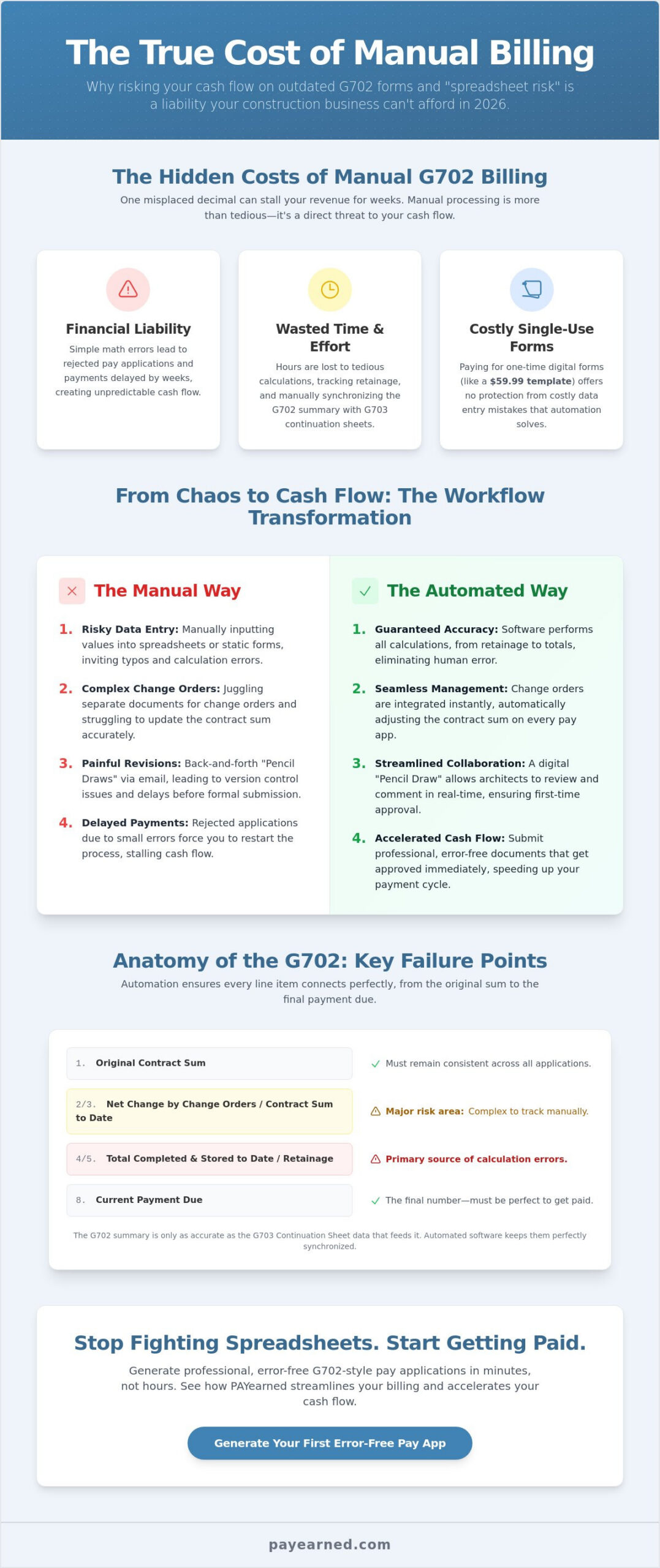
Many contractors view the $59.99 cost of a single digital aia document g702 as a minor expense. However, this per-use model creates a significant financial trap for subcontractors managing multiple projects. If you’re handling five active jobs, you’re spending nearly $300 every month just for the permission to request the money you’ve already earned. This overhead doesn’t even account for the administrative time spent manually entering data into static PDFs or Word documents. For a firm operating on tight margins, these recurring costs and the labor required to manage them can eat into project profits quickly.
Then there’s the “Spreadsheet Risk.” Relying on unverified Excel templates is a dangerous gamble in construction finance. A single broken formula in a hidden cell can miscalculate your retainage or the total work completed to date. If an architect catches a math error, they won’t fix it for you; they’ll reject the entire application. In a high-stakes environment, a simple typo can delay a $100,000 payment by 30 days, creating a massive hole in your company’s monthly cash flow. You can’t afford to let a clerical error dictate your ability to meet payroll or pay vendors. Contractors who have experienced this frustration firsthand are increasingly seeking a reliable aia g702 excel template alternative that eliminates formula drift and guarantees mathematical accuracy.
Manual documents also lack reliable audit trails. During a financial dispute or a year-end audit, searching through local folders for old paper forms or disconnected Excel files is an administrative nightmare. Using a cloud-based solution provides a professional, AIA-style appearance that architects and owners trust immediately. You get the benefit of a standardized format without the trademark overhead or the risk of losing your project history. This professional-grade billing signals to your clients that your back-office operations are as disciplined as your field work.
Feature Comparison: Manual vs. Automated
The differences between manual entry and automation are stark. Manual processes suffer from high error rates and slow turnarounds because there is zero data persistence. You have to re-enter project details and previous totals every single month. Conversely, automated systems ensure 100% math accuracy by pulling data from previous applications. By using AIA billing software, most contractors report saving 4 to 6 hours per billing cycle. Your project history is stored securely in the cloud, allowing you to generate the next month’s application in seconds.
ROI of Billing Software for Small to Mid-Sized Firms
For small to mid-sized firms, the return on investment is measured in both time and predictability. Consider the “Cost of Rejection.” If a manual error leads to a 30-day payment delay, the interest on your line of credit can cost your business hundreds or even thousands of dollars. Moving to an automated platform shifts your workflow from a stressful “Billing Day” to an efficient “Billing Minute.” You gain searchable project data and a built-in engine that tracks every change order and retainage percentage automatically. This transition provides the peace of mind that your cash flow is protected by precision rather than luck.
Best Practices for Error-Free Payment Applications in 2026
Achieving a 100% approval rate on your first submission requires absolute consistency between your summary and your detail. Your aia document g702 is only as reliable as the G703 continuation sheet supporting it. If your total work completed on the summary page differs from the sum of the individual line items by even one cent, the architect will likely reject the application. This isn’t just about math; it’s about maintaining a professional image that signals you have full control over your project’s finances. When your numbers align perfectly every month, you build a level of trust with owners that can lead to faster approvals and fewer intrusive audits.
The “Pencil Draw” phase is your most effective tool for avoiding formal rejections. This collaborative step allows you to share a draft of your payment application with the architect or general contractor before the official submission deadline. Using automated software makes this process seamless, as you can generate and send a digital preview in seconds. By resolving discrepancies in work percentages or stored materials early, you ensure the final, notarized document is a mere formality. This proactive approach eliminates the back-and-forth emails that typically plague the final week of the billing cycle.
Timely submissions are just as critical as accuracy. Most construction contracts dictate a strict billing window, often requiring applications to be submitted by the 25th of the month. Missing this deadline by as little as 24 hours can result in your payment being pushed to the following month’s cycle, creating a 30-day gap in your cash flow. Automation helps you hit these marks by tracking your billing history and alerting you when it’s time to generate the next draw. As the project nears completion, you must also carefully track the transition from progress billing to the release of unbilled retainage. Ensure your final application reflects the total contract sum and that all lien waivers are ready for exchange.
The G702 Submission Checklist
- Verify the “Work Completed” percentage on every line item against actual site progress to prevent overbilling.
- Ensure all approved change orders are included in the summary and backed by documentation on the continuation sheet.
- Check that the notary block is fully executed if your contract requires a formal seal for payment certification.
- Confirm that the “Previous Certificates for Payment” amount matches the “Total Completed and Stored” from your last approved draw.
Avoiding Common G702 Pitfalls
Math errors on Line 5 regarding retainage calculations remain the primary cause of document rejection in 2026. Many contractors also forget to update the “Application Number” and “Period To” dates, leading to administrative confusion and delayed processing. It’s also vital to ensure you correctly link your g702 to the current Schedule of Values. If your SOV has changed due to a major scope revision, your summary page must reflect the new baseline immediately. To eliminate these manual risks and protect your cash flow, you should start your error-free billing today with a specialized automation platform.
Streamlining Your Workflow with PAYearned G702-Style Software
PAYearned simplifies the transition from manual entry to digital precision. By automating the generation of the aia document g702, the platform eliminates the repetitive data entry that leads to fatigue and errors. You can generate professional-grade G702 and G703 style documents in seconds; the system automatically carries over totals from your previous application. This ensures that your “Total Completed and Stored to Date” is always mathematically sound. Instead of paying the $59.99 fee for every single-use digital form, you benefit from a predictable subscription model that supports your project’s growth without penalizing your success.
Data security and accessibility are the foundations of a reliable back office. PAYearned provides a centralized, searchable database of every payment application your firm has ever generated. You’ll never lose a pay app or a continuation sheet again. If an owner requests a copy of a draw from six months ago, you can find it and resend it in under 60 seconds. This level of organization provides a stabilizing force during financial audits or project closeouts, where missing documentation often leads to delayed final payments or legal friction. You gain a permanent audit trail that protects your business from disputes.
Built Exclusively for Pay Applications
General accounting software often fails when faced with the specific logic of construction billing. These general-purpose tools don’t understand the nuances of unbilled retainage, stored materials, or the complex interplay between additive and deductive change orders. PAYearned is a specialized tool that focuses on one critical task: getting you paid accurately and on time. Because it’s a premium solution built for this specific purpose, it handles the technical requirements of the 1992 standard with ease. If you encounter a complex billing scenario, our live, US-based support team is available to provide expert guidance, ensuring you never feel alone in your administrative work.
Get Started with Error-Free Billing
Moving beyond risky spreadsheets is the most effective way to protect your project profit in 2026. You can start generating professional billing today with no credit card required, allowing you to test the platform on your next project without any upfront risk. Don’t let a manual error on your next aia document g702 stall your cash flow or damage your reputation with a key client. Experience the relief of automated, error-free calculations and a streamlined workflow that respects your time. Simplify your construction billing with PAYearned today.
Take Control of Your Construction Billing Today
Mastering the industry standard shouldn’t mean wasting hours on manual calculations or risking your cash flow on unverified spreadsheets. We’ve detailed why the aia document g702 remains the cornerstone of professional billing and how the 1992 edition continues to drive project certifications in 2026. By moving beyond manual entry, you eliminate the math errors that cause rejected applications and 30-day payment delays. You now have the roadmap to faster, more predictable revenue cycles through precision and automation.
PAYearned is built exclusively for pay applications, providing a specialized solution that general accounting software can’t match. Our platform handles automated retainage and change order tracking with 100% accuracy; meanwhile, our live US-based support team stands ready to assist with any complex billing scenario. Stop gambling with your project margins and start presenting the professional-grade documents that architects and owners demand. Start Generating Professional Pay Apps with PAYearned and secure the financial stability your business deserves. It’s time to make your billing process as reliable as your field work.
Frequently Asked Questions
Is a G702 valid without a G703 continuation sheet?
No, a G702 is not considered a complete or valid payment application without the accompanying G703 continuation sheet. The G702 provides the high-level financial summary, but the G703 contains the line-by-line detail of the Schedule of Values required for verification. Architects and owners rely on this detailed breakdown to certify that the work claimed on the summary page matches the actual progress on the job site. Submitting one without the other leads to immediate rejection.
How is retainage calculated on an AIA G702 form?
Retainage is typically calculated as a fixed percentage, such as 5% or 10%, of the total work completed and materials currently stored on-site. This value is entered on Line 5 of the aia document g702 to show the amount being held back by the owner. It’s critical to calculate this accurately to avoid “double-dipping” errors. Automation tools ensure these percentages are applied consistently across every line item, protecting your cash flow from manual math mistakes.
Can I use an AIA-style template instead of purchasing the official form?
Yes, many contractors use AIA-style templates generated by specialized software to avoid the high cost of single-use official forms. While the official G702-1992 is the benchmark, “style” documents provide the same professional structure and data fields required by architects. This approach allows you to maintain industry standards while using a more cost-effective, automated platform. However, you must ensure your contract doesn’t explicitly mandate the use of original, purchased documents for every draw.
What is the difference between “Work Completed” and “Materials Stored” on a pay app?
“Work Completed” refers to the value of labor and materials already installed on the project, while “Materials Stored” covers items delivered to the site but not yet incorporated into the build. Both values contribute to the total earned to date on your pay application. Architects scrutinize stored materials heavily to verify they are properly insured and protected. Distinguishing these correctly ensures that your billing reflects the physical reality of the job site and satisfies audit requirements.
How do I handle deductive change orders on a G702?
Deductive change orders are handled as negative values on Line 2 of the summary page to reduce the total contract sum. You must list these changes individually on your continuation sheet to maintain a clear audit trail. If a deductive change is approved, it lowers your “Adjusted Contract Sum” on Line 3. Accurate tracking prevents you from overbilling and ensures that your final project balance remains correct through every phase of the construction lifecycle.
Does the AIA G702 require a notary signature?
Most construction contracts require the aia document g702 to be notarized before it is submitted for payment. The notary block on the form serves as a legal verification that the contractor’s signature is authentic and that the information provided is accurate. While some private projects may waive this requirement, approximately 90% of commercial and public works projects mandate a formal seal. Check your specific contract terms to avoid a clerical rejection that could delay your funding.
What happens if my G702 math is off by even one cent?
A math error of even one cent will likely result in the immediate rejection of your entire payment application. Architects and owners require the summary page and the continuation sheet to balance perfectly to ensure financial integrity. A single discrepancy suggests a lack of administrative control and can trigger a full audit of your previous draws. This is why many subcontractors are moving toward automated billing to eliminate manual calculation risks and prevent 30-day payment delays.
Can I use PAYearned for both GC and Subcontractor billing?
Yes, PAYearned is designed to handle both General Contractor billing to owners and Subcontractor billing to GCs. The platform generates the specialized G702 and G703 style formats required for both roles. It allows you to manage multiple projects simultaneously, tracking retainage and change orders for every tier of the project. Whether you are a GC or a sub, the software provides the same level of professional accuracy and cloud-based project history for your entire team.
PAYearned is an agnostic workflow platform that helps teams manage pay applications
PAYearned is an independent software product and is not developed, endorsed, approved, sponsored or affiliated with the American Institute of Architects (AIA). AIA®, G702®, G703®