

How much is a single math error on your G703 costing you when California’s Civil Code 8850 now mandates a strict 30-day review window for claims? Relying on risky spreadsheets isn’t just slow; it’s a financial liability that invites payment delays and audit headaches. You know the frustration of hunting for change order data or recalculating unbilled retainage by hand every single month. It’s difficult to maintain a steady pace when simple manual oversights trigger immediate rejections from owners. By improving construction Pay App work flow through specialized automation, you can protect your margins and easily comply with the new 5% retention caps that took effect on January 1, 2026. This guide will show you how to modernize your payment application process to eliminate manual errors and accelerate your capital cycle. We’ll walk through five actionable steps to generate error-free G702 and G703 documents while building a searchable audit trail that keeps your business compliant, secure, and your payments predictable.
Key Takeaways
- Pinpoint hidden bottlenecks in the pencil requisition stage that lead to frequent payment rejections.
- Structure your Schedule of Values to align with contract requirements and reduce architectural pushback during the review cycle.
- Implement a 5-step plan for improving construction Pay App work flow by centralizing change orders and G703 continuation sheets.
- Reduce your Days Sales Outstanding (DSO) by replacing manual calculations with specialized billing automation.
- Leverage a “compatible but independent” software approach to create secure audit trails that generalist tools often lack.
Identifying Bottlenecks in Your Current Construction Billing Workflow
Identifying exactly where your billing process stalls is the first step toward reclaiming your cash flow. Most delays originate in the “pencil requisition” stage, where project managers and owners negotiate work progress before the formal submission. If this preliminary review isn’t handled with precision, it creates a domino effect of revisions that can push your payment date back by weeks. Fragmented communication is a primary culprit here. When you rely on email-based billing, change orders frequently get lost in crowded inboxes, leaving them unbilled for months and creating gaps in your financial reporting.
Improving construction Pay App work flow requires a deep look at how you manage your Schedule of Values (SOV). When your SOV is fragmented across multiple email threads and disconnected Excel files, tracking unbilled retainage or pending change orders becomes a manual nightmare. This administrative friction is why many contractors struggle to meet the strict 30-day review timelines mandated by California’s Civil Code 8850, which took effect on January 1, 2026. Without a centralized view, you risk missing the 60-day payment deadline for undisputed amounts because your documentation simply isn’t ready for audit.
To better understand the core components of this process, watch this helpful video:
The Danger of Manual AIA-Style G702 Calculations
Manual G702 and G703 generation is notoriously unforgiving. A single rounding error on a line item within your continuation sheet doesn’t stay localized; it cascades through your totals, retainage calculations, and net due amounts. This often leads to “over-billing” flags from owners, resulting in an immediate rejection of the entire application. Spreadsheet risk is the #1 threat to construction cash flow because it relies on static, disconnected formulas that lack the guardrails of a specialized system. When calculations aren’t automated, you’re essentially betting your company’s liquidity on the hope that every cell formula is still correct after months of edits.
Communication Gaps Between Field and Office
Friction often peaks when the field’s percentage-complete estimates don’t align with the office’s accounting records. Project managers might report 75% completion based on visual progress, while the accountant sees only 60% of the associated costs processed in the system. These discrepancies, combined with missing lien waivers, create a bottleneck that halts the approval timeline. To stay compliant with regulations like California’s Civil Code 8850, which enforces a 30-day response window, your team must reconcile these figures before the billing deadline. Start by requiring weekly syncs between project managers and accountants to verify work-in-place figures. This alignment prevents last-minute scrambles and ensures your pay app matches the documented reality of the job site, providing a clear path to faster funding.
Standardizing the Schedule of Values (SOV) for Faster Approvals
A well-structured Schedule of Values (SOV) is the foundation of a predictable billing cycle. It acts as the agreed-upon roadmap for how every dollar will be earned and distributed throughout the project lifecycle. When you align your SOV with both the contract requirements and your actual billing cycle, you eliminate the friction that leads to pencil requisition disputes. Architectural pushback often happens when line items are too broad or lack the granular detail needed to verify work-in-place. Improving construction Pay App work flow starts with a transparent G703 continuation sheet that leaves no room for ambiguity regarding work completed or materials stored on-site.
Best practices for handling stored materials require specific documentation on the SOV. Owners and lenders rarely pay for off-site materials without proof of insurance and clear invoicing. Including these details directly in your continuation sheet prevents the back-and-forth that stalls approvals. While federal projects are protected by the Prompt Payment Act, private projects rely heavily on the clarity of your submission to trigger the 30-day review windows established by state regulations. Clear, standardized documentation ensures that undisputed amounts are processed within the 60-day window mandated by California’s Civil Code 8850.
Structuring Line Items for Maximum Clarity
Avoid lump sum traps at all costs. Large, un-detailed line items are magnets for requests for information (RFIs) that delay your cash flow. Instead, use sub-line items to track progress with surgical accuracy. This level of detail ensures that your G702 application for payment is backed by a solid, defensible G703. Under California’s Civil Code 8811, retention is now capped at 5% for most private contracts; this makes it even more vital to track every penny of your SOV correctly to ensure your final release is accurate and audit-ready.
Automating SOV Updates and Progress Billing
Manual updates to continuation sheets are the leading cause of math errors and billing delays. A “living” SOV updates automatically as you log work completion, ensuring that your cumulative totals and unbilled retainage balances are always precise. This automation is a cornerstone of improving construction Pay App work flow, as it removes the human error inherent in manual data entry. Modern AIA billing software standards require this level of automation to maintain secure audit trails. Transitioning to a specialized billing platform ensures your SOV remains a tool for growth rather than an administrative burden.
The ROI of Construction Billing Automation vs. Manual Spreadsheets
Manual G702 generation often consumes 5 to 10 hours per project during every billing cycle. When you multiply that by a dozen active jobs, your office staff spends nearly 100 hours a month simply fighting with cell formulas. Specialized SaaS platforms reduce this time to less than 20 minutes per application. This administrative drag contributes to the broader decline in construction productivity documented by the Federal Reserve Bank of Richmond in 2025. Improving construction Pay App work flow isn’t just about saving time; it’s about reclaiming your team’s ability to focus on project execution rather than data entry.
Reducing your Days Sales Outstanding (DSO) is the most immediate financial benefit of automation. A faster submission leads to a faster approval, which is critical in a high-interest environment. If a contractor manages $500,000 in monthly billings, reducing the payment cycle by just 10 days significantly improves operational liquidity. Automation also eliminates the “re-work” loop. When an owner rejects a pay app due to a math error, the entire process resets, often pushing your payment into the next month’s cycle. A built-in search engine for project data further accelerates this by allowing you to retrieve specific change order details or unbilled retainage history in seconds, rather than digging through paper files or disconnected email threads.
Quantifying the Cost of Billing Errors
A 30-day payment delay on a mid-sized project can stall subcontractor payments and trigger late fees that eat your profit margins. Automated math checks stop these issues before they start by preventing over-billing disputes that lead to immediate rejection. When your totals, retainage, and progress percentages are calculated by a system designed for construction, you remove the human error that plagues manual spreadsheets. Automation is a “premium solution” for risk mitigation. It provides a level of financial security that general-purpose tools simply can’t match, ensuring your cash flow remains steady regardless of project complexity.
Transparency and Trust with Project Owners
Professional, standardized forms do more than just look better; they build trust with project owners and lenders. When you provide an “audit trail” that makes third-party reviews seamless, you signal that your financial management is disciplined and transparent. This transparency is vital for complying with California’s 30-day review mandates. Predictable pricing in your software stack is always superior to the hidden, escalating costs of manual errors and rejected applications. By improving construction Pay App work flow, you transform a potentially contentious billing process into a reliable, automated routine that protects your reputation and your bottom line.
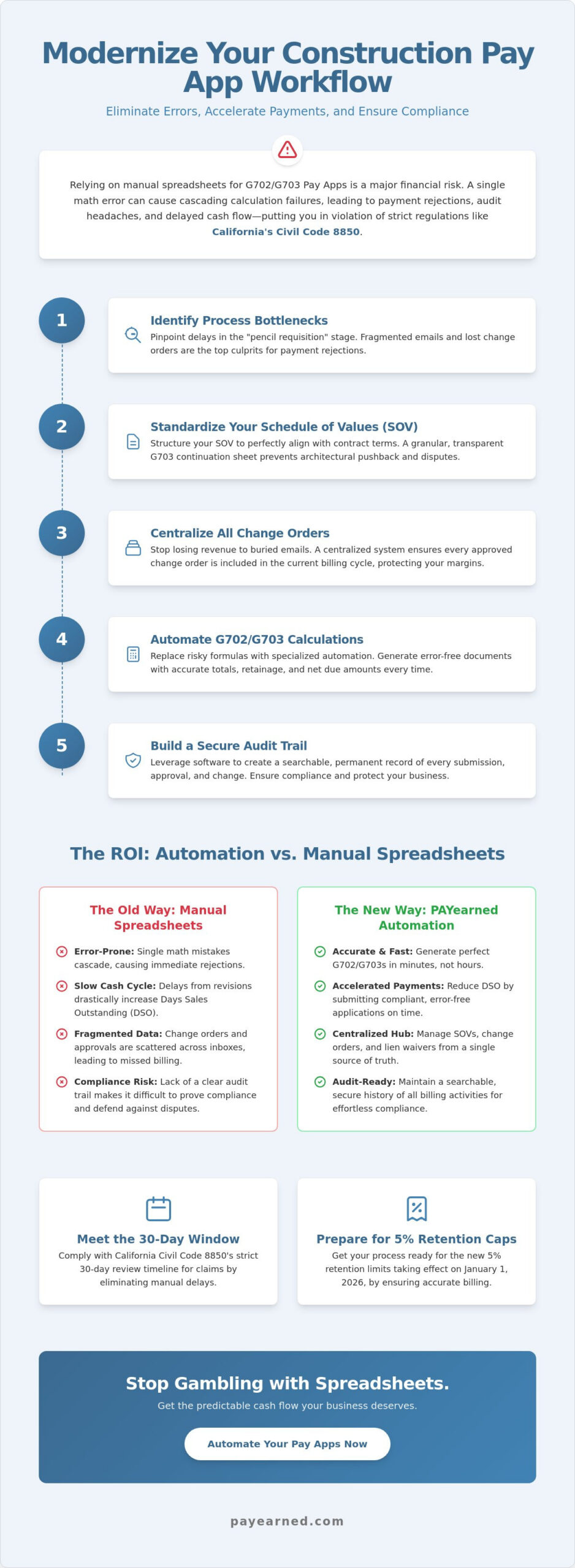
A 5-Step Plan for Improving Your Pay App Workflow
Success in construction billing requires more than just knowing your numbers; it requires a disciplined sequence of events. Improving construction Pay App work flow is about moving from a reactive “firefighting” mode to a proactive, standardized system. By following these five steps, you can ensure that your submissions are accurate, compliant with 2026 regulations, and processed without the typical back-and-forth delays that stall your capital cycle.
Step 1 & 2: Setting the Foundation
Centralizing your change order management is the first critical step. Change orders should never be treated as separate entities; they must be integrated into your payment application well before the submission deadline. When you wait until the last minute to reconcile these adjustments, you invite errors that trigger rejections. Standardizing your G703 continuation sheets during the first week of the project ensures all stakeholders agree on the SOV structure from day one. This early alignment is essential for managing unbilled retainage correctly, especially with California’s Civil Code 8811 capping retention at 5% for most private contracts as of January 1, 2026. You don’t want to discover a discrepancy in your retention calculations during the final closeout phase when the stakes are highest.
Step 3 involves implementing automated retainage tracking to replace manual tallying. With strict liability laws in Oregon regarding subcontractor wage theft, which went into effect on December 11, 2025, having a clear, automated record of every dollar withheld and released is a vital layer of protection. Step 4 requires establishing a firm “Pencil Requisition” deadline. Setting a hard date for preliminary reviews allows you to address disputes while there’s still time to meet the formal 30-day review window mandated by California’s Civil Code 8850. This creates a predictable rhythm that the field and office teams can rely on month after month, reducing the stress of the billing cycle.
Step 5: The Move to Specialized Cloud Software
The final step is transitioning to a cloud-based, AIA-style billing platform. Improving construction Pay App work flow is significantly easier when your team isn’t tethered to local drives or paper files. Evaluate your software options based on ease-of-use for the accounting team and the availability of live, US-based support. During the transition phase, having an expert available to help reconcile your existing SOV data is invaluable. A searchable database of past project billing also allows you to handle audits or historical inquiries in minutes rather than hours. If you’re ready to stop fighting with manual documents, you can simplify your construction billing today with a platform built exclusively for payment applications.
Scaling Your Business with Specialized Pay App Solutions
Specialized tools outperform bloated generalist suites every time. Many contractors are told they need a massive, all-in-one project management system just to handle their monthly billing. This is a myth that often leads to administrative bloat and unnecessary complexity. Improving construction Pay App work flow doesn’t require a total overhaul of your project management style; it requires a surgical focus on the G702 and G703 process. By choosing a specialized solution, you avoid the steep learning curves and high costs associated with generalist platforms while gaining precision in your financial reporting.
The PAYearned “Compatible but Independent” stance is a strategic advantage for growing firms. It allows you to maintain your existing accounting software while adding a dedicated layer of protection for your payment applications. This separation ensures that your billing data remains clean, searchable, and audit-ready without cluttering your general ledger with unfinished pencil requisitions. As you scale, this modular approach provides the flexibility to handle larger, more complex projects that demand rigorous documentation. You move from survival mode to financial precision by utilizing tools that excel at one critical task: securing your cash flow.
Why PAYearned is Built Exclusively for Pay Applications
We designed our platform to eliminate the noise. By focusing exclusively on G702/G703 accuracy and change order tracking, we’ve removed the features you don’t use and perfected the ones you do. This focus is vital for staying compliant with the 5% retention caps mandated by California’s Civil Code 8811, which took effect on January 1, 2026. You can start a trial with no credit card required to test the workflow for yourself. This allows your accounting team to experience the ease-of-use firsthand, ensuring the platform fits your daily routine before you make any commitment. It’s a risk-free way to move away from manual spreadsheets and embrace professional automation.
The Future of Construction Finance in 2026
The landscape of construction finance is shifting toward automated compliance and digital audit trails. Strict liability laws, like Oregon’s wage theft regulations effective December 11, 2025, mean that your records must be impeccable. A streamlined workflow prepares your firm for this reality by creating a searchable database of every billing event. When you can prove exactly what was billed, what was retained, and what was paid to subcontractors, you protect your business from legal and financial risks. Improving construction Pay App work flow is the most effective way to prepare for the larger contracts and tighter regulations of the modern industry. Simplify your construction billing today with PAYearned and build a foundation for sustainable growth.
Secure Your Cash Flow with Specialized Automation
Eliminating the administrative drag of manual billing is no longer just an option; it’s a requirement for staying competitive under the strict 2026 payment regulations. By standardizing your Schedule of Values and centralizing change order management, you move away from the spreadsheet risk that stalls your funding. Improving construction Pay App work flow allows your team to focus on project execution while ensuring that every G702 and G703 you submit is accurate and audit-ready. You’ve seen how specialized automation reduces administrative time from hours to minutes, providing the predictable cash flow your business needs to scale.
PAYearned is built exclusively for Pay Applications, offering a premium solution that handles the complex math of retainage and progress billing automatically. With live, US-based support and a platform designed for professional precision, you can stop fighting with cell formulas and start billing with confidence. Don’t let another billing cycle pass with the stress of manual errors and potential rejections. Start your free trial of PAYearned – no credit card required and experience the relief of a modernized workflow. Your path to faster, error-free payments starts here.
Frequently Asked Questions
How does pay app software improve payment speed?
Pay app software accelerates payments by eliminating the manual math errors that lead to immediate rejection by owners or architects. By automating calculations for progress billing and retainage, you ensure your submission is accurate the first time. This accuracy is vital for meeting the 30-day review windows established by California’s Civil Code 8850, which took effect on January 1, 2026. Faster approvals mean your cash flow remains steady and predictable throughout the project lifecycle.
What is the difference between a pay application and a standard invoice?
A standard invoice typically covers a single transaction, while a pay application provides a cumulative record of the entire project’s financial history. Pay apps include a G702 summary and a G703 continuation sheet that tracks previous work, current progress, and unbilled retainage. This specialized format is required on most commercial projects to provide lenders and owners with a clear audit trail. Improving construction Pay App work flow requires managing these complex, multi-layered documents with precision rather than simple invoicing tools.
Can I use PAYearned if my client requires AIA-style G702 forms?
Yes, PAYearned is designed to generate AIA-style G702 and G703 documents that meet industry standards. Our platform is a compatible but independent solution that provides the professional formatting your clients expect without the need for manual form filling. You get the benefit of automated calculations and searchable data while delivering the familiar payment certificates required by your contracts. It’s a premium way to maintain compliance while increasing your office’s daily productivity.
How do I track change orders within a payment application workflow?
The most effective way to track change orders is to integrate them directly into your G703 continuation sheet as separate line items. This ensures that every approved adjustment is reflected in your cumulative totals and that you aren’t leaving money on the table. Improving construction Pay App work flow involves moving away from fragmented email threads and centralizing these updates in a single, searchable database. This prevents unbilled change orders from slipping through the cracks during the monthly billing rush.
What is the best way to calculate retainage on a G702 continuation sheet?
The best way is to use automated software that applies consistent percentages across all line items. As of January 1, 2026, many private projects in California now have retention capped at 5% for the total life of the contract. Manual calculations often fail to account for previous retainage held, leading to discrepancies that halt the approval process. Specialized software auto-calculates these totals for you, ensuring your net due amounts are always correct and audit-ready.
Is specialized billing software better than a full ERP system for small contractors?
Specialized software is often superior because it avoids the high costs and complex implementation of a full ERP system. Many contractors don’t need a bloated project management suite; they simply need a reliable way to generate error-free pay applications. A specialized tool allows you to focus on financial precision without the learning curve of a generalist platform. It complements your existing accounting software while providing the technical depth required for AIA-style billing.
How do I handle stored materials on an automated G703 form?
You handle stored materials by entering the value in the “Materials Presently Stored” column of your continuation sheet. The software then automatically adds this value to your “Total Completed and Stored to Date” and carries it over to the G702 summary. This automation ensures that your insurance and invoice documentation for off-site materials matches your billing totals exactly. It removes the risk of over-billing disputes and keeps your payment cycle moving forward without manual intervention.
Does PAYearned provide US-based support for its billing platform?
Yes, we provide live, US-based support to assist you with any technical questions during your billing cycle. We understand that construction finance is a high-stakes environment where a delay of even a few hours can be costly. Having access to a supportive expert who understands the nuances of G702 and G703 forms provides the peace of mind you won’t find with impersonal, global platforms. We’re here to ensure your transition from manual spreadsheets is seamless and successful.
PAYearned is an agnostic workflow platform that helps teams manage pay applications
PAYearned is an independent software product and is not developed, endorsed, approved, sponsored or affiliated with the American Institute of Architects (AIA). AIA®, G702®, G703®