

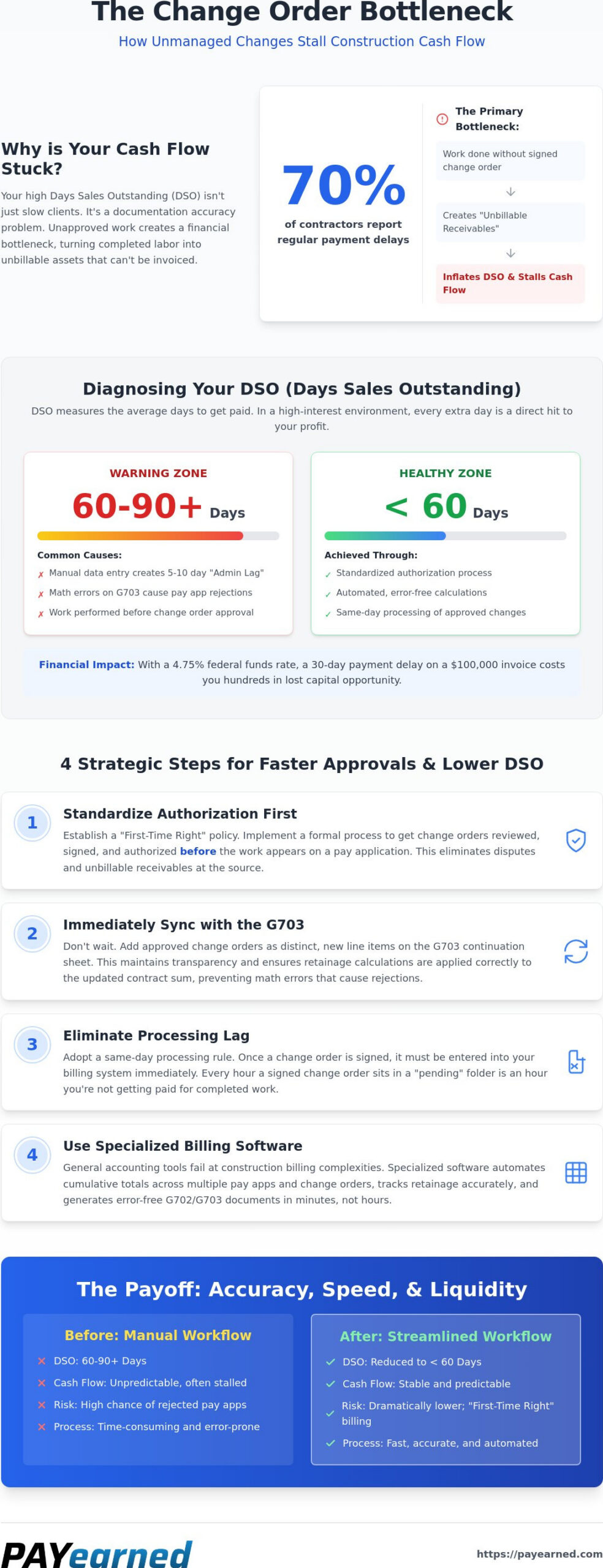
Your high Days Sales Outstanding (DSO) isn’t a sign of bad credit or slow clients. It’s a documentation accuracy problem. Unmanaged change orders act as the primary bottleneck choking your cash flow and stalling your growth. If you’re tired of administrative panic when a billing specialist leaves or seeing pay apps rejected because of simple math errors, you’re not alone. Roughly 70% of contractors report experiencing payment delays regularly. This usually happens because the paperwork simply can’t keep up with the field work.
We know that waiting 60 or 90 days for payment on work you’ve already completed is unsustainable. With the federal funds rate around 4.75% in late 2026, carrying unbilled work is more expensive than ever. This guide will show you exactly how to manage construction change orders to master the link between documentation accuracy and faster payment cycles. We’ll cover how to seamlessly integrate changes into G703 continuation sheets to secure faster client approvals without constant disputes. You’ll gain a clear roadmap to lower your DSO to under 60 days and keep your 2026 construction projects liquid.
Key Takeaways
- Understand why unapproved work acts as a financial bottleneck, turning your field labor into unbillable receivables that artificially inflate your DSO.
- Learn how to manage construction change orders by standardizing your authorization process before the work ever hits your monthly billing cycle.
- Discover the critical need to synchronize approved change orders with G703 continuation sheets immediately to prevent the math errors that lead to pay app rejections.
- Identify why specialized billing software outperforms general accounting tools when handling the complex calculations required for construction retainage and progress billing.
- Master a streamlined administrative workflow that secures faster client approvals and keeps your 2026 construction projects liquid.
Understanding Change Orders and Their Impact on Days Sales Outstanding (DSO)
Days Sales Outstanding (DSO) represents the primary metric for construction liquidity health. It measures the average number of days it takes to receive payment after a progress billing is submitted. In the high-interest environment of late 2026, where the federal funds rate sits at 4.75%, every day of delayed payment directly erodes your profit margin through financing fees. The most common culprit for a spiked DSO isn’t a slow client; it’s the “Change Order Bottleneck.” When your team performs work without a signed agreement, you create “unbillable receivables.” These costs sit on your books, inflating your DSO because they can’t be included in your current pay application. Understanding what is a change order from a financial perspective is the first step in learning how to manage construction change orders to protect your cash flow.
The Construction DSO Formula for 2026
To calculate your cycle, use this formula: (Total Accounts Receivable / Total Credit Sales) x Number of Days in the period. While a DSO of 60 to 90 days is common in the industry, it’s a warning sign of inefficient administrative processes. You must differentiate between “work in progress” on the original contract and “unapproved change orders” in your financial reporting. If unapproved changes aren’t tracked separately, they hide the true cause of your liquidity gaps and make it impossible to forecast your 2026 project cash flow accurately.
Why Manual Tracking Fails the DSO Test
Manual data entry creates an “Administrative Lag” that typically adds 5 to 10 days to your billing cycle. This delay occurs when field notes must be hand-keyed into spreadsheets for the monthly billing cutoff. The cost of a rejected pay application is even higher. A single math error on a change order line item can reset a 30-day payment clock, forcing you to wait another month for funds. You should focus on mastering the payment application to avoid these procedural inaccuracies. Learning how to manage construction change orders through automation ensures that your billing remains accurate and your cash flow stays steady.
Strategic Steps to Manage Change Orders for Faster Approvals
Standardizing your authorization process is the only way to ensure work is paid before it drains your reserves. Evolving industry standards and best practices increasingly require owners to respond to change order claims within a reasonable timeframe, often around 30 days. This makes knowing how to manage construction change orders a matter of both compliance and survival. You should implement a “First-Time Right” policy for all subcontractor billing to eliminate the back-and-forth cycle that delays funding. Establishing a proactive communication cadence with owners and architects five days before your billing deadline prevents last-minute surprises. For those seeking a gold standard in documentation, following the logic of Federal Change Order Procedures ensures every modification is backed by a clear paper trail.
Updating the G703 Continuation Sheet Correctly
Properly adding change order line items to your continuation sheet is a precise task. You must add these as distinct line items rather than rolling them into existing contract sums to maintain transparency. Ensure that your retainage tracking applies correctly to these new totals. Given that retention rates can vary significantly by jurisdiction and project type, your math must always be exact to avoid immediate pay app rejection. Using cloud-based storage allows your team to retrieve signed authorizations instantly, providing the “proof of work” architects require for approval.
Eliminating Unbilled Receivables
Don’t let change orders sit in a “pending” folder. Same-day processing is critical for maintaining a low DSO. Every hour a change order remains unentered is an hour you aren’t getting paid for labor and materials already deployed. You can use built-in search tools to quickly retrieve historical data during client disputes, keeping the conversation focused on facts rather than memory. For document-level accuracy, consult our G702 Reference Guide to see how these changes flow into your final certificate. To streamline this entire workflow, consider using a specialized billing platform that automates these complex calculations for you.
Leveraging Specialized Billing Software to Automate the Change Order Lifecycle
General accounting software isn’t built for the structural complexities of construction progress billing. These systems often fail to track cumulative totals across multiple change orders, leading to discrepancies that architects catch and reject immediately. Using a dedicated SaaS platform for AIA-style billing ensures your documentation remains synchronized without manual re-entry. Automation eliminates the “fat-finger” math errors in tax, retainage, and total calculations that plague manual workflows. Automated G702/G703 generation protects your cash flow from personnel turnover by ensuring your billing process isn’t tied to the memory of a single staff member. Learning how to manage construction change orders through a centralized system turns a chaotic administrative task into a repeatable, error-free operation.
Moving Beyond Manual Excel Templates
The hidden cost of “free” downloads is surprisingly steep. Broken formulas and formatting nightmares in unmanaged spreadsheets are leading causes of pay application rejections. These errors don’t just delay one check; they disrupt your entire 2026 project schedule by stalling material orders. PAYearned provides a cloud-based solution that makes pay applications easy for less, removing the risk of corrupted files or outdated templates. You can explore our detailed comparison of AIA Billing Software vs. Excel to understand why spreadsheets have become a liability for modern subcontractors.
The ROI of Automated Change Order Management
Every rejected invoice carries a high administrative price tag. You must calculate the hours your back-office team spends on rework, combined with the cost of capital while you wait for a corrected payment. Transitioning your firm toward a 45-day DSO goal is only achievable through automated document generation that guarantees accuracy on the first submission. By removing the friction from the approval-to-cash cycle, you ensure your business remains liquid even as material prices fluctuate. Don’t let paperwork hold your profit hostage. You can start streamlining your change orders with PAYearned to secure your cash flow today.
Secure Your Construction Liquidity Through Precision Billing
Change orders don’t have to be the bottleneck that stalls your monthly progress billing. By standardizing your authorization workflow and synchronizing modifications directly with your continuation sheets, you eliminate the math errors that drive up DSO. Learning how to manage construction change orders through a centralized, automated system is the most effective way to protect your profit margins against the high interest rates of 2026. It’s about moving from administrative panic to a steady, reliable rhythm that keeps your team focused on the field rather than the back office.
You can eliminate the hazards of manual spreadsheets while ensuring every dollar of work is accounted for. PAYearned provides automated AIA-style G702 and G703 generation, specialized change order and retainage tracking, and cloud-based accessibility for national construction projects. It’s time to stop chasing paperwork and start focusing on the build. Start streamlining your pay apps and change orders with PAYearned today to keep your projects moving forward with absolute confidence.
Frequently Asked Questions
What is a good DSO for a construction company in 2026?
A target Days Sales Outstanding (DSO) of under 60 days is considered healthy for most contractors in 2026, though top-performing firms strive for 45 days. Maintaining this level requires aggressive management of receivables and immediate processing of approved work. If your DSO exceeds 75 days, your cash flow is likely being restricted by administrative delays rather than client inability to pay. Focused automation is the most reliable way to hit these targets.
How do unapproved change orders affect my progress billing?
Unapproved change orders act as a financial anchor because they represent costs you’ve already incurred but cannot yet bill. You cannot include these amounts on your AIA-style progress billing until you have a signed authorization. Mastering how to manage construction change orders ensures you don’t carry these unbillable receivables for months. This prevents your labor and material costs from draining your liquidity while your accounts receivable remains stagnant.
Can I reduce my DSO without hiring more accounting staff?
Yes, you can lower your DSO by automating the clerical tasks that cause administrative lag. Learning how to manage construction change orders through specialized software allows your existing team to generate error-free pay apps in minutes rather than days. Automation handles the complex math of retainage and cumulative totals, ensuring that your billing cycle remains steady even during periods of high project volume or staff turnover.
Why is my AIA-style pay application being rejected so often?
Frequent rejections are usually the result of mathematical discrepancies on the G703 continuation sheet or missing documentation for new change order line items. A single rounding error or an incorrect retainage calculation can invalidate the entire application. Switching from manual spreadsheets to a system that auto-calculates these values ensures that your math is always precise; this is the fastest way to secure architect approval and avoid payment delays.
PAYearned is an agnostic workflow platform that helps teams manage pay applications
PAYearned is an independent software product and is not developed, endorsed, approved, sponsored or affiliated with the American Institute of Architects (AIA). AIA®, G702®, G703®