

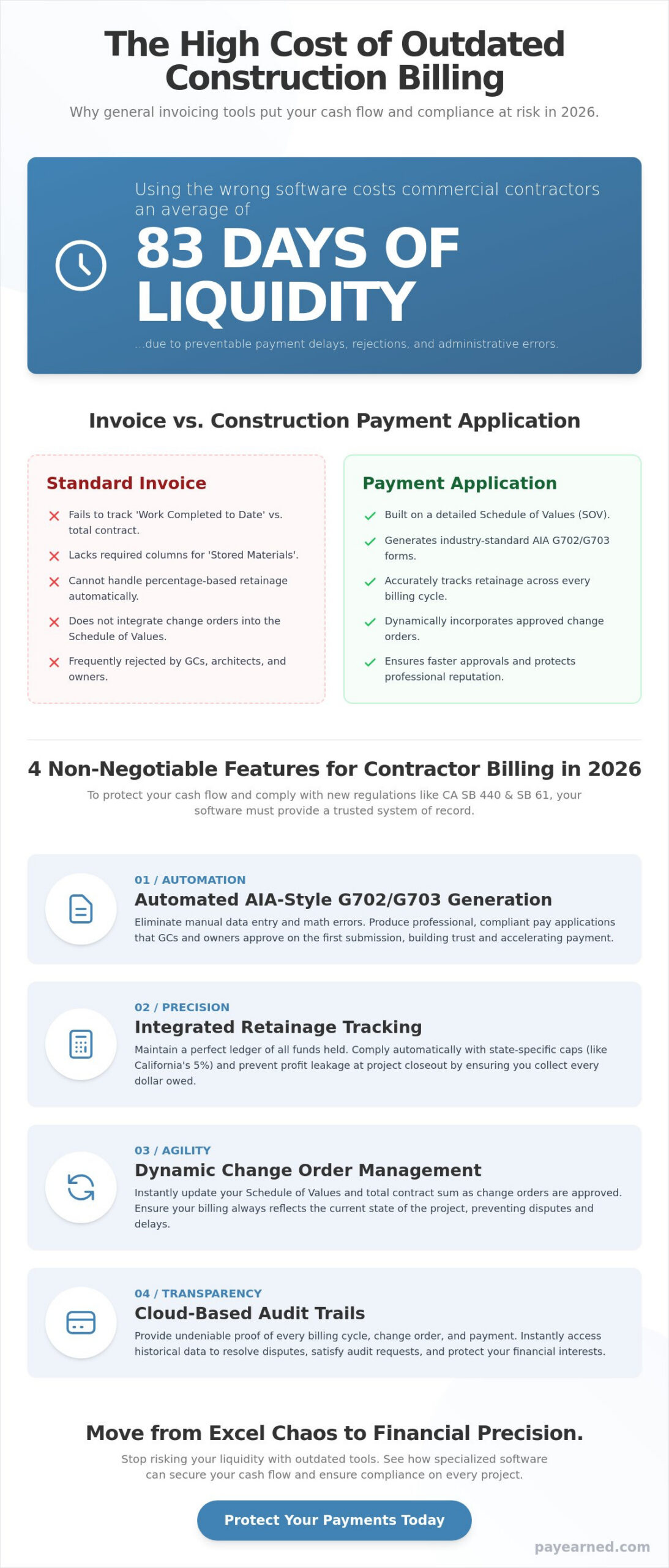
Using general-purpose invoicing tools for commercial construction is a gamble that costs you 83 days of liquidity on average. In 2026, the margin for error has vanished. With California’s SB 440 and SB 61 now in full effect, the financial stakes for payment applications are at an all-time high. If your current contractor billing software doesn’t handle 5% retention caps or AIA-style documentation automatically, you aren’t just wasting time. You’re risking rejected pay apps and losing out on the 2% monthly interest you’re legally owed on undisputed claims.
The same need for precision applies to managing your workforce’s legal entitlements; if you are looking for a way to automate complex labor calculations like severance or overtime with the Calculadora Trabalhista IA, click here.
You’ve likely felt the frustration of a GC returning a G702 because of a single math error on a G703 continuation sheet. It’s a preventable administrative bottleneck that stalls your cash flow and damages your professional reputation. This guide reveals why specialized systems are critical for maintaining AIA compliance and protecting your project’s liquidity. You’ll learn how to automate your change orders, master retainage tracking, and produce the professional, AIA-style documentation that GCs demand for immediate approval.
Key Takeaways
- Understand the critical distinction between a standard bill and a construction payment application that tracks stored materials and work completed to date.
- See how specialized contractor billing software automates the generation of AIA-style G702 and G703 documents to secure immediate approval from GCs and owners.
- Stop losing profit at project closeout by using integrated tools that track retainage accurately across every progress payment.
- Learn the exact steps to migrate your Schedule of Values from error-prone Excel templates to a professional, cloud-based environment.
- Master the documentation requirements for 2026 to ensure your change orders and continuation sheets protect your project’s financial liquidity.
The Critical Difference Between Invoices and Construction Payment Applications
Commercial construction doesn’t operate on simple bills. A standard invoice is merely a request for payment, but a payment application is a comprehensive financial package that proves your right to that payment. At its core is the Schedule of Values (SOV), which acts as the roadmap for the entire project’s budget. Understanding The Critical Difference Between Invoices and Construction Payment Applications is essential because the SOV dictates how much you can bill for specific milestones. Without specialized contractor billing software, managing this breakdown becomes a manual nightmare that risks your project’s liquidity.
To better understand how these financial components interact on a job site, watch this complete guide to the billing process:
General invoicing tools fail because they cannot track ‘work completed to date’ versus ‘stored materials’ with the precision required by architects and owners. When you use documentation that doesn’t comply with industry standards, you invite scrutiny and delays. In an industry where the average days-to-pay is 83 days, you cannot afford to give a general contractor any reason to set your pay app aside.
Why General Accounting Software Falls Short
General tools are designed for simple transactions. They lack the native architecture to handle ‘stored materials’ columns, which are mandatory for most commercial projects. If you’ve purchased $50,000 in steel that is sitting in your yard, general software won’t let you bill for it correctly. These tools also struggle with percentage-based progress billing, often forcing you to use workarounds that lead to rounding errors. An AIA-style G702 is the gold standard for commercial payment certificates because it provides a standardized, legally recognized summary of the project’s financial status.
The High Cost of Administrative Errors
Administrative mistakes are the primary cause of payment rejections. A single math error on a G703 continuation sheet can trigger a full rejection of your month’s billing, forcing you to wait another 30 days for the next cycle. This isn’t just an inconvenience; it’s a cash flow crisis. The labor cost of manually reconciling previous applications against current work is also a hidden drain on your profit. You spend hours checking Excel formulas instead of managing the project, all while your risk of non-compliance grows.
4 Non-Negotiable Features of Contractor Billing Software in 2026
The regulatory environment of 2026 has made standard invoicing tools obsolete for commercial work. With California’s SB 61 capping retention at 5% and SB 440 mandating strict change order resolutions, your financial documentation must be bulletproof. To survive, your contractor billing software must move beyond simple data entry and provide a system of record that GCs and owners trust implicitly. High-performance software should include these four core capabilities:
- Automated AIA-Style G702 and G703 Generation: Eliminate the manual assembly of payment certificates to ensure immediate approval.
- Integrated Retainage Tracking: Maintain a precise ledger of held funds to prevent revenue leakage at project closeout.
- Dynamic Change Order Management: Automatically update your Schedule of Values so your billing reflects the current contract sum.
- Cloud-Based Audit Trails: Provide instant retrieval of historical billing cycles and approved field changes for any project audit.
Mastering AIA-Style Compliance Without the Headache
The G702 Application and Certificate for Payment is the industry standard for a reason. In the 2026 bidding environment, submitting anything less suggests a lack of professional maturity. Your software must auto-calculate critical totals, including “less previous applications” and “current payment due,” without manual intervention. Precision in these payment applications builds the trust necessary to maintain long-term professional relationships with Tier-1 general contractors. When the math is guaranteed, the approval process accelerates.
Protecting Profit with Retainage and Change Order Tracking
Manual retainage tracking is a primary reason subcontractors lose profit. It’s too easy to lose track of thousands of dollars over a multi-month project. Specialized contractor billing software handles the complex math of “retention held” versus “retention released” across every cycle, ensuring you collect every dollar owed. Research into Transitioning to Automated Billing shows that firms using dedicated platforms significantly reduce revenue leakage. By maintaining a cloud-based audit trail for every change order, you protect your cash flow from disputes. If you’re ready to stop the spreadsheet chaos, consider exploring PAYearned’s specialized billing platform to secure your project’s financial future.
Transitioning to Automated Billing: From Excel Chaos to Financial Precision
Excel reaches its breaking point when a single project becomes a portfolio. Manual templates cannot scale with the rigorous demands of 2026 commercial standards. If you’re spending your weekends reconciling G703 continuation sheets, your administrative process has become a liability. Transitioning to dedicated contractor billing software marks the move from reactive crisis management to proactive financial precision. It replaces the anxiety of “did I miss a formula?” with the certainty of mathematical accuracy.
The “Clean Data” phase begins by migrating your current Schedule of Values into a specialized platform. This ensures your baseline is accurate before the first progress payment is ever generated. By setting up automated workflows for change orders, you ensure that no field directive or extra work goes unbilled. When a GC has an inquiry or an auditor requests documentation, cloud-based search tools allow you to retrieve historical billing cycles in seconds. You no longer have to dig through paper files or buried email attachments to prove your work.
The ROI of Specialized Billing Software
The hours saved through automation translate directly to improved liquidity. By eliminating manual G702 and G703 data entry, firms recover dozens of administrative hours every month. Reducing your Days Sales Outstanding (DSO) from the industry average of 83 days strengthens your balance sheet and improves your bonding capacity for larger projects. This AIA billing software serves as a specialized financial partner that protects your margins and accelerates your cash flow.
Future-Proofing Your Construction Business
Large-scale commercial and federal projects in 2026 now require digital-first documentation for transparency and auditability. Providing GCs with clean, searchable, and error-free pay apps is no longer a luxury. It’s a competitive necessity. Firms that embrace automation position themselves as reliable, low-risk partners that are easier to work with and faster to pay. You can streamline your construction billing with PAYearned’s specialized AIA-style platform to ensure your business remains profitable and compliant in an increasingly complex market.
Secure Your Financial Liquidity in the 2026 Commercial Market
Commercial projects no longer tolerate the administrative friction of manual spreadsheets. You’ve seen how the distinction between a simple bill and a comprehensive payment application defines your professional standing with general contractors. By automating your AIA-style G702 and G703 documents, you eliminate the math errors that trigger payment rejections and stall your cash flow. High-performance contractor billing software isn’t just an administrative tool; it’s a strategic asset that manages your retainage and change orders with mathematical precision.
Transitioning to a specialized platform provides the cloud-based search capabilities needed to resolve GC inquiries in seconds. You protect your profit margins by ensuring every stored material and work milestone is tracked accurately across every billing cycle. It’s time to move past the chaos of Excel and embrace a system built for the high-stakes reality of modern construction finance. Precision in your documentation is the fastest way to build trust and accelerate your path to payment.
Start generating professional AIA-style pay apps with PAYearned to protect your cash flow and streamline your project closeouts. Your expertise belongs on the job site, not buried in a continuation sheet. Let automation handle the documentation while you build the future.
Frequently Asked Questions
Is contractor billing software different from standard accounting software?
Yes, contractor billing software is specifically engineered to handle the unique financial requirements of construction, such as progress billing and stored materials. Standard accounting tools lack the native columns for AIA-style documentation and percentage-based work completion. By using a specialized platform, you ensure that your documentation meets the rigorous compliance standards that general invoicing tools simply cannot satisfy.
Can I generate AIA G702 and G703 forms with PAYearned?
Yes, the PAYearned platform is designed specifically to generate professional AIA-style G702 and G703 documents. It automates the creation of these payment certificates, ensuring that your summary sheets and continuation sheets align perfectly every month. This automation eliminates the risk of manual data entry errors that often lead to payment delays or rejections on high-stakes commercial projects.
How does the software handle retainage for long-term projects?
The software automatically calculates and tracks retainage across every billing cycle of a project. It maintains a running ledger of funds held, preventing the lost profit that often occurs during manual tracking over multi-month contracts. You can easily manage the transition from retention held to retention released, ensuring your final closeout is mathematically accurate and fully documented.
Do I need to be an accountant to use specialized billing software?
You don’t need to be an accountant to use specialized contractor billing software. These platforms are built for contractors and project managers who need to manage project finances without getting bogged down in complex accounting theory. The interface guides you through the Schedule of Values and progress billing steps, making professional financial management accessible to anyone familiar with the job’s scope.
Can I manage change orders within my payment applications?
Yes, you can manage change orders directly within your payment applications to ensure the contract sum is always current. When a change order is approved, the software updates your Schedule of Values automatically. This integration ensures that every dollar of extra work is accounted for in your next billing cycle, protecting your project’s total liquidity and preventing work from going unbilled.
How does automated software prevent rejected pay applications?
Automated software prevents rejections by eliminating the math errors that architects and owners use as grounds for denial. It ensures that “less previous applications” and “current payment due” totals are always perfectly synchronized with your historical data. By providing standardized, error-free documentation, you build the professional trust necessary for faster approvals and more consistent cash flow.
PAYearned is an agnostic workflow platform that helps teams manage pay applications
PAYearned is an independent software product and is not developed, endorsed, approved, sponsored or affiliated with the American Institute of Architects (AIA). AIA®, G702®, G703®