

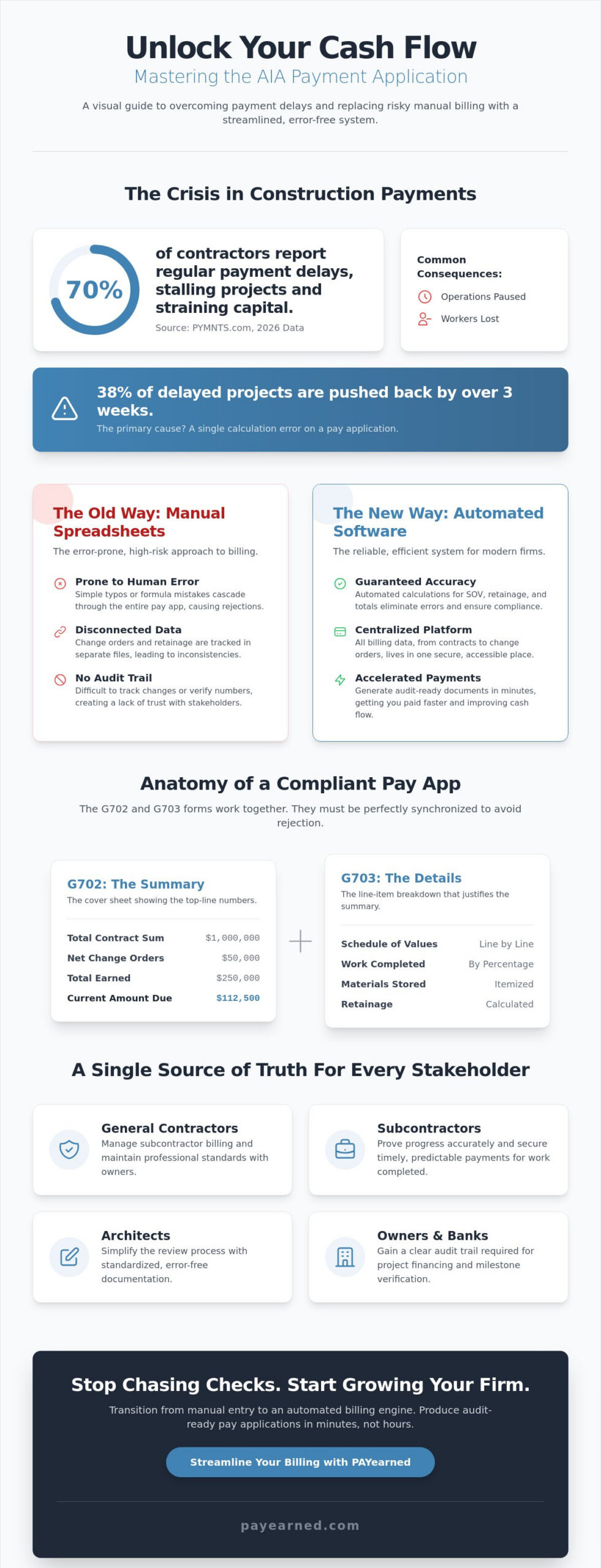
According to 2026 data from PYMNTS.com, 70% of construction contractors report regular payment delays. When these delays occur, 38% of projects are pushed back by more than three weeks, often forcing firms to lose workers or pause operations. You already know that a single calculation error on an aia pay app can stall your capital for an entire billing cycle. It’s frustrating to manage complex retainage and change orders across disconnected spreadsheets that offer zero protection against clerical mistakes.
We’re going to show you how to master AIA-style payment applications to ensure your billing is audit-ready and error-free. You’ll learn how to leverage the 1992, 2017, and 2021 document standards to accelerate your cash flow and protect your project margins. We’ll preview the transition from manual entry to automated billing engines so you can stop chasing checks and start growing your firm.
Key Takeaways
- Master the core components of the G702 and G703 to ensure your billing aligns perfectly with industry standards and contract requirements.
- Identify the critical risks of manual billing and learn how to replace error-prone spreadsheets with a reliable aia pay app solution.
- Streamline your Schedule of Values (SOV) management to prevent calculation errors from cascading through your entire project lifecycle.
- Automate complex retainage calculations and change order tracking to produce audit-ready documentation that accelerates your payment cycles.
- Gain peace of mind with cloud-based tools that provide real-time billing visibility for both field teams and back-office staff.
What is an AIA Pay App? Understanding the Industry Standard
An aia pay app isn’t just a piece of paper; it’s the financial heartbeat of a construction project. Created by the American Institute of Architects (AIA), these standardized forms provide a universal language for progress billing. They certify that work is completed according to the contract before any funds change hands. This system ensures that everyone from the owner to the boots on the ground understands exactly what’s being paid for and why.
The approval process involves a tight loop between the owner, the architect, and the contractor. The contractor submits the request. The architect reviews the progress on-site. The owner releases the payment based on that certification. This structure builds trust because it provides a clear audit trail that banks and stakeholders require for funding. It’s a protective measure that prevents overpayment and ensures project milestones are met.
To better understand this concept, watch this helpful video:
Many contractors confuse official AIA documents with “AIA-style” forms. Official documents are copyrighted forms purchased directly from the AIA. These can be expensive and difficult to fill out manually without making errors. Modern “AIA-style” software like PAYearned generates compatible formats that follow the exact G702 and G703 layouts. This is a cost-effective, automated way to meet industry requirements without the friction of manual entry. It’s about getting the layout right without paying for a physical paper template every time you need to bill.
The Core Components: G702 vs. G703
The billing process relies on two primary documents that work in tandem. The G702 Application and Certificate for Payment acts as the summary cover sheet. It shows the total contract sum, change orders, and the amount due for the current period. The G703 Continuation Sheet provides the granular detail. It breaks the project down into a Schedule of Values (SOV), justifying every dollar requested by showing the percentage of work completed for each specific line item. Whether you’re using the standard 1992 edition or the 2017 subcontractor variation, these forms must match perfectly to avoid rejection. Even a small rounding error on the G703 can cause the entire G702 to be sent back, delaying your cash flow for weeks.
Who Uses AIA-Style Billing and Why?
General contractors use these forms to manage complex tiers of subcontractors and maintain professional standards across the job site. Subcontractors rely on an aia pay app to prove their progress and secure timely payments. Architects and owners require this standardized format because it simplifies the review process and provides the necessary documentation for bank financing. Software like PAYearned automates the g702 and G703 process, ensuring that totals, retainage, and progress percentages are calculated correctly the first time. This eliminates the “broken link” issues found in spreadsheets and keeps your billing cycle predictable.
The Anatomy of a Compliant Payment Application
Precision in your aia pay app starts with the static data. Every application must mirror the prime contract, including the exact contract number and project dates. Discrepancies here are the most common reason for immediate rejection by architects. This level of administrative rigor aligns with Federal construction contracting regulations updated in December 2019, which emphasize the importance of standardized project delivery and billing documentation. If your header information doesn’t match the owner’s records, the rest of your data won’t even be reviewed.
The Schedule of Values (SOV) serves as the mathematical foundation of the G703. You must break the total contract sum into logical line items that represent specific phases of work. When calculating work completed, you’re tracking three distinct values: work from previous applications, work completed this period, and materials currently stored on-site. The “this period” column is where most errors occur. It must be a discrete value that, when added to previous work, doesn’t exceed the total scheduled value for that line item. If you’re tired of manual entry, you can automate your progress billing to ensure these columns always balance perfectly.
Billing for stored materials requires specific attention. This allows you to request payment for inventory that is on-site but hasn’t been installed yet. However, architects typically require proof of insurance or photos of the materials before certifying these amounts. Mismanaging this column often leads to “over-billing” flags, which can damage your reputation with the owner and delay your funding.
Mastering Retainage Calculations
Retainage is your project’s “safety net,” but it’s also a significant portion of your profit. You’ll encounter both fixed retainage (a flat percentage like 5% or 10% across the whole project) and variable retainage, which might change once you hit 50% completion. You must track unbilled retainage separately to ensure you don’t lose sight of your final payout. For a deeper dive into how this impacts your bottom line, read our guide on what is retention. Accurate tracking here is the difference between a profitable job and a cash flow crisis.
Integrating Change Orders into the Billing Cycle
Change orders are not just side agreements; they are formal modifications to your aia pay app. Approved changes must be added as new line items on your G703 continuation sheet and reflected in the “Change Orders” section of your G702 summary. Billing for unapproved or “pending” change orders is a high-risk move that often leads to a rejected certificate. Keep your billing clean by only including changes that have a signed, executed document number. This keeps your audit trail transparent and ensures your total contract sum is always accurate.
The High Cost of Manual Billing: Why Spreadsheets are Risky
Relying on Excel for your aia pay app is a gamble with your company’s cash flow. A single broken formula in one cell can cascade through your entire project history, corrupting every subsequent application. This “broken link” problem often goes unnoticed until a final audit, where a contractor discovers they’ve under-billed for months. According to 2026 data from PYMNTS.com, 70% of contractors already face regular payment delays. You can’t afford to add clerical errors to that risk. Manual data entry is a massive time sink, often requiring four to six hours per billing cycle just to re-type numbers from the previous month’s sheets. It’s an expensive, low-value task that pulls your best people away from the job site.
Architects and owners don’t tolerate “close enough” when certifying funds. Even a one-cent discrepancy between your G702 summary and G703 details is enough to trigger a full rejection. When this happens, your payment isn’t just delayed; it’s sent to the back of the line. Data from the 2025 Construction Delays and Payment Timing Report shows that 38% of payment delays last more than three weeks. A simple rounding error in a spreadsheet can literally stop your payroll. Managing loose Excel files across various folders also creates an audit nightmare. Finding a specific change order from three months ago becomes a scavenger hunt rather than a quick search.
Common Calculation Errors in G702 Forms
The “Balance to Finish” column is a frequent source of failure. Contractors often fail to carry this value over correctly from the prior month, leading to a cumulative error that grows over time. Applying sales tax incorrectly to stored materials versus labor is another common pitfall. If your summary sheet doesn’t mathematically align with your continuation sheet’s line items, the architect will flag it immediately. These mathematical inconsistencies are almost inevitable when you’re manually managing multiple sheets without built-in validation rules.
The Security and Searchability Gap
Cloud-based storage beats local server files every time. When your billing records live in loose folders, you lose the ability to quickly verify historical data for tax or legal compliance. Modern aia pay app software provides a built-in search engine, allowing you to find specific line items or change orders in seconds. This creates a clean, transparent audit trail that protects your firm during project closeout. Moving away from risky spreadsheets isn’t just about speed; it’s about building a stable financial environment where your data is searchable, secure, and always accurate.
Key Features to Look for in Modern AIA Billing Software
Selecting the right tool for your aia pay app isn’t just a matter of convenience. It’s a strategic move to protect your firm’s cash flow. You need a platform that automates total and retainage calculations with absolute precision. This eliminates the manual errors that lead to rejected certificates and delayed payments. A premium solution should also provide cloud-based accessibility. This allows your field teams to update progress percentages directly from the job site while your back-office staff handles the final review. When you generate professional, AIA-style documents that meet strict architect requirements, you significantly reduce the friction in the approval process. Automation ensures that your continuation sheets and change order summaries stay synchronized, preventing the “broken link” issues that plague manual spreadsheets.
Specialized vs. General Accounting Software
General accounting platforms and traditional bookkeeping tools are excellent for standard business tasks, but they often struggle with construction-specific retainage. These platforms aren’t natively designed to track unbilled retainage or manage complex continuation sheets across multiple billing cycles. This is where a tool built exclusively for aia billing software provides a distinct advantage. Specialized apps bridge the critical gap between project management and accounting. They handle the nuanced data flow of progress billing without the massive overhead of full-suite project management systems. Many contractors find that these specialized tools offer a more focused, no-nonsense approach that excels at the one task that matters most: getting paid on time.
Support and Implementation
Implementation speed is vital when you’re facing a billing deadline. You shouldn’t need a week of specialized training to generate your first aia pay app. Look for a platform that prioritizes ease of use; your team should be able to produce professional documents within minutes. Live, US-based support is another essential trust signal. When you have a complex question about a change order on a Friday afternoon, you need a human expert, not a generic chatbot. Pricing transparency is equally vital. Avoid vendors that hide per-document fees or charge extra for every additional user. Predictable monthly or annual plans allow you to budget your administrative costs with confidence. You can simplify your construction billing today with a platform designed for reliability, speed, and precision.
Streamlining Your Construction Billing with PAYearned
PAYearned is the premium solution for contractors who’ve outgrown the chaos of manual billing. It’s a cloud-based platform built exclusively for generating an aia pay app with total precision. By moving your data from risky spreadsheets to our automated engine, you eliminate the clerical errors that cause significant payment delays. Our interface handles the heavy lifting of progress billing, ensuring your G702 summary and G703 continuation sheets are always in sync. You get professional, audit-ready documentation that meets the highest architect standards without the manual struggle.
The platform automates the g702 and G703 process by calculating totals, retainage, and progress percentages in real time. Whether you need the 1992 standard edition, the 2017 subcontractor version, or the 2021 “Cost of the Work” format, PAYearned supports the specific documentation your project requires. You can manage multiple change orders and line items within a single, searchable interface. This ensures that your historical data is never more than a click away, providing the stabilizing force your administrative team needs.
The PAYearned Advantage: Precision and Speed
One of the biggest time-wasters in construction billing is re-typing data from previous months. PAYearned solves this by automatically carrying over data from your prior applications, maintaining a perfect mathematical chain of custody. You’ll also benefit from a built-in search engine designed for construction professionals. Finding a specific line item from a project completed last year is instantaneous. We believe in predictable pricing with no hidden costs. You can choose our Free Limited Plan for $0, or scale up with our Monthly Unlimited Plan at $89 per month. For long-term projects, our Annual Unlimited Plan offers the best value at $67 per month, which is billed as $799 prepaid annually.
Get Started Today
We’ve designed PAYearned to be as accessible as it is powerful. There’s no credit card required to start your first project, allowing you to experience the speed of automated billing firsthand. If you have questions while setting up your Schedule of Values, our live, US-based support team is ready to help you manage your first aia pay app submission. Don’t let another billing cycle pass with the risk of spreadsheet errors. It’s time to stabilize your cash flow with a specialist partner. Start generating professional AIA-style pay apps with PAYearned today and experience the relief of error-free billing.
Take Control of Your Construction Cash Flow
Mastering the aia pay app is the most direct way to stabilize your firm’s finances. You’ve seen how standardized G702 and G703 forms protect your project margins by creating a clear audit trail between architects and owners. Relying on risky spreadsheets is a liability you don’t need; especially when 70% of contractors already face regular payment friction. By automating your progress billing, you eliminate the mathematical errors that stall your capital for weeks.
PAYearned is a premium solution built exclusively for Pay Applications. We provide the specialized tools you need to manage retainage and change orders without the overhead of complex project management software. With live, US-based support and a no-nonsense interface, you can generate your first professional certificate in minutes. There’s no credit card required to start, so you can experience the relief of error-free billing today. Simplify your construction billing and start your first PAYearned project for free. It’s time to stop chasing checks and start building with confidence.
Frequently Asked Questions
What is the difference between an AIA G702 and G703?
The G702 is a summary cover sheet, while the G703 is the detailed continuation sheet. The G702 provides the architect with a high-level overview of the contract sum, total work completed, and the current amount due. In contrast, the G703 breaks the project into a Schedule of Values (SOV), justifying every dollar requested through specific line items. You must submit both together to provide a complete audit trail.
Can I create my own AIA-style forms without buying official paper?
You can generate your own AIA-style forms using specialized software like PAYearned without purchasing official paper templates. These “AIA-style” documents follow the industry-standard layout and are widely accepted by architects and owners. This approach is a cost-effective alternative to buying individual copyrighted forms from the American Institute of Architects. It allows you to automate your aia pay app workflow while maintaining professional standards.
How is retainage calculated on a standard pay application?
Retainage is typically calculated as a fixed percentage, such as 5% or 10%, of the total work completed and materials stored to date. You subtract this amount from your progress billing to create a safety net for the owner. It’s vital to track unbilled retainage throughout the project lifecycle. Accurate calculations ensure that your final payout matches your expected profit margins once the project reaches substantial completion.
What happens if my pay application is rejected by the architect?
A rejected application triggers immediate payment delays. When an architect finds a calculation error or a discrepancy in the Schedule of Values, they’ll return the entire package for correction. This forces you to restart the approval cycle, which stalls your capital for the entire billing period. Using automated tools reduces this risk by ensuring that every column and row balances perfectly before you hit submit.
Do I need specialized software for construction billing, or is Excel enough?
While Excel is common, it’s a risky choice for construction billing due to “broken link” errors. Specialized aia pay app software is built to handle the complex math of progress billing, retainage, and stored materials automatically. Moving to a dedicated platform provides a centralized database for all historical project data. It replaces the scavenger hunt of searching through loose Excel folders with a searchable, cloud-based audit trail.
How do I handle change orders on an AIA-style payment application?
You handle change orders by adding them as new line items to your G703 continuation sheet once they’re officially approved. The cumulative total of these changes is then reflected in the summary section of your G702. It’s a high-risk move to bill for “pending” change orders, as this often leads to immediate rejection. Keeping these additions organized ensures your total contract sum remains accurate and audit-ready.
Is a pay application the same as a construction invoice?
A payment application is not the same as a standard construction invoice. An invoice is a simple request for payment, whereas a pay app is a certified document that proves work was completed according to the contract. It requires a detailed breakdown of progress and often needs an architect’s signature. This standardized process provides the transparency that lenders and owners require before releasing project funds.
What are stored materials and how do I bill for them on a G703?
Stored materials are inventory items that are on the job site but haven’t been installed yet. You bill for these in a specific column on the G703 continuation sheet to maintain cash flow for upfront material costs. Architects usually require proof of insurance or photographic evidence before they’ll certify these amounts. Correctly tracking these items prevents “over-billing” flags and keeps your billing cycle moving smoothly.
PAYearned is an agnostic workflow platform that helps teams manage pay applications
PAYearned is an independent software product and is not developed, endorsed, approved, sponsored or affiliated with the American Institute of Architects (AIA). AIA®, G702®, G703®