

The average commercial contractor loses over $14,000 in annual revenue due to manual spreadsheet errors on their pay applications. When 78% of commercial projects require the standard G702-1992 format, even a minor calculation mistake on your retainage or unbilled work can halt your cash flow instantly. You’ve likely felt the frustration of a GC rejecting a submission because Line 5 doesn’t match your continuation sheet. Having this aia g702 form explained clearly is the difference between getting paid on Friday and waiting another thirty days for an architect’s approval.
We understand that navigating the relationship between your Schedule of Values and the 9-line summary is often the most stressful part of the month. This guide provides a deep dive into the mechanics of progress billing, showing you exactly how to calculate every line item without the risk of manual typos. You’ll learn how to handle change orders properly and manage unbilled retainage with precision. By the end of this article, you’ll have the knowledge to produce professional, error-free pay apps that secure faster payments and build trust with your project owners.
Key Takeaways
- Understand why the G702 is the gold standard for progress billing and how it transforms project values into predictable payment milestones.
- Master the mathematical logic behind the 9-line summary with this aia g702 form explained guide to ensure your totals always balance.
- Learn to synchronize your G702 summary with G703 continuation sheets to provide the detailed Schedule of Values that architects and GCs demand.
- Identify the common retainage and calculation pitfalls that trigger pay app rejections and learn the steps to eliminate them.
- Explore how automated billing solutions replace risky spreadsheets with error-free, cloud-based document generation for faster cash flow.
What is an AIA G702 Form and Why is it the Construction Standard?
The AIA G702-1992, formally titled the Application and Certificate for Payment, is the industry’s most recognized financial document. It serves as the primary bridge between a contractor’s field progress and their bank account. On 78% of commercial projects, owners and lenders mandate this specific format because it provides a standardized, high-level summary of a project’s financial health. Having this aia g702 form explained is vital for any contractor looking to maintain a professional reputation and ensure their billing isn’t immediately tossed into the “rejected” pile.
This document isn’t just a request for cash; it’s a dual-purpose instrument that balances the interests of the contractor and the owner. The top half is the contractor’s sworn statement of work completed to date. The bottom half is the Architect’s certification, which confirms that the work matches the contract documents and the value reported is accurate. This verification process significantly reduces the owner’s risk and ensures that funds are only released for verified, physical progress on the job site.
To better understand how these fields are populated in real-time, watch this helpful video:
The Purpose of Progress Billing
Progress billing is the incremental payment for work completed during a specific period. This method stabilizes cash flow for long-term projects by ensuring you aren’t financing the entire build out of pocket. To be successful, your G702 must align perfectly with your Schedule of Values (SOV). Without this standardized documentation, contractors face an average of $14,000 in annual billing errors. A well-prepared G702 ensures that every stakeholder, from the bank inspector to the project owner, has a clear view of the total contract sum, change orders, and the remaining balance to finish.
G702 vs. Traditional Invoicing
Standard Word or Excel invoices lack the rigorous audit trail required for commercial construction. A basic invoice doesn’t track retainage, previous payments, or stored materials with the same level of legal weight as a G702. When an Architect signs the “Certificate for Payment” section, they’re providing a professional endorsement that the billing is accurate. This signature transforms a simple request into a legally binding document that protects the Owner from overpayment. It also protects the Contractor from arbitrary payment delays by establishing a clear, undisputed record of work performed. If you’re still using custom invoices, you’re likely facing constant rejections that stall your cash flow for weeks.
Breaking Down the AIA G702: The 9-Line Summary Explained
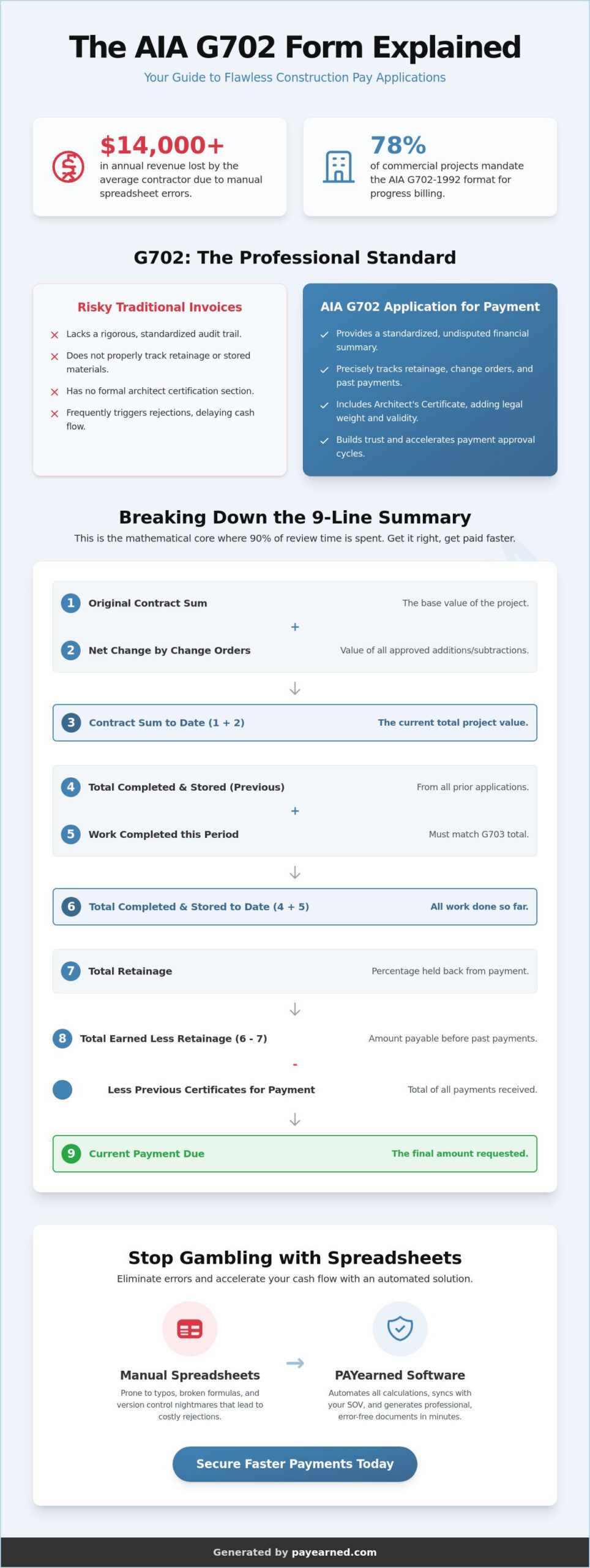
The 9-line summary acts as the mathematical engine of your payment application. It’s the section where Architects and Owners spend 90% of their review time. If your math fails to balance here, your submission will be rejected, regardless of how much work you’ve actually performed. Having the aia g702 form explained through the lens of mathematical logic helps you spot errors before they leave your desk. Each line builds upon the previous one to create an undisputed audit trail of the project’s financial history.
Line 1 represents your Original Contract Sum. This is the baseline value established at the project’s start. It doesn’t change throughout the job unless you execute a formal contract amendment. Lines 2 and 3 track the Net Change by Change Orders. Line 2 shows the total value of all additions and subtractions to the contract, while Line 3 provides the Adjusted Contract Sum. This ensures everyone agrees on the current total project value before moving to the progress calculations.
Lines 4, 5, and 6 represent the current status of the build. Line 4 shows the total work completed from previous applications. Line 5 is the value of work finished during the current period. Line 6 is the sum of these two plus any materials currently stored on-site but not yet installed. This interaction is where most manual errors occur. If your Line 6 doesn’t perfectly match the sum of your detailed continuation sheet, you’re looking at a payment delay. To avoid these manual calculation risks, many contractors use streamlined pay applications to keep their totals in sync.
Calculating Retainage and Net Due
Line 7 handles Retainage, which is typically a 5% or 10% holdback used to ensure project completion. You must calculate this precisely on both completed work and stored materials. Line 8, the Total Earned Less Retainage, is your actual “vested” value in the project. Finally, Line 9 reveals the Current Payment Due. You reach this number by subtracting the total of all previous certificates from Line 8. This ensures you’re only being paid for new progress, preventing the overbilling that lenders fear most.
The Logic of Change Orders on the G702
Accuracy on Lines 2 and 3 is non-negotiable. You must only include change orders that have received final, written approval. Including “pending” or “verbal” change orders is the fastest way to get a G702 rejected by an Architect. These lines must reflect a clear paper trail that matches your change order logs exactly. Using specialized AIA billing software ensures that as soon as a change order is marked as approved, it automatically updates your summary lines. This automation eliminates the risk of using outdated contract totals that lead to $14,000 in average annual billing errors.
The Critical Relationship Between G702 and G703 Continuation Sheets
You can’t submit a G702 in isolation. It’s merely a summary page that lacks the granular data required for an Architect’s review. The G703 Continuation Sheet provides the detailed evidence that justifies every penny on that summary. In this aia g702 form explained guide, it’s essential to realize that discrepancies between these two documents are the primary cause of pay app rejections. If Line 4 on your G702 doesn’t match the sum of your G703 line items, your application is dead on arrival.
Think of the G702 as the “cover sheet” and the G703 as the “evidence.” The G703 tracks the specific progress of every task, from mobilization to final punch-list items. It documents work completed in previous periods, work finished during the current cycle, and the value of materials currently stored on-site. This transparency allows the Owner to see exactly how their money is being spent. Without this breakdown, an Architect has no way to verify if your 45% completion claim on electrical work is based on physical reality or just a rough estimate.
Building a Strong Schedule of Values
Your G703 is only as good as your initial Schedule of Values (SOV). Before you send your first pay application, the Architect must approve the G703 structure. If your line items are too broad, such as “General Construction – $1,000,000,” they’ll likely reject it immediately. You must break work into manageable, billable increments that reflect the actual construction sequence. For a deeper look at document history and legal requirements, check out our G702 reference guide. Understanding how the SOV feeds the summary is the core of having the aia g702 form explained for your project management team.
Stored Materials: Billing for What is on Site
Billing for stored materials is a common point of contention that requires precise documentation on the G703. This column allows you to bill for items “stored to date” but not yet installed, which is vital for cash flow when pre-purchasing expensive equipment like HVAC units. However, you must provide proof of insurance and often receipts or photos of the materials in a bonded warehouse. Over-billing for materials is a major red flag for owners. It suggests a contractor is struggling with liquidity, which often triggers a full audit of your previous submissions. Lenders typically require a Bill of Sale or a specific Certificate of Insurance before they’ll release funds for off-site storage.
Avoiding Rejections: Common Mistakes When Filling Out G702 Forms
A rejection of your payment application is more than a minor administrative hurdle. It’s a total stoppage of your project’s financial momentum. When 78% of commercial projects rely on these documents, the standard for accuracy is absolute. Most rejections don’t stem from major contractual disputes but from simple, avoidable oversights. Having the aia g702 form explained in the context of these pitfalls helps you build a pre-submission checklist that protects your revenue.
Data inconsistency between the G702 summary and the G703 continuation sheet remains a top offender. If the “Total Completed and Stored to Date” on Line 6 of your summary doesn’t perfectly match the grand total on your breakdown, the Architect will return the package immediately. Beyond math, compliance errors like missing notary stamps or expired insurance certificates often stall the process. These clerical details are just as critical as the dollar amounts themselves. Architects and lenders look for reasons to protect the owner’s capital, and a sloppy form provides the perfect excuse to delay a disbursement.
The Danger of Manual Spreadsheet Templates
Many contractors rely on “free” Excel templates found online, but these often suffer from “spreadsheet rot.” Over time, hidden formula errors or broken cell references can lead to the $14,000 in average annual billing errors seen across the industry. Manual entry lacks a proper audit trail, making it nearly impossible to track how a specific figure was reached three months ago. A single clerical error can delay cash flow by 30 days or more. Relying on static files means you’re manually calculating tax, retainage, and previous payments every month, which exponentially increases the risk of a typo that halts your funding. To protect against these risks, follow a structured error-free AIA invoice checklist before every submission to catch calculation mistakes before they reach the Architect’s desk.
Managing Retainage Correctly
Retainage is often the most confusing part of the 9-line summary. You must clearly distinguish between “held” and “released” retention to avoid overbilling or underclaiming. If you’re unsure about the specifics of these holdbacks, read our guide on what is retention for a full breakdown of industry rules. Problems typically arise during project milestones when a partial release of retention is negotiated. You must document these releases precisely on Line 7 to ensure your “Total Earned Less Retainage” on Line 8 remains accurate. Failing to update these percentages as the project nears 50% or 100% completion will result in an immediate audit of your pay app.
Stop risking your cash flow on manual calculations and outdated templates. You can generate error-free pay applications today and ensure your G702 and G703 are always perfectly synced for instant approval.
Streamlining Your Workflow with AIA-Style Billing Software
Transitioning from manual entry to a professional, automated workflow is the most effective way to protect your project’s financial health. While we’ve had the aia g702 form explained through its individual lines and legal requirements, the reality is that manual calculation remains a liability. PAYearned eliminates this risk by automating the 9-line summary math. It ensures that every dollar on your continuation sheet rolls up correctly to your application. This cloud-based approach replaces “spreadsheet rot” with precision. It provides an immutable audit trail for every billing cycle. Stop wasting time on manual entry and start focusing on your build.
Using a specialized SaaS platform reflects the May 2026 industry shift toward mobile accessibility and cloud-based financial management. When a single-use digital copy of a G702-1992 form costs $59.99, the value of an automated system becomes clear. You aren’t just buying a form. You’re investing in a system that prevents the $14,000 in average annual billing errors that plague manual users. The platform’s built-in search engine allows you to organize projects by status, date, or owner. This functionality makes it easy to reference previous months during an audit or when preparing for project closeout.
Built Exclusively for Pay Applications
General accounting tools often fail to handle the specific nuances of construction billing. They don’t naturally track unbilled retainage or sync change order sheets with your main application. Because our platform is built exclusively for pay applications, you can generate AIA-style G702 and G703 documents in minutes. The system automatically manages your percentage completion. It calculates the net due based on previous certificates. This level of specialization means you spend less time on administrative paperwork. You spend more time managing your job site. It handles the complex relationship between your Schedule of Values and the summary page so you don’t have to. Having the aia g702 form explained within an automated system ensures your math is always perfect.
US-Based Support and Reliability
When you’re facing a tight billing deadline, you can’t afford to wait for an email response from a global help desk. Reliability is a core pillar of specialized financial technology. We provide live, US-based support to ensure you have a human expert ready to help when questions arise. Our team understands that a missing percentage on a continuation sheet can delay your entire crew’s payroll. This support, combined with a searchable project database, gives you the peace of mind that your financial documentation is both organized and accurate. Professional-looking pay apps lead to faster approvals from GCs and Architects. This directly improves your bottom line and project reputation. Ready to simplify your pay apps? Try PAYearned today.
Take Control of Your Construction Cash Flow
Accurate progress billing is the backbone of a successful commercial project. By ensuring your 9-line summary balances perfectly with your continuation sheets, you eliminate the primary cause of payment rejections. We’ve seen how the 78% industry adoption rate for these standards makes precision a requirement rather than an option. Having the aia g702 form explained through a logical, step by step framework allows your team to move from administrative chaos to financial stability. You don’t have to risk $14,000 in annual revenue on manual spreadsheet formulas that are prone to rot.
Transitioning to a professional, automated system provides the relief of knowing your documents are approved instantly. Our platform is built exclusively for G702 and G703 style billing, ensuring your totals, retainage, and change orders are always synced. We provide live, US-based support to help you meet every deadline with confidence. Start Generating Error-Free AIA-Style Pay Apps with PAYearned today with no credit card required. It’s time to stop chasing checks and start building with the peace of mind that your cash flow is secure.
Frequently Asked Questions
What is an AIA invoice?
An AIA invoice is a colloquial term for the G702 Application and Certificate for Payment. It’s a standardized document used by contractors to request progress payments on commercial construction projects. Unlike a simple bill, it provides a comprehensive summary of the original contract sum, approved change orders, and the total value of work completed to date, ensuring financial transparency for all parties. Contractors looking to master the preparation of each AIA invoice submission can follow a structured checklist to eliminate common errors and secure faster approvals.
Can I use the G702 form without a G703?
No, you cannot submit a G702 without the G703 Continuation Sheet. The G702 serves as the summary cover page, while the G703 provides the detailed evidence by breaking down the Schedule of Values. Architects require the G703 to verify that your percentage of completion claims for specific tasks, such as electrical or framing, match the physical reality on the job site.
Who is responsible for signing the G702 form?
Three distinct parties must sign the G702 to authorize payment. The Contractor signs a sworn statement certifying the work is complete. A Notary Public then verifies the Contractor’s identity and signature. Finally, the Architect signs the Certificate for Payment section, which confirms to the Owner that the work has progressed to the point indicated and matches the contract documents.
What happens if there is a math error on my G702 application?
Your pay application will be rejected immediately if there is a math error. Even a minor discrepancy between your summary and your continuation sheet can delay your cash flow by 30 days or more. This risk is why having the aia g702 form explained through automated software is vital. It eliminates the manual calculation mistakes that trigger automatic rejections by Architects and lenders.
Do I need a notary for the AIA G702 form?
Yes, the standard G702-1992 format requires a notary signature and seal. This notarization acts as a legal safeguard. It confirms that the Contractor’s representative is who they claim to be and that they are providing a sworn statement regarding the work performed and the intended payment of subcontractors. Without this seal, most commercial owners won’t release funds.
Is the AIA G702 form required by law?
The G702 is not required by federal or state law, but it is a strict contractual requirement on 78% of commercial projects. If your contract specifies the use of AIA documents, you must use this format to get paid. Using a standard invoice instead of the mandated G702 is considered a failure to provide proper documentation, which allows the owner to legally withhold payment.
How do I calculate retainage on a G702 form?
You calculate retainage on Line 7 by applying your contract’s specified percentage, typically 5% or 10%, to the total work completed and stored materials. This figure is then subtracted from your total earned to date. Accurate tracking is essential because this “unbilled retainage” accumulates over the project’s life and is only released during the final closeout or at specific project milestones.
What is the difference between an AIA G702 and a standard contractor invoice?
A standard invoice is a basic request for a specific dollar amount, but a G702 is a cumulative financial history of the project. The G702 tracks the original contract sum and every approved change order from day one. It provides an audit trail that shows previous payments and current holdbacks, offering a level of detail and certification that standard invoices don’t provide.
PAYearned is an agnostic workflow platform that helps teams manage pay applications
PAYearned is an independent software product and is not developed, endorsed, approved, sponsored or affiliated with the American Institute of Architects (AIA). AIA®, G702®, G703®