

With the average days sales outstanding for subcontractors projected to reach 96 days in 2026, you can’t afford a single administrative delay. You already know that a minor math error on your Schedule of Values can trigger an immediate rejection from the architect, pushing your payment back by weeks. It’s frustrating to watch your cash flow stall because of a manual data entry mistake or a misplaced change order. Reliability in your billing process isn’t just a preference; it is a requirement for survival in a high stakes environment.
This guide provides a comprehensive aia g703 example and a column by column breakdown to ensure your documentation is airtight and your project liquidity remains stable. We’ll examine the 1992 version of the continuation sheet, explain how to itemize the contract sum, and show you how to automate these calculations to eliminate the risk of human error. By the end of this article, you’ll have the technical clarity needed to submit error free payment applications that get approved and paid on time.
Key Takeaways
- Define the G703 as the critical Schedule of Values that provides the mathematical proof for every dollar requested on your G702 cover sheet.
- Walk through a detailed aia g703 example using a hypothetical subcontract to learn how to properly itemize work-in-place and materials stored.
- Master the direct link between the G703 grand totals and the G702 summary lines to ensure your entire payment application package is perfectly synchronized.
- Identify and avoid common manual billing pitfalls, such as over-billing work-in-place or using spreadsheet formulas that miscalculate retainage.
- Discover how cloud-based automation tools like PAYearned generate accurate AIA-style documents and auto-calculate totals to protect your project cash flow.
What is an AIA G703 Example and Why is it Critical?
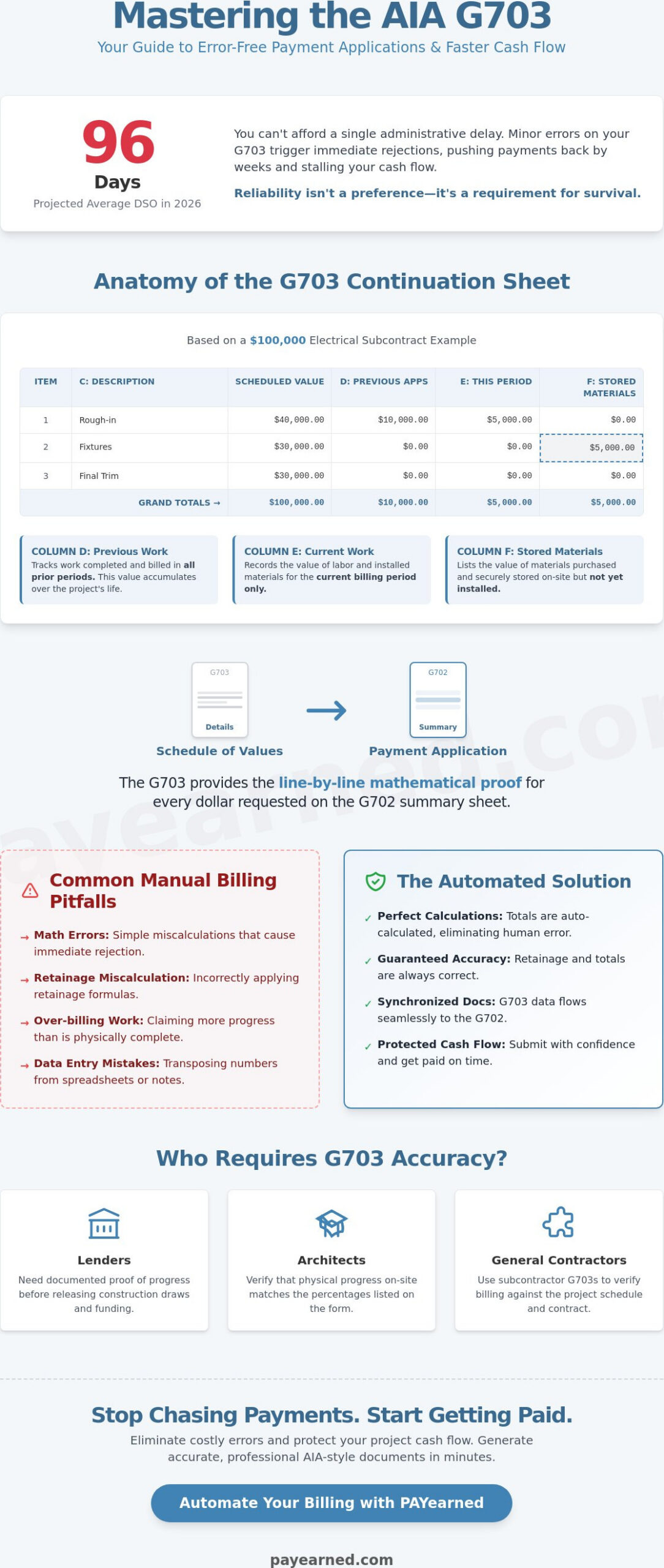
The AIA G703 is the essential continuation sheet for the G702 Application and Certificate for Payment. It isn’t just a supporting document; it’s the mathematical heartbeat of your billing. Without it, the G702 is a summary without evidence. By breaking down the total contract sum into a detailed Schedule of Values, this form provides a line-by-line justification for every cent you request. This level of detail ensures that your billing reflects the actual physical progress on the job site.
Reviewing a clear aia g703 example is vital because it reveals how complex progress billing actually works. You have to track work completed in previous periods, work completed this period, and materials currently stored on-site. If your math fails to account for retainage or previous payments accurately, your entire application will be rejected. This document creates the transparency that architects, owners, and lenders demand before they release funds. It serves as a financial roadmap that prevents over-billing and protects project liquidity.
To better understand this concept, watch this helpful video:
The Anatomy of a Continuation Sheet
Each G703 begins with critical header information, including the project name, application number, and date. These must match your G702 perfectly to avoid administrative confusion. The core of the document is the Schedule of Values (SOV), which serves as the foundation for your billing. While the G702 provides a high-level summary of your financial status, the G703 delivers the granular detail. It lists specific tasks, such as “Rough-in” or “Finishes,” and assigns a dollar value to each. This structure ensures that you aren’t just guessing at your progress; you’re measuring it against the original contract values.
Who Requires the G703 Form?
Accuracy on this form is a non-negotiable requirement for several project stakeholders. Precision here eliminates friction and builds trust with the people who sign your checks:
- General Contractors: They need these detailed breakdowns from subcontractors to verify that the billing aligns with the project schedule and contract terms.
- Lenders: Financial institutions require documented proof of work completed before they release construction draws or funding.
- Architects: They act as the first line of defense, verifying that the physical progress on the job site matches the percentages listed in your aia g703 example.
When you provide a clean, automated breakdown, you remove the doubt that leads to payment delays. Using the current 1992 version of the G703 ensures you are meeting the industry standard that these professionals expect.
A Step-by-Step AIA G703 Example Breakdown
To see how these figures function in a real-world scenario, let’s examine a $100,000 electrical subcontract. This aia g703 example serves as your template for maintaining financial accuracy and protecting your cash flow. Column C is where you provide the description of work. For an electrical scope, you might list line items like “Rough-in” at $40,000, “Fixtures” at $30,000, and “Final Trim” at $30,000. These descriptions must be clear enough for an architect or inspector to verify during a physical site walk.
Column D and Column E represent your progress over time. Column D tracks work completed from previous applications, while Column E records work completed during the current period. If you finished $10,000 of the rough-in last month, that amount stays in Column D for all future applications. If you completed another $5,000 this month, that goes into Column E. This distinction is vital for tracking the velocity of the project and ensuring you aren’t double-billing for the same labor.
Column F is reserved for “Materials Presently Stored.” This includes items you’ve purchased and delivered but haven’t installed yet. If you have $5,000 worth of lighting fixtures sitting in a secure on-site trailer, you list that value here. This Step-by-Step AIA G703 Example shows how these individual components build toward your total payment request. Architects frequently ask for invoices to back up the values you enter in this column.
Calculating Total Completed and Stored to Date
Column G is the sum of your progress: Column D + Column E + Column F = Column G. This is the most scrutinized number on the entire sheet. Inspectors and architects use this figure to judge if you’ve over-billed. If you claim 50% completion but the site only shows 30%, your application will be rejected immediately. For materials stored off-site, you must typically provide proof of insurance and a bill of sale before including them in this total to maintain transparency.
Understanding Column I: The Retainage Calculation
Retainage acts as a security holdback, usually set at a rate of 5% or 10%. In Column I, you apply this rate to the total value found in Column G. If your total completed and stored is $15,000 and your retainage is 10%, you’ll record $1,500. Column H represents the “Balance to Finish,” which is your original Scheduled Value minus Column G. Managing these shifting totals manually is a high-risk task; using automated pay app software ensures your math remains perfect every month.
The Mathematical Link: How G703 Feeds the G702
The relationship between your billing documents is hierarchical and absolute. Think of the G702 as your executive summary and the G703 as the granular evidence that supports every dollar claimed. In a standard aia g703 example, the “Grand Total” from Column G must transfer directly to Line 4 on the G702 cover sheet. If these numbers differ by even a single cent, the architect or owner will likely reject the entire package. This synchronization is the foundation of professional billing.
Many contractors utilize “pencil draws” to mitigate the risk of formal rejection. This is a preliminary review where you submit your draft numbers to the architect or general contractor before the official signing. It allows you to resolve discrepancies in work-in-place percentages or stored material valuations early. Achieving high levels of payment application accuracy during this stage is the most effective way to protect your project liquidity and avoid the industry’s rising DSO trends.
Reconciling Totals Across Documents
Architects won’t certify a payment if your summary and detail don’t align perfectly. Reconciliation failures often stem from simple manual typos or rounding errors in complex spreadsheets. When you calculate percentages across dozens of line items, those fractional differences can aggregate into a discrepancy at the bottom of the page. The architect’s role is to verify that the physical progress matches the certified totals. If the math doesn’t hold up under scrutiny, the certification process stalls, and your payment is pushed to the next billing cycle.
Managing Change Orders on the Continuation Sheet
Change orders shouldn’t be buried within your original contract line items. Instead, list each approved change order as a separate, distinct line item at the bottom of your Schedule of Values. This maintains a clean audit trail for the owner and lender. A strict rule in construction finance is to never bill for a change order until it’s fully executed by all parties. Billing for “pending” changes is a leading cause of administrative friction. Utilizing specialized change order tracking software for contractors ensures these additions are captured with the correct values and retainage rates automatically. This automation prevents the mathematical inconsistencies that often plague manual aia g703 example templates when the project scope begins to shift.
Common Mistakes in Manual G703 Examples
Manual data entry is the primary reason for payment rejections in the construction industry. Even when you follow a standard aia g703 example, the risk of human error remains high. Architects and owners look for specific red flags that signal administrative negligence. If your documentation contains even one of these errors, your payment application will likely be returned, causing a significant delay in your cash flow.
The most frequent errors found in manual submissions include:
- Over-billing: Claiming a higher percentage of completion than is physically present on the job site. This triggers immediate scrutiny and damages your professional credibility.
- Mathematical Inconsistencies: Using spreadsheet formulas that do not account for retainage correctly across different line items.
- Missing Change Orders: Failing to update the Schedule of Values after a contract modification. This creates a mismatch between your billing and the legal contract.
- Incorrect Application Numbers: Breaking the sequential order of your applications, which disrupts the project accounting trail and complicates reconciliation for the owner.
Relying on a static aia g703 example without verifying your project-specific retainage rules is a recipe for financial friction. When your math doesn’t hold up under a basic audit, you lose the trust of the lenders and architects who certify your payments.
The Danger of Static Excel Templates
Excel templates are a liability in high-stakes construction finance. Broken links between cells can lead to thousands of dollars in under-billing, leaving earned money on the table. Many contractors seek out an “aia g702 and g703 free download” to save costs, but these files often contain hard-coded formulas or outdated logic that doesn’t fit your current project requirements. Manual entry is the #1 cause of payment delays in 2026. It’s an inefficient process that increases your risk of administrative failure and financial instability.
Ensuring Billing Integrity
To maintain integrity, you must double-check “Work Completed This Period” (Column E) against your daily site logs. This ensures that your progress claims are defensible during a site walk. You also need to verify that your “Scheduled Value” in Column C matches your most recent contract documents exactly. Transitioning to specialized application for payment software eliminates these manual risks by automating the entire calculation process. This technology ensures that your totals, retainage, and progress billing are always synchronized and accurate.
Stop risking your project liquidity on manual spreadsheets. Generate error-free AIA-style G702 and G703 forms with PAYearned today.
Moving Beyond the Example: Automating Your G703
Studying a static aia g703 example provides a necessary foundation, but manual execution remains a significant liability for your business. In a high stakes financial environment, relying on human entry for complex progress billing is an unnecessary risk. PAYearned offers a specialized SaaS platform that transforms the way you manage AIA-style G702 and G703 documents. By moving your billing to a dedicated cloud-based solution, you replace fragile spreadsheets with a system designed for mathematical precision and project liquidity.
The platform handles the heavy lifting by auto-calculating totals, retainage, and progress billing percentages. This automation ensures that your continuation sheet is always in perfect synchronization with your application for payment. In 2026, the construction industry demands real-time access to financial data. PAYearned allows you to manage your G703 from any job site, ensuring that you can update your billing as soon as work is verified. It also features a built-in search engine for retrieving past project data, making it easy to reference historical Schedule of Values for new bids or audits.
Why Automation Beats an Example
An aia g703 example can show you where the numbers go, but it cannot prevent a broken Excel formula from stalling your payment. Specialized software ensures the math is right every time. It eliminates the need for you to manually verify every cell and cross-reference every total. When you enter your progress data into the G703, the system auto-populates the corresponding fields on the G702 summary. This integration saves hours of clerical work and removes the typos that lead to architect rejections. Utilizing aia billing software is the most effective way to maintain professional standards while protecting your time.
Getting Started with PAYearned
Modernizing your billing process is straightforward and requires no complex training. You can upload your existing Schedule of Values and start generating your first pay app in minutes. The platform allows you to track change orders and manage retainage with a single click, ensuring your documentation reflects the most current contract state. This level of organization builds trust with owners and lenders, often resulting in faster approvals. Don’t let manual errors dictate your cash flow. Try PAYearned for error-free AIA-style billing today.
Secure Your Project Liquidity with Automated Billing
Mastering the detailed breakdown of your Schedule of Values is the only way to ensure your progress billing remains defensible. While a static aia g703 example provides a helpful template, the complexity of tracking work-in-place, materials stored, and shifting retainage rates requires a more robust solution. In a market where subcontractors face nearly 100 day payment cycles, you can’t afford administrative rejections caused by manual calculation errors or missing change orders.
The transition from outdated spreadsheets to specialized software is no longer optional for contractors who value their time and cash flow. You need a system that auto-calculates totals and retainage while providing built-in change order management. With cloud-based access for your 2026 projects, you can verify your billing accuracy from the job site or the office without the fear of formula corruption.
Protect your business from the hazards of manual data entry. Start generating error-free AIA-style G702 & G703 forms with PAYearned today. Professional billing standards are within your reach, and the peace of mind that comes with automated accuracy is just a click away.
Frequently Asked Questions
What is the difference between AIA G702 and G703?
The G702 is the summary cover sheet that provides the high level financial status of the project and the formal certification signature. The G703 is the continuation sheet that provides the granular evidence for those figures. It breaks down the total contract sum into a Schedule of Values, justifying every percentage of progress you claim on the cover sheet.
Can I use a free AIA G703 template for my construction project?
While free templates are available, they represent a significant administrative risk. Manual spreadsheets often contain broken formulas or outdated logic that fails to account for complex retainage rules. Using an automated platform ensures your aia g703 example remains mathematically sound and compliant with current industry standards, reducing the likelihood of payment rejection.
How do I list change orders on an AIA G703 example?
Approved change orders must be listed as separate, distinct line items at the bottom of your Schedule of Values. Do not bundle these additions into your original contract items. Only include change orders that are fully executed by all parties to maintain a clean audit trail and prevent billing disputes during the architect’s review process.
What does ‘Materials Presently Stored’ mean on the G703?
This refers to the value of materials you have purchased and delivered for the project but have not yet installed. You record this value in Column F of the continuation sheet. Architects often require supporting documentation, such as invoices or proof of insurance, to verify these costs before certifying the payment for stored items.
How is retainage calculated on a continuation sheet?
Retainage is calculated by applying your contract’s specific percentage, typically 5% or 10%, to the total work completed and materials stored to date in Column G. This calculated amount is then recorded in Column I. Automated systems perform this calculation per line item to ensure the final totals match your contract requirements exactly.
Is the G703 required for every payment application?
The G703 is a mandatory requirement for every G702 submission. It serves as the detailed backup that proves your progress to the architect, owner, and lender. Submitting the G702 summary without the accompanying continuation sheet will result in an immediate administrative rejection and delay your payment cycle.
What happens if the G703 math doesn’t match the G702 cover sheet?
Your payment application will be rejected if the grand totals do not align perfectly. This discrepancy usually indicates a manual entry error or a rounding mistake in a spreadsheet. Architects will not certify a payment request until the summary on the G702 and the detail on the aia g703 example are reconciled to the cent.
How do I update the Schedule of Values mid-project?
Updating the Schedule of Values requires formal approval from the architect or owner before you can bill against new figures. You cannot unilaterally change original line items once the project begins. Instead, use fully executed change orders to modify the contract sum and add new scopes of work to the bottom of your sheet.
PAYearned is an agnostic workflow platform that helps teams manage pay applications
PAYearned is an independent software product and is not developed, endorsed, approved, sponsored or affiliated with the American Institute of Architects (AIA). AIA®, G702®, G703®