

With average project margins dropping to a lean 3.1% in 2026, you cannot afford to leave 15% of your contract value sitting in a stack of unapproved paperwork. Every unrecorded field directive is a direct hit to your project liquidity. Learning how to manage and track construction change orders is no longer just an administrative task; it’s a survival strategy for subcontractors facing 50% tariffs on steel and aluminum. When material costs are this volatile, your documentation must be absolute.
It’s frustrating to reach the end of a project only to realize you’ve lost thousands on “forgotten” changes or unapproved verbal requests that the GC refuses to honor. We’ll show you how to master the systematic process of documenting, tracking, and billing construction change orders to protect your profit margins and cash flow. This guide previews a standardized workflow for approvals, explains how to avoid manual entry errors on G703 continuation sheets, and outlines how the 2026 California Private Works Change Order Fair Payment Act can help you secure undisputed payments within 60 days.
Key Takeaways
- Establish a rigorous protocol for Potential Change Orders (PCOs) to ensure every modification is documented and approved before work begins.
- Learn how to manage and track construction change orders by integrating them directly into your AIA-style G702 summary and G703 continuation sheets.
- Protect your project liquidity by correctly updating the Schedule of Values with distinct line items for every approved adjustment.
- Eliminate the risk of manual calculation errors and disputed totals by moving from fragmented spreadsheets to automated billing workflows.
- Accelerate your approval cycles and improve cash flow through a standardized evaluation and negotiation phase for all extra work.
Standardizing Your Construction Change Order Workflow
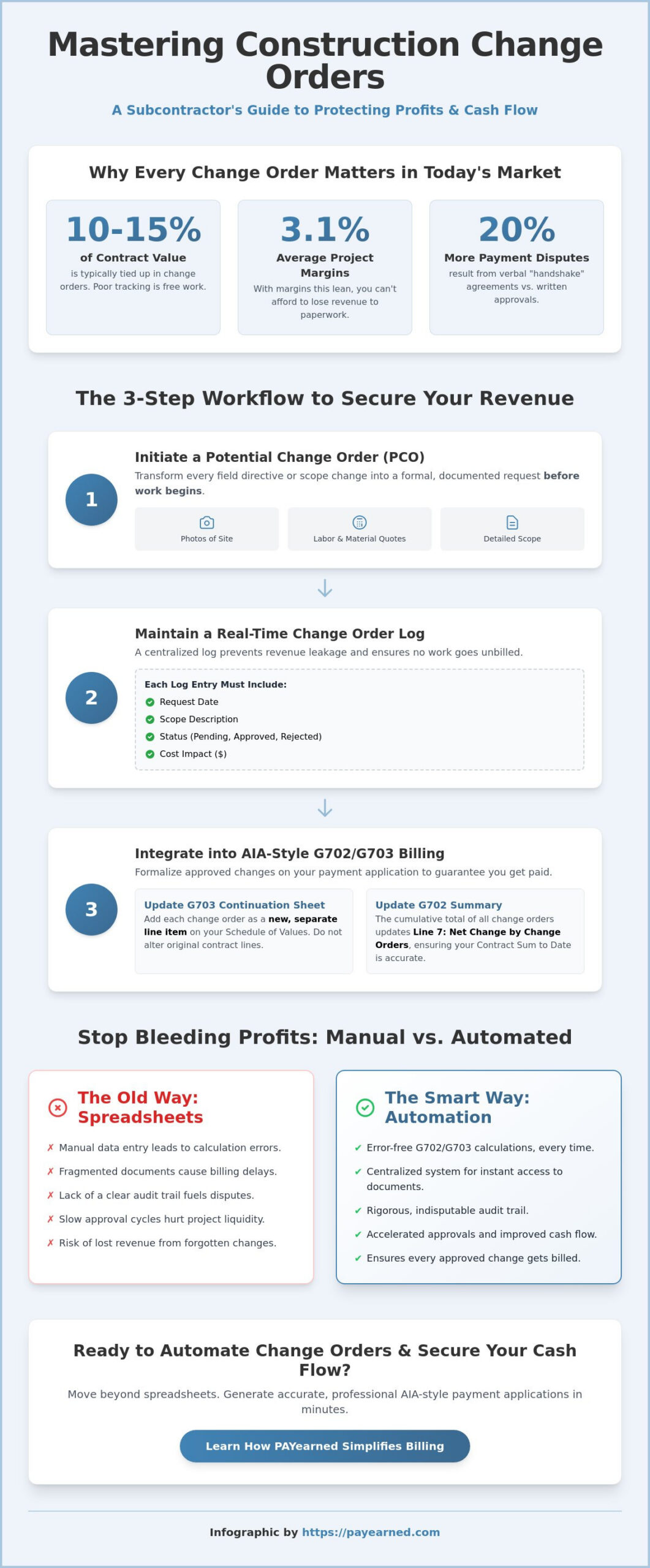
Standardizing your workflow is the first line of defense against margin erosion. On major projects, change orders typically account for 10% to 15% of the total contract value. If your process for capturing these changes is loose, you are effectively working for free. You must establish a rigid initiation protocol that moves every deviation from the original contract into a formal review cycle immediately. This ensures that cost impacts are identified before the labor is spent and the materials are ordered. Mastering how to manage and track construction change orders requires moving from a reactive stance to a proactive, documented system.
From Potential Change Order (PCO) to Approved CO
Distinguishing between a field directive and a formal change order is critical for financial accuracy. A field directive is an instruction to proceed with work to avoid delays, but it doesn’t automatically adjust the contract sum. A Potential Change Order (PCO) is your proposal for that adjustment. To secure a valid PCO, you need clear documentation: photos of the site condition, a detailed labor breakdown, and material quotes reflecting current 2026 tariffs. Relying on verbal “handshake” agreements is a high-risk gamble. Industry data shows that verbal approvals lead to 20% more payment disputes compared to written authorizations. Understanding What is a Construction Change Order? helps your team recognize exactly when a scope shift requires formal documentation.
Maintaining the Change Order Log
A real-time change order log prevents revenue leakage by ensuring no task remains unbilled. This level of organization is essential for accurate progress billing and is the foundation of how to manage and track construction change orders effectively. Every entry must include:
- The date of the original request or field directive.
- A concise description of the scope change.
- The current status, such as pending, approved, or rejected.
- The projected or final cost impact.
Categorize these changes by project phase or trade to identify where scope creep is most prevalent. For more advanced strategies, consult our guide on The 2026 Evolution of Change Order Management Software for Contractors to see how digital logs outperform manual entry.
Tracking Change Orders on AIA-Style G702 and G703 Documents
Securing a signature is part one. Part two is formalizing that change within your AIA-style billing cycle. Too many subcontractors rely on static Excel templates or free versions of forms for their construction invoicing. These manual methods often break during mid-cycle modifications. Mastering how to manage and track construction change orders on your G702 and G703 forms keeps your cash flow steady. Accurate documentation separates immediate payment from a rejected application that triggers a dispute.
Updating the G703 Continuation Sheet
Add every approved amendment as a separate line item at the bottom of your Schedule of Values on the G703 sheet. Never modify your original contract lines. This creates a clear audit trail. Unlike basic fillable PDFs that force you to recalculate totals manually, your continuation sheet must track “Work Completed” and “Stored Materials” for each new item. This precision aligns with Federal Government Change Order Regulations. For advanced strategies, see our guide on Mastering the Payment Application: A Contractor’s Guide to Error-Free Billing in 2026.
Summary Calculations on the G702
The G702 summary sheet is your project’s financial pulse. Line 7, “Net change by Change Orders,” must show the cumulative total of all additions and deductions. This figure updates your “Contract Sum to Date.” If you are still learning how to manage and track construction change orders, remember that a single rounding error can stall your check. Eliminate this risk. You can generate AIA g702 style Pay Apps that automate these calculations. Automation ensures your summary matches your continuation sheet every time.
Moving Beyond Spreadsheets: Automating Change Order Management
Relying on fragmented spreadsheets in 2026 is a significant financial liability. Manual entry often leads to calculation mismatches that stall your payment applications and frustrate general contractors. You need a centralized system that bridges the gap between field modifications and the accounting office. Automation is the most effective way to master how to manage and track construction change orders while maintaining a rigorous audit trail. By moving your documentation to a cloud-based environment, you accelerate the transition from “approved” to “billed,” ensuring your project liquidity remains strong even as material costs fluctuate.
The Power of Specialized Search Engines
Searching through nested PDF folders or physical binders costs your administrative team hours every month. This inefficiency often results in missed billing opportunities or lost documentation during a dispute. Digital systems provide a dedicated environment where you can retrieve specific change order data in seconds. You can instantly view the status and history of any modification without digging through endless email chains. This level of organization is a primary trust signal for GCs who value transparency. Visit our PAYearned Tutorials for data retrieval tips that keep your records organized and accessible.
Ensuring Accuracy in Retainage and Totals
Retainage tracking is where many subcontractors lose their final project profit. With 2026 regulations like California’s SB 61 capping retention at 5% on specific projects, your math must be precise across every new line item. Automated AIA-style document generation eliminates the risk of pay app rejection due to simple rounding errors or formula breaks. When your G703 continuation sheet totals don’t align perfectly with your G702 summary, your cash flow is delayed. Learning how to manage and track construction change orders through an automated platform ensures that your retainage, work completed, and stored materials are always in balance. Explore how PAYearned simplifies change order billing for subcontractors to ensure every dollar of extra work is protected.
Securing Your Profit Margins for the Long Term
Effective documentation is the only way to ensure you’re paid for every hour of extra work performed on a jobsite. By standardizing your workflow and strictly updating the Schedule of Values on your G703 continuation sheet, you eliminate the ambiguity that leads to payment delays. Mastering how to manage and track construction change orders isn’t just about record-keeping; it’s about maintaining the project liquidity necessary to navigate the high-stakes construction environment of 2026. Transitioning from manual spreadsheets to a dedicated system provides the mathematical precision and transparency that general contractors and architects demand.
Don’t let unapproved changes or rounding errors erode your hard-earned margins. You can streamline your change order billing with PAYearned’s automated platform. Our software provides automated AIA-style G702 and G703 generation, a built-in search engine for instant project data retrieval, and real-time retainage tracking to ensure your totals are always accurate. Take control of your progress billing today and build a more stable, predictable financial future for your trade business.
Frequently Asked Questions
How do I add a change order to an AIA-style G702 form?
You add a change order to an AIA-style G702 form by updating Line 7, labeled “Net change by Change Orders.” This figure must represent the cumulative total of all additions and deductions to the original contract sum. It’s vital that this total matches the sum of the individual change order line items listed on your G703 continuation sheet. Manual entry often leads to math errors that stall payments. Automation ensures your summary always aligns with your line items.
What is the difference between a Change Order and a Change Directive?
A Change Order is a bilateral agreement between the owner, architect, and contractor regarding a change in scope, cost, or time. A Change Directive is a unilateral instruction from the owner to proceed with work before a final agreement on cost is reached. Directives keep the project moving but carry higher financial risk. Understanding these differences is a core part of how to manage and track construction change orders effectively to protect your project’s cash flow.
How often should I update my construction change order log?
Update your change order log daily or immediately after identifying a Potential Change Order (PCO). Real-time logging prevents revenue leakage by ensuring no field directive is forgotten during the busy month-end billing cycle. Waiting until the application deadline increases the risk of documentation errors and disputes. A centralized digital log provides an instant audit trail, which is essential for accurate progress billing and securing faster approval cycles from your GC.
Can I bill for a change order before it is formally signed?
Standard industry practice dictates that you shouldn’t bill for a change order until it’s formally signed by all parties. Most general contractors will reject pay apps that include unapproved work. However, some contracts allow billing under a Construction Change Directive if the work is verified. Always check your specific contract language first. To avoid cash flow gaps, move from approval to billing quickly by securing signatures as soon as the cost is negotiated.
PAYearned is an agnostic workflow platform that helps teams manage pay applications
PAYearned is an independent software product and is not developed, endorsed, approved, sponsored or affiliated with the American Institute of Architects (AIA). AIA®, G702®, G703®