

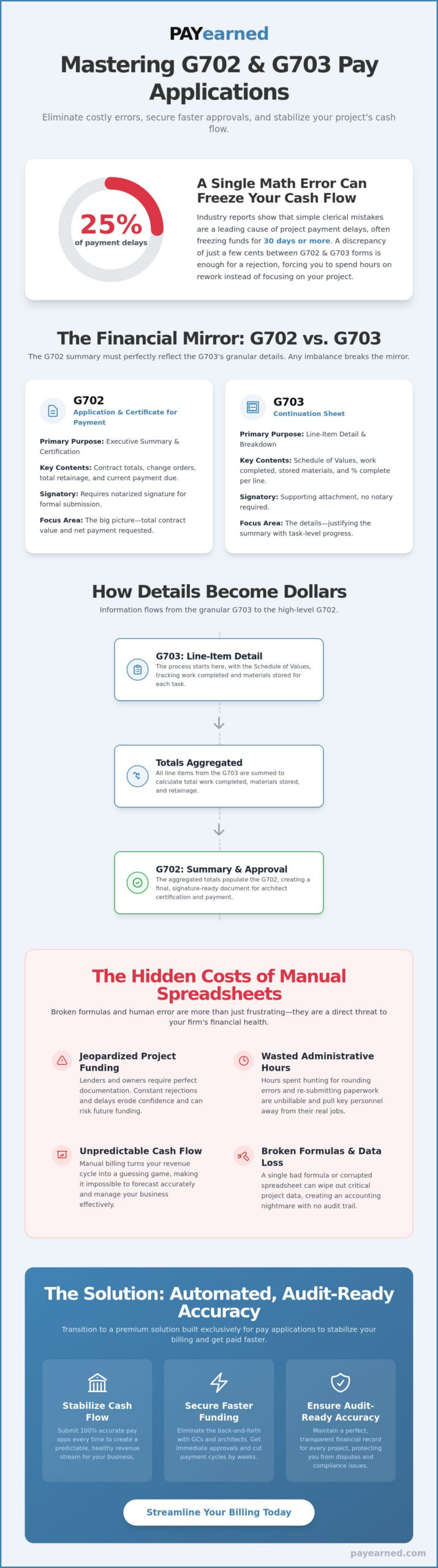
A single math error on your g702 and g703 forms is the fastest way to freeze your project’s cash flow for 30 days or more. Precision is your best defense. You’ve likely spent hours double-checking continuation sheets only to have a General Contractor reject your application because the totals are off by a few cents. Industry reports from 2024 suggest that clerical mistakes cause 25% of all construction payment delays. We agree that manual entry across multiple spreadsheets is a recipe for frustration and inconsistent cash flow.
This guide will help you master the relationship between the G702 summary and the G703 detail sheet to ensure 100% accurate pay applications. You’ll learn how to calculate unbilled retainage correctly and track change order sheets automatically to secure faster funding. We’ll break down the technical requirements for 2026 and provide a clear roadmap for securing immediate approvals from architects, so you can stop worrying about administrative errors and focus on your projects.
Key Takeaways
- Understand the “financial mirror” relationship between high-level summaries and granular details to ensure your project billing remains perfectly synchronized.
- Learn how to accurately complete g702 and g703 forms to eliminate common calculation errors that lead to payment delays and administrative rejections.
- Master the field-by-field breakdown for establishing a Schedule of Values and recording work completed to maintain a predictable, healthy cash flow.
- Identify why manual spreadsheets and broken formulas are “hidden costs” that jeopardize project funding and increase your firm’s financial risk.
- Discover how transitioning to a premium, automated solution built exclusively for pay applications can stabilize your billing process and provide audit-ready accuracy.
Understanding G702 and G703: The Backbone of Construction Progress Billing
Construction progress billing relies on a standardized framework to ensure every dollar is accounted for. The g702 and g703 documents serve as this framework. While the G702 acts as the high-level summary, the G703 provides the granular detail needed to justify payment. These forms are the national standard for commercial construction projects in the United States. They create a transparent audit trail for the three key parties: the Contractor, who submits the request; the Architect, who certifies the work; and the Owner, who releases the funds. Historically, teams handled these documents with manual paper or risky spreadsheets. Today, automated digital billing has replaced those error-prone methods to improve cash flow and accuracy.
The Role of the G702 Application for Payment
The G702 is the signature-ready cover page for the entire billing period. It provides a concise summary of the contract sum to date. This includes the original contract amount, any approved change orders, and the total completed work. It calculates the current payment due after accounting for previous payments and retainage. The most critical part of this document is the Architect’s certification section. When an Architect signs the G702, they confirm that the work has progressed as described in the application. This signature is the final gatekeeper before a check is cut. It’s a legal affirmation that the contractor is entitled to the amount requested based on site observations and data. If you’re new to this process, understanding what is AIA G702 and how it functions as a payment application is essential before submitting your first draw request.
The Role of the G703 Continuation Sheet
The G703 functions as the essential line-item breakdown of the project. Every claim made on the G702 summary must be supported by the detailed data in the G703. This document is built upon the Schedule of Values, which allocates the entire contract sum into specific work items. Without an accurate SOV foundation, progress billing becomes a guessing game. The G703 tracks work completed in previous periods, work finished during the current period, and materials currently stored on-site. It also manages the math for unbilled retainage and stored materials. This level of detail prevents overbilling and ensures the project remains financially viable for all stakeholders. By tracking the exact percentage of completion for each line item, the G703 eliminates the ambiguity that often leads to payment disputes. It transforms a complex construction site into a searchable, organized financial report.
The Relationship Between G702 and G703: Summary vs. Detail
The g702 and g703 operate as a single, cohesive unit. While the G702 acts as the executive summary and formal request for payment, the G703 provides the granular line-item detail that justifies every dollar requested. This relationship creates a financial mirror in construction accounting. If the data on one side doesn’t reflect the other perfectly, the entire application is typically rejected.
Consistency between these documents is the primary audit requirement for project owners and lenders. A discrepancy as small as $0.01 between the G703 totals and the G702 summary lines can halt payment for weeks. This strict alignment protects both parties. The payer receives a verified breakdown of work completed, while the payee maintains a clear, documented history of their contract balance and retainage. Relying on manual calculations often introduces rounding errors that jeopardize this balance. Using a premium billing solution ensures these figures remain synchronized automatically.
Comparison Table: G702 vs. G703 at a Glance
| Feature | G702 (Application for Payment) | G703 (Continuation Sheet) |
|---|---|---|
| Primary Purpose | Executive Summary & Certification | Line Item Detail & Breakdown |
| Key Contents | Contract totals, change orders, retainage | Description of work, stored materials, % complete |
| Signatory | Notarized signature required | Supporting attachment (no notary) |
| Focus Area | Total contract value and net payment | Individual task progress and material tracking |
How Data Flows from the G703 to the G702
Understanding the flow of information is crucial for accurate billing. The G703 serves as the foundational document, where every work item, change order, and stored material is meticulously detailed, along with its percentage of completion. The subtotal for each item, representing the work performed and materials stored during the current billing period, is then calculated. These individual totals from the G703 are aggregated and transferred to the summary lines on the G702. Specifically, the G702 pulls the total amount of work completed this period, the total value of stored materials, and the total completed to date. This ensures the G702, as the summary, accurately reflects the granular detail provided by the G703, facilitating a streamlined review and approval process and minimizing discrepancies. For a deeper dive into how these two documents function as a binary system, the AIA G702 and G703 complete reference guide for construction billing provides a comprehensive breakdown of the 1992 standard editions and their specific mechanics.
Field-by-Field Breakdown: How to Accurately Complete Your Pay Application
Completing the g702 and g703 requires a disciplined, step-by-step approach. Accuracy is your best tool for maintaining cash flow. If your numbers don’t align between these two documents, your payment will likely face delays. Follow these five steps to ensure your submission is error-free.
- Step 1: Establish the Schedule of Values. List every line item from your contract on the G703. This creates the baseline for all future billing.
- Step 2: Record Current Work. Enter the dollar amount of labor and materials completed during this specific billing window in Column E.
- Step 3: Calculate Retainage. Apply your contract’s retention percentage, often 5% or 10%, to the total work completed and stored materials.
- Step 4: Transfer Totals. Move the grand totals from the bottom of your G703 continuation sheet to the corresponding lines on the G702 cover sheet.
- Step 5: Verify Changes. Update your change order summary to reflect any newly approved adjustments to the contract sum.
Consistency is vital. Architects and owners look for exact matches between the detailed columns on your continuation sheet and the summarized lines on your cover sheet. One misplaced decimal point can trigger a full rejection of the application.
Mastering the Schedule of Values (SOV)
Your SOV is the foundation of the entire g702 and g703 process. Break your contract into logical, manageable line items that reflect the actual flow of work. For a $1,000,000 project, aim for at least 15 to 20 distinct lines. Avoid “front-loading,” which is the practice of overvaluing early tasks like mobilization. Architects often flag applications where 20% of the budget is billed within the first 5% of the project timeline. Keep your values realistic to avoid scrutiny and build professional trust.
Handling Change Orders and Stored Materials
Change orders don’t belong in your original line items. List them in the “Summary of Changes” section at the bottom of the G703 to keep the original contract price clear. Stored materials, found in Column F, represent items purchased and delivered but not yet installed. You must document these with invoices or insurance certificates to get paid. It’s also critical to track unbilled retainage across every cycle. Failing to monitor these cumulative totals can lead to a $10,000 or $50,000 shortfall when you attempt to collect final payment at the end of the job.
Managing these calculations manually often leads to “risky spreadsheets” that break over time. Use automated tools to ensure your math stays precise and your audit trail remains searchable. This pragmatic approach protects your profit margins and ensures your team stays focused on construction rather than troubleshooting accounting errors.
Avoiding Rejections: Why Manual Spreadsheets Jeopardize Your Cash Flow
Manual spreadsheets are the silent killer of construction margins. While Excel feels like a free tool, the labor hours spent reconciling a g702 and g703 over a 12-month project often result in thousands of dollars in lost administrative time. A single broken formula in a complex continuation sheet can ripple through your entire document, leading to a flat rejection from the architect. These hidden costs accumulate every time a project manager has to restart a filing because a cell reference didn’t carry over correctly from the previous month. In a high-stakes environment, relying on a static file is a gamble with your company’s liquidity.
The Danger of “Risky Spreadsheets” in Construction
Manual data entry is a liability that most contractors can’t afford. When you manually type figures into a template, you’re one keystroke away from a payment delay. Standard spreadsheets lack the robust audit trails found in professional software. This makes it incredibly difficult to track cumulative totals as projects span 12, 18, or 24 months. Without automated data retrieval, managing unbilled retainage and change order sheets becomes a logistical nightmare. Software ensures that every dollar is accounted for from the first mobilization to the final punch list, whereas a spreadsheet often loses historical context. Consider these common spreadsheet failures:
- Circular references that hide errors until the final submission.
- Overwritten formulas that break the link between the summary and continuation sheets.
- Lack of version control, leading to “Final_v2” vs “Final_Actual” confusion.
- Formatting errors that make the document unreadable for the GC.
Improving Cash Flow Through Accuracy
Mathematical inconsistency is the #1 reason for pay app rejection in the construction industry. Architects and GCs prefer software-generated documents because they provide a standardized, professional format that signals financial reliability. Error-free documents lead to faster approval cycles. According to industry observations, accurate submissions can reduce the time-to-payment by 10 to 15 days compared to manual filings. This precision builds psychological trust with your clients. When you submit a clean, professional g702 and g703, you demonstrate that your back office is as organized as your job site. This trust often results in less scrutiny on future applications, streamlining your cash flow for the duration of the contract.
Stop risking your revenue on broken formulas and manual entry. Master Payment Applications for Faster Cash Flow with a system built exclusively for the construction industry.
Streamlining Your Workflow with Automated AIA-Style Software
Manual entry is often the primary cause of delayed payments and rejected submissions. PAYearned offers a premium solution designed to eliminate the risks inherent in manual g702 and g703 preparation. This platform isn’t a general purpose accounting tool. It’s built exclusively for pay applications. This singular focus ensures every feature serves the contractor’s need for financial accuracy and speed.
The software includes built-in search engines for project data. You won’t have to hunt through old folders or legacy spreadsheets to find contract sums or previous totals. Automation handles the heavy lifting of complex calculations. It tracks unbilled retainage and carries over balances from previous periods with total mathematical precision. This eliminates the risk of a project owner rejecting a draw because of a minor rounding error or a typo in the “balance to finish” column.
The PAYearned Advantage: Precision and Speed
Managing change orders often complicates the billing cycle, leading to confusion on the continuation sheet. PAYearned handles change order management automatically. It integrates new totals directly into your documents so your math always stays current. If you encounter a complex billing scenario, you can access live, US-based support to resolve questions in real time. This human element provides a level of security that generic templates can’t match. New users can start a trial with no credit card required, allowing you to experience the efficiency of the platform before committing.
Moving Beyond Simple Templates
Static PDF and Word templates are disconnected documents. They don’t communicate with each other, and they don’t remember what you billed in the previous month. Relying on these “dumb” forms increases the likelihood of data silos and transcription errors. Moving to a specialized platform creates a central database for all your billing history. You’ll maintain a secure, searchable audit trail for every project you manage. This organization is vital for year-end reporting and potential audits.
Stop wasting hours on risky spreadsheets that can break with one accidental keystroke. You can simplify your construction billing with PAYearned to ensure your g702 and g703 forms are professional and accurate. High-stakes construction finance requires a tool that’s as serious as the work you do on-site. Transitioning from manual forms to an automated system protects your cash flow and your professional reputation.
Secure Your Payments with Automated Precision
Mastering the g702 and g703 workflow is the difference between a healthy project and a stalled one. You’ve learned how the summary document and continuation sheet work together to provide full financial transparency. Relying on manual spreadsheets is a gamble that leads to rejected pay apps and stalled cash flow. Industry data suggests that manual entry errors trigger over 25% of payment delays in commercial construction. You need a system that eliminates these risks while keeping your retainage and change orders perfectly tracked.
Stop fighting with broken formulas. PAYearned provides a specialized platform built exclusively for construction billing. You get error-free automated calculations and the peace of mind that comes with live US-based support. It’s time to professionalize your office. You can start today with no credit card required and see why contractors are moving away from risky manual processes. Don’t let administrative errors delay your hard-earned money.
Start Generating Professional Pay Apps for Free
Your administrative work shouldn’t stand in the way of your project’s success. Take the first step toward a more predictable and professional billing cycle right now.
Frequently Asked Questions
What is the difference between AIA G702 and G703?
The G702 serves as the summary cover sheet while the G703 provides the detailed line-item breakdown. Think of the G702 as the high-level invoice that requires a notary signature and architect certification. The G703 is the continuation sheet where you list every task from your Schedule of Values to show exactly how you calculated the progress for that period.
Can I use a spreadsheet to create G702 and G703 forms?
You can use a spreadsheet to create g702 and g703 documents, but it’s a high-risk method for your cash flow. Industry data shows that 88 percent of spreadsheets contain errors, which leads to rejected pay apps and unnecessary payment delays. Using a dedicated billing solution eliminates manual entry mistakes and ensures your math is perfect every time you submit.
How do I calculate retainage on a G702 form?
Calculate retainage by multiplying your total completed and stored to date by the percentage specified in your contract, which is usually 5 or 10 percent. You enter this amount in Section 5 of the G702 to show the portion of earnings the owner holds back until project completion. Correct calculations prevent the 14-day delays often caused by architect rejections for simple math errors.
What is a Schedule of Values on a G703 continuation sheet?
The Schedule of Values is an itemized list of every work component and its associated cost for the entire project. You enter these values into Column C of the G703 continuation sheet at the start of the job. This list must equal 100 percent of your total contract sum so the architect can verify progress against specific, pre-approved milestones.
Do I need to be an AIA member to use G702-style billing?
You don’t need to be an AIA member to use G702-style billing formats for your projects. However, the American Institute of Architects owns the copyright to the official documents and requires a license for their use. Many contractors use compatible software that generates the same professional layout without the high annual cost of a full AIA legal suite.
How are change orders handled on G702 and G703 documents?
Change orders appear as a summary in the “Change Order Summary” box on the G702 and as new line items at the bottom of the G703. Always wait for a signed Change Order before adding it to your billing. This ensures your g702 and g703 totals reflect the current, legally binding contract sum and avoids 100 percent of the disputes related to unauthorized work.
What happens if the G702 and G703 totals do not match?
Your payment application will be rejected immediately if the totals on the G702 and G703 don’t match exactly. The “Total Completed and Stored to Date” on line 4 of the G702 must equal the sum of Column G on the G703. Even a one-cent discrepancy can halt your cash flow for an entire 30-day billing cycle while you wait to resubmit.
Is there a free download for AIA G702 and G703 forms?
There is no legal free download for official AIA G702 and G703 forms because they’re copyrighted intellectual property. While some sites offer free templates, these often contain broken formulas or outdated layouts that look unprofessional to general contractors. Investing in a professional billing tool provides the security of a 100 percent accurate, audit-ready document that protects your business. For a complete overview of the form’s purpose and requirements, the contractor’s guide to what is AIA G702 and how to use it in 2026 covers everything from retainage calculations to regulatory compliance.
PAYearned is an agnostic workflow platform that helps teams manage pay applications
PAYearned is an independent software product and is not developed, endorsed, approved, sponsored or affiliated with the American Institute of Architects (AIA). AIA®, G702®, G703®