

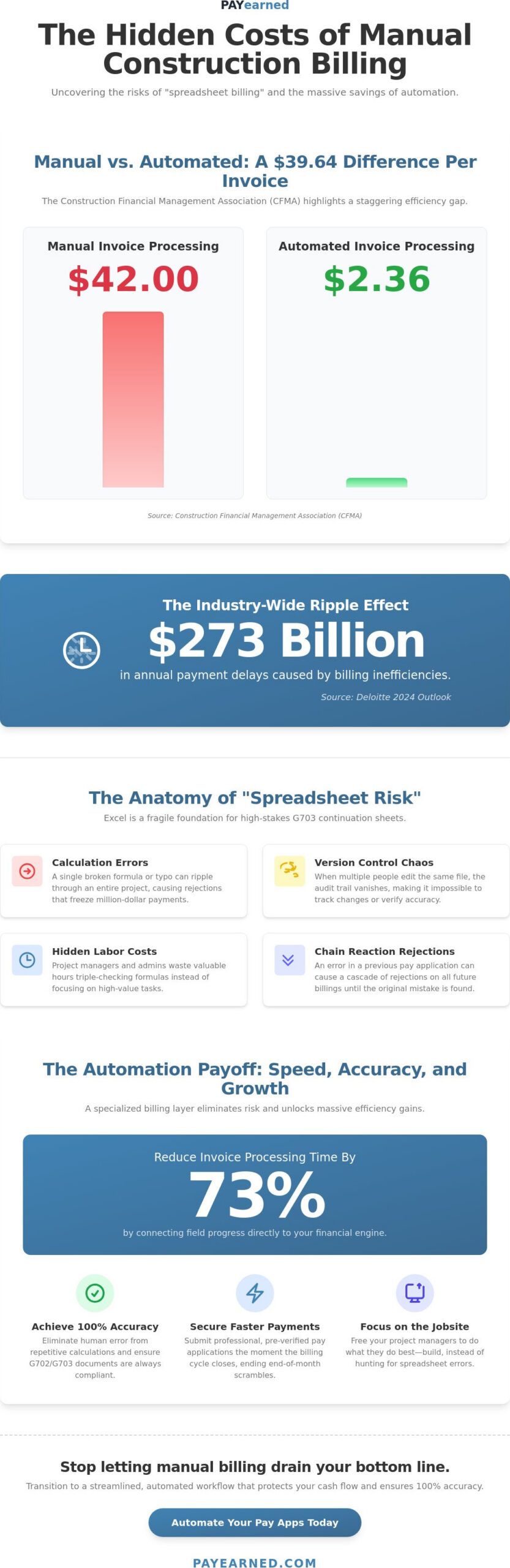
The Construction Financial Management Association (CFMA) reports that manual invoice processing costs $42 per document, while companies using construction billing process automation spend just $2.36. When you multiply that difference across every pay app and subcontractor invoice, the “spreadsheet risk” becomes a massive drain on your bottom line. You’ve likely felt the sting of a rejected G702 because of a minor calculation error or struggled to track unbilled retainage as projects stack up. It’s a chaotic way to manage high-stakes finances, and it often leads to the $273 billion in payment delays Deloitte identified in their 2024 outlook.
You shouldn’t have to choose between error-prone manual entry and spending $24,000 a year on complex platforms like Procore. We believe you deserve a reliable, specialized solution that protects your cash flow. In this guide, you’ll learn how to transition to a streamlined, automated billing workflow that ensures 100% accuracy in your continuation sheets. We’ll show you how to simplify change order tracking and secure faster payment cycles so you can focus on the jobsite instead of the desk.
Key Takeaways
- Identify how construction billing process automation serves as a specialized financial layer that eliminates the “spreadsheet risk” of manual formula errors.
- Learn to standardize your Schedule of Values (SOV) for digital input to ensure your billing engine reflects real-time project progress.
- Discover the best methods for automating change orders and retainage tracking to prevent disputes and stop revenue from slipping through the cracks.
- Evaluate the ROI of specialized billing tools versus all-in-one ERP systems to maximize the hours your administrative team saves.
- Understand how to leverage a dedicated platform built exclusively for generating accurate, professional G702 and G703 payment applications.
The Hidden Costs of Manual Construction Billing vs. Automation
Construction billing process automation isn’t just a software upgrade. It’s a specialized financial workflow layer designed to handle the unique complexities of progress billing. According to the Construction Financial Management Association (CFMA), companies using manual methods spend $42 per invoice, while automated firms spend just $2.36. This gap represents more than just administrative overhead; it represents a fundamental shift in how modern contractors protect their margins. By adopting Business process automation principles, firms can eliminate the manual bottlenecks that lead to the $273 billion in annual payment delays reported by Deloitte. In 2026, with construction loan interest rates for 30-year fixed terms hovering around 6.375%, you can’t afford to let cash sit in unbilled retainage or rejected pay apps.
Automation is no longer optional. As OSHA increases enforcement of the construction silica standard and mandates new heat illness prevention rules, your administrative burden is already growing. Adding manual billing errors to this regulatory weight creates a recipe for financial instability. True construction billing process automation removes the human element from repetitive calculations, ensuring that your financial data remains as precise as your blueprints.
The Anatomy of Spreadsheet Risk in Pay Apps
Excel is a powerful tool, but it’s fundamentally fragile for G703 continuation sheets. One broken link in a cell can ripple through an entire project, leading to “spreadsheet risk” that derails million-dollar payments. Manual data entry creates version control nightmares; when three different people edit the same billing file, the audit trail vanishes. You end up paying for hidden labor costs as project managers spend hours triple-checking formulas instead of managing the jobsite. A single error in a previous application can cause a chain reaction of rejections, freezing your cash flow for weeks while you hunt for the mistake.
Why General Accounting Software Fails Construction Billing
General ledger software like QuickBooks or Xero is built for static invoicing, not the dynamic nature of progress billing. These systems often fail to track unbilled retainage or materials stored on-site with the necessary detail. There’s a massive gap between “invoicing” and the logic required for AIA-style billing. While general software tracks what you’ve spent, it doesn’t naturally handle the complex percentages of completion or the specific formatting required for professional pay applications. Implementing a specialized billing layer allows you to maintain your existing accounting system while ensuring your pay apps are 100% accurate and industry-compliant.
How to Build an Automated Progress Billing Workflow
Building a reliable billing engine requires a shift from reactive entry to proactive data management. To achieve true construction billing process automation, you must move beyond simply digitizing paper. You need a structured workflow that connects your field progress directly to your financial outputs. This transition eliminates the manual lag that often causes payment delays and billing disputes. By following a logical, four-step process, you can transform your administrative office into a center of efficiency:
- Step 1: Standardize your Schedule of Values for digital input to ensure data consistency.
- Step 2: Link field progress directly to your financial engine to eliminate end-of-month data entry.
- Step 3: Generate G702 and G703 documents automatically using pre-verified project data.
- Step 4: Maintain a searchable audit trail for every transaction to speed up General Contractor approvals.
Research indicates that AP automation designed for construction can reduce invoice processing time by 73%. By inputting completion percentages as they happen, you ensure your next pay application is ready the moment the billing cycle closes. This eliminates the end-of-month scramble and the risk of over-billing or under-billing. You can start building this level of precision today by exploring automated pay application solutions designed for modern contractors.
Transitioning from Paper to Digital Schedule of Values
A Schedule of Values is the foundational document that allocates the total contract price to specific portions of the work. Mapping your project budget to a digital SOV format is the first step in protecting your cash flow. Unlike static paper files, digital SOVs create searchable project data that allows for instant historical billing retrieval. This structure ensures every line item is tracked from day one, preventing the “lost” costs that plague manual systems.
Generating Error-Free AIA-Style Documents
The core of construction billing process automation lies in the seamless link between the G703 continuation sheet and the G702 summary. Automated systems use a mechanism that auto-populates the summary page directly from the detailed line items in the continuation sheet. This ensures 100% mathematical accuracy across every page. You don’t have to worry about manual formatting or broken Excel formulas. Standardized, professional output reduces the review time for General Contractors, as they can trust the calculations are consistent and compliant.
Automating the Two Biggest Bottlenecks: Change Orders and Retainage
Manual retainage tracking is a primary source of friction in construction finance. It’s easy to lose track of that final 5% or 10% when you’re managing dozens of line items across multiple project phases. When calculations are done by hand, a single rounding error on a continuation sheet can trigger a full rejection of your pay application. Construction billing process automation eliminates this friction by applying retention rules automatically to every line item. This ensures your unbilled retainage is always calculated correctly, providing essential visibility for your year-end financial reporting. You won’t have to hunt through old spreadsheets to find out exactly what the owner still owes you.
Change orders present a similar risk to your bottom line. They often get lost in the shuffle of field reports and email threads. Without a specialized system, these costs might not make it onto the G703 until months later, directly hurting your cash flow. Dodge Data & Analytics reports that contractors with real-time cost visibility complete projects 18% more profitably. In an environment where land loan interest rates reached 7.25% in April 2026, capturing every change order immediately is a financial necessity. Automation ensures that math errors never lead to overbilling, which protects your reputation with General Contractors and owners alike.
Predictable Retainage Tracking
Automation handles the heavy lifting of percentage-based retention across different project phases. The system tracks exactly what’s been withheld and what’s still due, preventing the rejections that delay final project closeout. You can set specific “release of retainage” triggers within the workflow. This ensures that when a phase is 100% complete, the system alerts you to bill for the held funds. It removes the guesswork and ensures you aren’t leaving money on the table at the end of the job.
Seamless Change Order Management
Integrating new change orders directly into the G703 continuation sheet is vital for maintaining an accurate revised contract sum. True construction billing process automation ensures that as soon as a change order is approved, it appears as a new line item. This gives all stakeholders full visibility into approved versus pending changes. You’ll never have to manually update a summary sheet again. The system maintains the audit trail for you, ensuring every addition to the contract is documented and billed in the correct cycle.
Choosing the Right Automation Strategy for Your Firm
Selecting a strategy for construction billing process automation requires you to balance functional power with administrative simplicity. Many contractors default to enterprise-grade ERP systems, but the financial entry point is often steep. Procore, for example, costs between $24,000 and $48,000 per year. For a firm primarily focused on eliminating spreadsheet risk in payment applications, that’s a significant investment in features that may never be utilized. You need a solution that solves your specific billing pain points without adding the weight of a complex, all-in-one platform.
Evaluate your potential ROI by looking at administrative hours saved. If your team currently spends 15 to 20 hours each month manually updating continuation sheets and chasing change order approvals, the cost of manual labor far outweighs the price of specialized software. AP automation designed for this industry can reduce processing time by 73%. This efficiency allows your staff to focus on high-value tasks like project coordination and cost control instead of data entry. To see these benefits in action, you can start automating your pay applications today with a focused, professional tool.
Specialized Tools vs. Enterprise ERPs
Deciding when to choose a dedicated AIA billing software over a full enterprise suite depends on your firm’s specific workflow. Specialized tools offer a much shorter learning curve for field staff and office managers. Enterprise systems often require months of training and expensive implementation consultants to set up correctly. A subscription-based billing platform allows you to generate your first professional pay app within minutes. You get the specialized logic required for progress billing without the “all-in-one” bloat that complicates daily operations.
Implementation Checklist for 2026
As you transition to an automated system, use this checklist to ensure your firm is protected and efficient:
- Cloud Security: Verify that the platform uses modern encryption and provides regular data backup protocols to protect your financial history.
- Searchability: Test the ease of retrieving historical pay applications. You must be able to find any G702 or G703 from a past project instantly during an audit.
- Native Logic: Ensure the tool handles G702 and G703 logic natively. It should automatically link summaries to continuation sheets without requiring manual workarounds.
Reliable support is the final, critical component. When a billing deadline is hours away and you encounter a complex change order scenario, you need immediate help. Look for a partner that provides live, US-based support. This localized expertise ensures you’re speaking with someone who understands the specific requirements of the American construction market and can help you maintain your cash flow without delay.
Scaling with PAYearned: Specialized Pay Application Automation
PAYearned isn’t a general accounting tool. It’s a premium solution built specifically for the high-stakes world of pay applications. While general-purpose software tries to be everything to everyone, we focus on one critical task: ensuring your G702 and G703 documents are perfect every time. This specialized approach to construction billing process automation allows you to strip away the complexity of enterprise ERPs while maintaining total financial accuracy. You get a no-nonsense platform that speaks the language of contractors, not just accountants. It’s about precision, not bloat.
Finding project data shouldn’t feel like a forensic investigation. Our built-in search engines allow you to pull up historical billing data, change order sheets, and audit trails in seconds. This level of organization is vital when you’re managing multiple projects with different retainage rules and billing cycles. When you’re facing a tight deadline, you shouldn’t have to wait 24 hours for a support ticket from a global call center. Our live, US-based support team acts as your ultimate safety net. We understand the urgency of a billing cycle and provide the human expertise needed to keep your cash flow moving without interruption.
Error-Free Calculations for Peace of Mind
Accuracy is the foundation of trust between you and your General Contractor. We take a “Reliable Specialist” approach to document generation, ensuring that every percentage of completion and retainage calculation is mathematically sound. The platform prevents the most common billing errors, like over-billing on a line item or miscalculating unbilled retainage, before they ever reach your client. By automating these cross-checks, PAYearned eliminates spreadsheet risk and protects your professional reputation. You can submit your pay apps with the confidence that the math is 100% correct.
Getting Started with Predictable Pricing
You don’t need a massive implementation budget or a year-long contract to modernize your office. We offer a “no credit card required” trial because we want you to see the utility of the software before you commit. You can move from a manual, spreadsheet-based workflow to PAYearned in under 30 minutes. There are no hidden fees or complex tiered pricing structures to navigate. It’s a professional solution designed for contractors who value stability and precision. Stop leaving money on the table due to billing delays and rejected pay apps. Take control of your construction billing process automation and secure your cash flow today.
Secure Your Cash Flow with Precise Billing
Manual spreadsheets are a liability that costs your firm $42 per invoice in administrative overhead according to CFMA data. By embracing construction billing process automation, you eliminate the risks associated with the $273 billion in annual payment delays identified by Deloitte. You’ve seen how specialized tools provide the searchable audit trails and automatic calculations necessary to navigate complex G702 and G703 requirements without the $24,000 annual price tag of enterprise ERPs. It’s about choosing a partner that excels at one critical task rather than settling for a general-purpose tool.
Reliable billing is about more than software; it’s about peace of mind. PAYearned is a premium solution built exclusively for pay applications, offering live, US-based support to ensure your continuation sheets are always error-free. You can move from risky spreadsheets to a professional workflow in under 30 minutes with no credit card required to start. We’re here to help you protect your margins and simplify your financial life.
Automate your AIA-style billing today with a free PAYearned trial. Take the first step toward a more stable and profitable future.
Frequently Asked Questions
What is the primary benefit of construction billing process automation?
The primary benefit is the total elimination of spreadsheet risk and the stabilization of project cash flow. By automating the payment application layer, you ensure that manual mathematical errors don’t trigger rejections from General Contractors. This precision leads to more predictable payment cycles and protects your firm’s margins. It transforms a chaotic end-of-month administrative scramble into a streamlined, error-free workflow that preserves your professional reputation and financial health.
Can I use automated billing software alongside my current accounting tool?
Yes, you can and should use a specialized billing layer alongside your existing general ledger. Most contractors utilize tools like QuickBooks or Xero for general accounting while using construction billing process automation to handle the complex requirements of progress billing. This setup prevents your general accounting software from becoming cluttered with construction-specific data that it wasn’t designed to process, ensuring higher accuracy and better organization across both systems.
How does automation handle AIA G702 and G703 compliance?
Automation handles G702 and G703 compliance by utilizing native logic that maps project data directly into these industry-standard formats. The software ensures that the summary on the G702 always matches the detailed line items on the G703 continuation sheet perfectly. This “compatible but independent” approach provides the professional formatting GCs expect without the manual formatting headaches or broken Excel formulas that typically cause document rejections during the review process.
Is automated billing software secure for sensitive project data?
Modern billing platforms utilize high-level cloud security and encryption protocols to protect your sensitive financial data. Unlike physical folders or local spreadsheets, automated systems provide regular data backups and searchable audit trails that are accessible only to authorized users. This ensures that every transaction is documented and secure. You maintain full control over project information, which is a standard requirement for meeting the digital compliance trends seen throughout 2026.
What happens if a change order is approved mid-billing cycle?
When a change order is approved mid-cycle, the system allows you to add it as a new line item on your continuation sheet instantly. The construction billing process automation engine then recalculates the revised contract sum and adjusts the summary page automatically. This ensures that you never miss a billing opportunity or lose track of approved changes. It provides real-time visibility for all stakeholders, preventing disputes during the final project closeout phase.
How long does it take to implement a new billing automation system?
Implementing a specialized billing system typically takes under 30 minutes from setup to your first document. Unlike enterprise ERP systems that require months of training and expensive consultants, a focused pay application tool is designed for immediate use. You can import your current Schedule of Values and generate your first professional document in the same afternoon. This low barrier to entry allows you to fix your billing process without disrupting ongoing project management.
Does automation help with retainage tracking and recovery?
Automation simplifies retainage tracking by automatically withholding the correct percentage from every line item based on your contract terms. The system tracks unbilled retainage across the entire project lifecycle and provides clear visibility into held funds. This prevents the “math error” rejections that often occur during final closeout. By maintaining a clear, automated record of withheld money, you ensure that every dollar earned is eventually recovered and accounted for in your year-end reporting.
PAYearned is an agnostic workflow platform that helps teams manage pay applications
PAYearned is an independent software product and is not developed, endorsed, approved, sponsored or affiliated with the American Institute of Architects (AIA). AIA®, G702®, G703®