

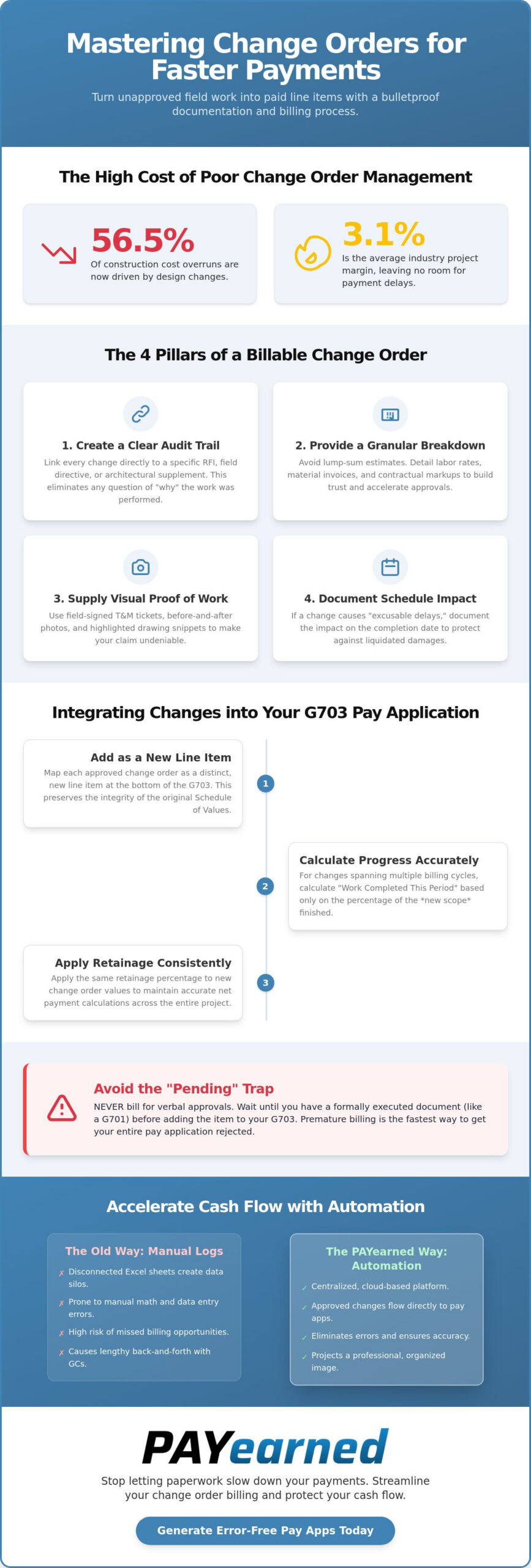
Did you know that design changes now drive 56.5% of construction cost overruns, while industry project margins have tightened to just 3.1% in 2026? You’ve likely felt the sting of performing critical field work only to have the payment stalled because the paperwork didn’t align with the Schedule of Values. It’s a frustrating cycle where unapproved work creates massive cash flow gaps and disputes over T&M hours derail your monthly billing cycle.
Mastering the art of documenting change orders for faster payment is no longer optional; it’s a requirement for protecting your liquidity. You’ll learn the exact documentation standards needed to turn change order requests into approved, paid line items on your next pay application. We’ll show you how to synchronize your field data with your G703 continuation sheet to eliminate manual entry errors and create a clear audit trail that ensures you get paid for every hour and every material cost increase.
Key Takeaways
- Learn how to link every change directly to a specific RFI or field directive to provide the clear audit trail owners require.
- Master the precise standards for documenting change orders for faster payment to ensure every field request becomes a billable line item.
- Discover the correct method for mapping approved change orders as distinct, new line items on your G703 continuation sheet.
- Understand how to manage “Pending” versus “Approved” statuses to prevent premature billing and avoid costly pay application rejections.
- Explore how transitioning to automated AIA-style billing eliminates manual math errors and streamlines the “back-and-forth” with general contractors.
The Documentation Standard for Billable Change Orders
Every billable change begins with a clear paper trail. You can’t expect a project owner to pay for work they didn’t authorize or can’t verify. Understanding What is a Change Order? is the first step; the second is ensuring your request is bulletproof. Every entry must link directly to a specific RFI, field directive, or architectural supplement. This eliminates the “why” question before it’s even asked. When you connect the change to a specific project event, you remove the owner’s ability to claim the work was part of the original scope.
Effective documenting change orders for faster payment requires a granular cost breakdown. Avoid the trap of providing lump sum estimates that invite scrutiny. Instead, list your specific labor rates, material invoices, and the markups agreed upon in your original contract. Providing this level of transparency removes the friction that typically slows down the approval process. If you need help formatting these documents to meet industry standards, our tutorials provide step by step guidance on creating professional submissions.
The “Proof of Work” Audit Trail
Field-signed Time and Material (T&M) tickets are your strongest defense against labor disputes. When a foreman or site supervisor signs off on hours in real time, it creates a binding verification of effort. Supplement these tickets with before and after photos. Visual evidence, combined with highlighted drawing snippets, justifies the scope shift. It transforms a verbal request into a tangible, verifiable asset. This level of detail makes it nearly impossible for an accounting team to reject the line item on your next pay application.
Calculating the Impact on Project Schedule
Scope changes rarely happen in a vacuum; they often impact your timeline. You must document “excusable delays” immediately to protect your business from liquidated damages. If the change adds three days to the critical path, your formal change order document must reflect the adjusted completion date. This ensures your project schedule and your payment applications remain in perfect synchronization. This proactive approach to documenting change orders for faster payment keeps your cash flow steady and your legal risks low.
Integrating Change Orders into Your G703 Schedule of Values
Getting a signature on a field ticket is only half the battle. To see the cash, you must integrate that work into your continuation sheet. Map every approved change order as a distinct, new line item at the bottom of your G703. This maintains the mathematical integrity of your original Schedule of Values while providing the clarity required by Federal Acquisition Regulation (FAR) standards. Effective documenting change orders for faster payment means your billing documents always reflect the current, executed contract value without burying new costs in old line items.
Accuracy here is critical for your cash flow. If you miscalculate the total contract sum, the entire pay application will likely be rejected by the owner’s accounting department. This leads to a multi week delay that most subcontractors can’t afford. For a more streamlined way to handle these updates, you can generate AIA style pay apps that automate the math for you.
The Math of Progress Billing for New Scope
When a change order spans multiple months, calculate “Work Completed This Period” based on the specific percentage of that new scope finished during the billing cycle. Change orders alter the total contract sum to ensure payment application accuracy across all continuation sheets. Apply retainage consistently to these new items. For instance, on projects starting in 2026 under new regulations like California’s SB 61, your 5% retention cap must be applied to the new change order value to maintain accurate net payment calculations.
Avoiding the “Pending” Trap
Never bill for verbal approvals. It’s a fast track to a rejected pay app. Wait until you have a formal G701 or equivalent executed document before moving the item from your internal log to the G703. Understanding what is retention is vital here; if you bill early and the owner disputes the scope, your held retention becomes even harder to recover. Proper documenting change orders for faster payment requires patience for the signature but absolute speed in the data entry once that signature is secured.
Accelerating Cash Flow with Automated Change Order Billing
Moving from fragmented Excel logs to a centralized, cloud-based platform is a strategic shift for your project liquidity. Manual logs are static; they don’t communicate with your pay application, creating a disconnect that leads to missed billing opportunities. Automation ensures that once a change is verified, it flows directly into your AIA-style billing package. This level of precision projects a professional image to general contractors and owners. It signals that your firm is organized, transparent, and financially stable.
Clean, standardized documentation is the most effective way to reduce the “back-and-forth” that stalls your cash flow. Digital systems offer built-in search engines that allow you to retrieve change order history during a project audit in seconds. This speed and accuracy are essential for documenting change orders for faster payment in an environment where project margins are increasingly tight. When your billing is predictable, your cash flow becomes a stabilizing force rather than a source of stress.
Eliminating Manual Entry Errors
Manual G703 updates are the primary cause of rejected pay applications. A single typo in a carry-forward balance or a miscalculated tax line can halt a significant payment for weeks. The PAYearned SaaS platform eliminates this risk by auto-calculating totals and retainage for all change orders. It ensures your math is perfect every time. By documenting change orders for faster payment through an automated system, you remove the hazards of non-automated processes and protect your revenue from simple human errors.
Streamlining the Review Process
Providing owners with professional, transparent documentation requires zero clarification, which speeds up the approval cycle. When every change order is clearly mapped and mathematically sound, the review process moves from days to hours. Check out our tutorials for a step-by-step look at managing change orders in a digital environment. This structured approach ensures your firm remains a preferred partner for complex projects by delivering error-free, AIA-style billing packages every month.
Secure Your 2026 Cash Flow with Precision Billing
You’ve seen how a single missing signature or a manual math error can stall your project’s liquidity for weeks. By linking every change to a specific RFI and ensuring your field-signed T&M tickets are bulletproof, you eliminate the ambiguity that owners use to delay payments. Moving these approved orders onto your G703 continuation sheet as distinct line items is the final step in maintaining the mathematical integrity of your pay application.
Mastering the art of documenting change orders for faster payment is about more than just administrative accuracy; it’s about protecting your hard-earned margins. Transitioning from error-prone Excel logs to a cloud-based solution ensures that your totals, retainage, and progress billing are always in perfect sync. This proactive approach turns your billing department into a specialized center for financial stability and risk mitigation.
Stop letting manual data entry errors drain your resources. You can start generating error-free AIA-style pay apps with PAYearned today and experience the relief of automated retainage and change order tracking. With a centralized system for your G702 and G703 documents, you’ll spend less time chasing signatures and more time growing your business. Your team deserves a workflow that works as hard as they do.
Frequently Asked Questions
Can I bill for a change order before it is officially signed?
No, you shouldn’t bill for a change order until you have a signed G701 or a formal written directive. Billing based on verbal promises often leads to rejected pay applications and strained relationships with the general contractor’s accounting team. Wait until the paperwork is executed to move the item into your active billing cycle. This discipline ensures your financial records remain accurate and defensible during a project audit.
How should change orders appear on an AIA G703 continuation sheet?
Approved change orders must appear as new, distinct line items at the bottom of your G703 continuation sheet. Never fold change order costs into original scope items; this obscures the audit trail and complicates the review process. Each line should clearly state the change order number and the agreed value. This transparency is a core part of documenting change orders for faster payment, as it allows the owner to verify new work instantly.
Do I need to include photos with every change order request?
Including photos isn’t always a strict legal requirement, but it’s a vital tool for preventing payment bottlenecks. Visual evidence of unforeseen site conditions or field directives provides the “proof of work” that accounting teams need to release funds. High quality photos combined with signed field tickets create a bulletproof submission. This practice eliminates the back and forth clarifications that typically delay the approval of new scope items.
How does a change order affect the retainage held on a project?
A change order increases the total contract value, which proportionally increases the dollar amount of retainage held. If you’re working on a project with a 5% retention cap, that percentage applies to every dollar added through new scope. Precise documenting change orders for faster payment requires updating these calculations on your G702 and G703 forms immediately. Failing to adjust these totals results in mathematical errors that trigger a full pay application rejection.
PAYearned is an agnostic workflow platform that helps teams manage pay applications
PAYearned is an independent software product and is not developed, endorsed, approved, sponsored or affiliated with the American Institute of Architects (AIA). AIA®, G702®, G703®