

The average commercial contractor loses over $14,000 annually due to simple manual errors in their billing documents. In an industry where 78% of projects rely on standardized G702 and G703 formats, a single miscalculation in retainage or work-in-place can halt your cash flow instantly. You’ve likely felt the frustration of a payment cycle grinding to a halt because of a disputed change order or a minor clerical oversight on your pay apps.
You understand that manual data entry is a liability that your margins cannot afford. This guide provides the roadmap to master construction payment applications to eliminate errors and accelerate your project cash flow. We will cover everything from handling the complexity of G702 and G703 documentation to adhering to the critical compliance demands and evolving industry standards for 2026. You’ll learn how to move from outdated, error-prone processes to a high-end, automated solution that provides total financial transparency and peace of mind.
Key Takeaways
- Distinguish professional construction pay apps from consumer P2P platforms to understand their critical role in project liquidity.
- Learn the specific components of G702 and G703 documents to maintain a precise, audit-ready record of work-in-place.
- Identify how manual data entry errors in spreadsheets lead to payment delays and discover the steps to mitigate these financial risks.
- Implement a structured workflow for tracking change orders and retainage to ensure every dollar earned is documented and paid.
- Discover how specialized automation tools generate professional billing packages that meet industry standards without the administrative burden.
Beyond the Smartphone: Defining ‘Pay Apps’ in the Construction Industry
When you search for pay apps, the results usually show mobile wallets for splitting a lunch bill or paying for groceries. In the high-stakes world of construction, a pay app is a complex financial packet that dictates your project’s survival. It’s not a simple request for money; it’s a formal certification of work completed, materials stored, and retainage withheld. For contractors, this document is the primary engine of cash flow. Without it, you don’t get paid, and your project stalls.
A professional payment application serves as a legal record of the contract’s progress. It bridges the gap between the physical labor on-site and the financial accounting in the office. By providing a transparent breakdown of costs, these documents facilitate trust between general contractors, owners, and subcontractors. They transform a potentially adversarial billing process into a structured, data-driven transaction.
To better understand this concept, watch this helpful video:
The High Stakes of Commercial Billing
Precision in your billing isn’t just a preference. It’s a requirement for liquidity. A single rejected application can freeze hundreds of thousands of dollars for an entire billing cycle. This leads to a chain reaction where subcontractors don’t get paid and material suppliers stop deliveries. You must transition from simply trying to get a check to managing the financial health of the project through meticulous documentation. Professional pay apps signal competence and reduce the time spent on audits.
Common Pay App Standards
The industry relies on standardized formats like the AIA G702 and G703 to keep projects moving. These documents ensure everyone speaks the same financial language. The G702 serves as the master summary of the contract sum and changes, while the G703 provides the detailed Schedule of Values. Using these standards prevents communication breakdowns and legal disputes. As we move through 2026, the shift toward cloud-based generation has become mandatory for firms that want to avoid the errors inherent in manual entry.
Reliability is the cornerstone of construction finance. When you provide an error-free billing package, you’re protecting your margins and your reputation. Standardized forms provide a clear audit trail that protects all parties if a dispute arises. Moving away from manual spreadsheets to automated systems ensures that your math is always correct and your project stays funded.
The Anatomy of a Professional Payment Application (G702 & G703)
Professional pay apps are multi-part documents that cross-reference each other to ensure mathematical integrity. The G702 serves as the Application and Certificate for Payment. It provides a high-level snapshot of the project’s financial status. This includes the original contract sum, the total of all change orders, and the current amount due. It acts as the cover sheet that an architect or owner signs to authorize payment. This summary is legally binding. It requires an officer of the company to certify that the work described is accurate and that all subcontractors have been paid for previous cycles.
The G703, or the Continuation Sheet, is where the granular work happens. It breaks the project down into a detailed Schedule of Values. Each line item tracks the work completed in previous applications, the work completed this period, and the value of materials currently stored on-site. For complex, multi-phase developments, this sheet can span dozens of pages. If the math on even one line doesn’t perfectly align with the G702 summary, the entire package is invalid. This hierarchy of data is why simple invoices are insufficient for commercial construction.
Calculating Work in Place and Stored Materials
Precision is vital when reporting work in place. You must report the exact percentage of completion for every line item. Reporting 50% completion when the site is only at 40% is “over-billing.” This is a common audit red flag that can destroy trust with owners and general contractors. Stored materials require separate, careful tracking. These are items purchased and delivered to the site or a bonded warehouse but not yet installed. Accurate reporting ensures you aren’t financing the owner’s project out of your own pocket while waiting for installation to begin. Mismanaging these entries often results in pay apps being returned for revision, delaying your cash flow by weeks.
Retainage and Net Change Orders
Retainage is a percentage of the earned amount held back by the owner to ensure project completion. Mastering the math behind calculating retainage is essential for protecting your final profit margins. You must track both the total retainage held to date and the specific amount withheld from the current period. Change orders must be integrated immediately once they receive formal approval. If the total contract sum on your summary sheet doesn’t match the sum of your line items, your application will be rejected. Using a dedicated platform to generate AIA-style documents ensures these totals always reconcile automatically, preventing the “Excel tax” of manual recalculation.
Why Manual Spreadsheet Pay Apps Are Killing Your Profit Margins
Every hour your team spends wrestling with broken cell formulas is an hour stolen from high-value project management. This “Excel Tax” is a silent killer of construction profitability. The average commercial contractor experiences over $14,000 in annual billing errors specifically due to manual, spreadsheet-based pay apps. These aren’t just minor clerical slips. They’re structural failures in your financial process that lead to unpaid work and strained relationships with owners.
Manual data entry invites “fat-finger” errors that are nearly impossible to catch in a sea of cells. A single misplaced decimal point on a G702 form can invalidate an entire month’s billing. When change orders aren’t perfectly synced across your continuation sheets, you end up billing against outdated contract sums. This lack of version control triggers immediate disputes, forcing your team to waste even more time reconciling data that should have been automated from the start. Traditional workflows lack a verifiable audit trail, leaving you vulnerable during project closeouts or financial audits.
The Hidden Cost of Rejected Applications
A rejected application doesn’t just mean a quick fix. It often pushes your payment back by an entire 30-day billing cycle. Most owners and GCs have strict cutoff dates. If your document contains a mathematical error and misses that window, you’re stuck financing the project’s labor and materials out of your own pocket for another month. Mastering the payment application process is the only way to reduce this administrative overhead. By ensuring your first submission is error-free, you protect your liquidity and eliminate the need for costly, time-consuming re-submissions.
Security and Data Integrity Risks
Relying on local spreadsheets is a gamble with your project’s most sensitive data. Local files are vulnerable to corruption, accidental deletion, and a total lack of transparency. If the person managing the master sheet is out of the office, your billing process grinds to a halt. Cloud-based systems solve this by centralizing project data in a secure environment. Automation ensures mathematical consistency across every sheet in the package. When you update a value on the G703, it must reflect instantly on the G702 summary. Without this system autonomy, you’re essentially guessing at your financial health rather than managing it with precision.
Stop treating your billing like a side task and start treating it like the critical financial operation it is. Moving away from manual entry isn’t just about convenience. It’s about risk mitigation and securing the profit you’ve already earned. Professional pay apps require a level of accuracy that manual spreadsheets simply cannot guarantee in a modern, fast-paced construction environment.
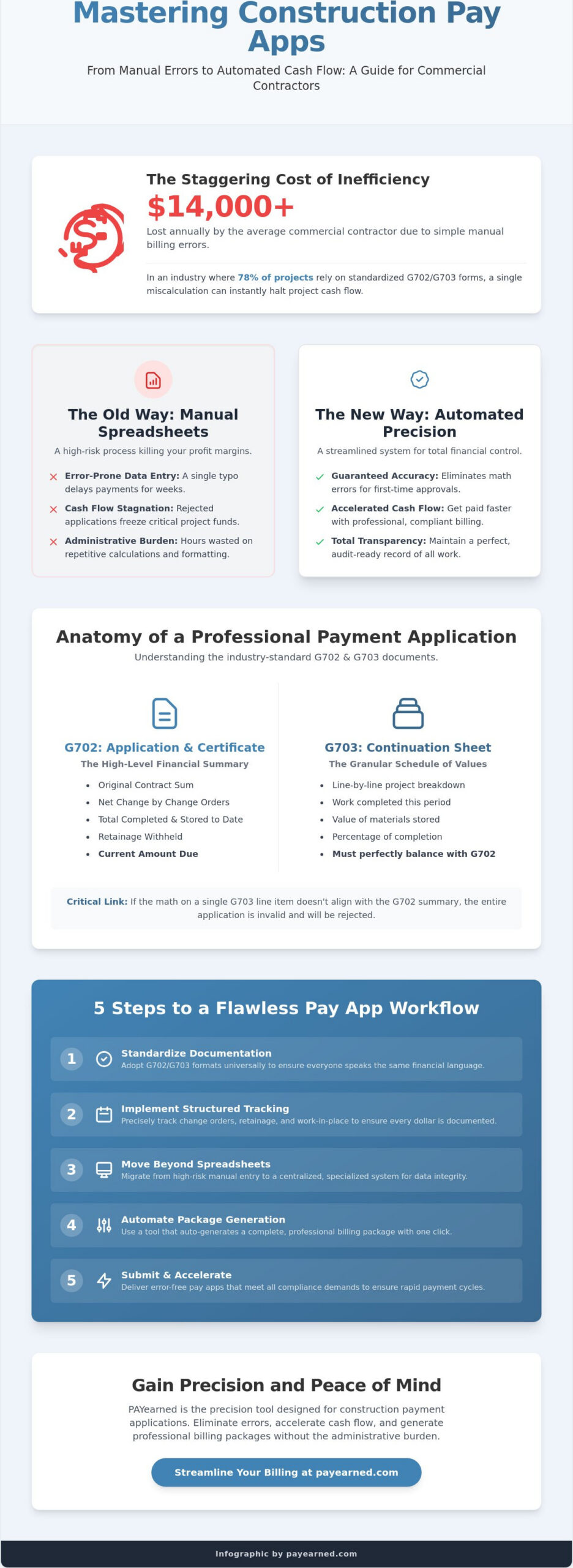
5 Steps to Streamlining Your Monthly Pay App Workflow
Efficiency in construction billing requires a systematic approach that begins long before the first invoice is sent. You must move away from reactive, month-end scrambles toward a proactive, daily data management habit. Streamlining your workflow ensures that your pay apps are submitted on time, every time, without the typical administrative friction that delays approvals.
Step 1: Standardize your Schedule of Values (SOV) at project kickoff. The SOV is the foundation of your entire billing cycle. You must break down the total contract sum into manageable, verifiable line items that align with the architect’s expectations. If your SOV is too vague, you invite scrutiny. If it is too detailed, you increase your administrative burden. Find the balance that allows for clear progress verification.
Step 2: Implement real-time tracking for change orders and retainage. Waiting until the end of the month to reconcile change orders is a recipe for disaster. Track every approved change order as it happens. This ensures your current contract sum is always accurate on your G702 summary. Similarly, maintain a dedicated log for retainage to ensure you are withholding the correct percentage per period.
Step 3: Use automated AIA billing software to generate documents. Manual entry is a liability your margins cannot afford. Professional software handles the complex math of progress billing and retainage automatically. This eliminates the “Excel tax” and ensures that your G702 and G703 forms are perfectly reconciled. Transitioning to automated pay apps allows your team to focus on project execution rather than data entry.
Step 4: Conduct an internal audit against the G702 reference guide. Before submission, verify your totals against industry standards. Check that your “Total Completed and Stored to Date” matches the sum of your continuation sheet. Verify that your retainage calculations follow the specific terms of your contract. A five-minute internal review can save you a 30-day payment delay.
Step 5: Submit digitally for faster review and timestamped approval. Paper submissions are easily lost or delayed. Digital submission provides an immediate audit trail and a timestamp for your records. This is critical for meeting the strict deadlines often found in commercial contracts. To ensure your billing is always professional and compliant, start generating your pay apps with PAYearned today.
Optimizing the Schedule of Values
A well-structured SOV is your best defense against billing disputes. Align your line items with the physical milestones of the project. This makes it easier for the owner’s representative to verify your percentage of completion on-site. When the physical work is easy to see, the payment is easy to approve. Ensure the sum of all line items always equals the original contract sum plus any net change orders.
The Digital Submission Advantage
Cloud-based submission offers transparency that spreadsheets cannot match. You can retrieve historical project data instantly using built-in search tools. This reduces the back-and-forth communication between your office and the general contractor. Setting up automated reminders for submission deadlines ensures you never miss a cutoff date, keeping your project’s cash flow steady and predictable.
PAYearned: The Precision Tool for Construction Payment Applications
Precision is the only defense against cash flow delays in the 2026 construction market. PAYearned provides the mathematical accuracy required to manage project liquidity without the heavy administrative burden of manual entry. It is a dedicated engine for progress billing. By automating the complex calculations behind your pay apps, you remove the human error that leads to rejected submissions and frozen assets. This software doesn’t just generate documents; it stabilizes your financial workflow.
The platform excels at managing the variables that typically derail manual billing. Approved change orders are integrated into your continuation sheets with a few clicks. This ensures your contract totals reconcile instantly across every page of your submission. Retainage is tracked with mathematical certainty, preventing the common errors that often hide in deep spreadsheet rows. This specialized focus allows you to scale your business by reducing the administrative friction that usually accompanies larger, more complex projects. PAYearned automates the generation of professional pay apps that meet industry standards while maintaining your unique professional identity.
Designed for Contractors, Not Accountants
Most accounting platforms are built for general ledgers and broad financial reporting. They don’t understand the nuance of a continuation sheet or the specific way retainage is withheld in a commercial contract. PAYearned is designed with the contractor’s daily reality in mind. The interface is direct and functional. It prioritizes the utility of the software over abstract financial concepts. You don’t need a finance degree to generate professional G702-style and G703-style documents. Built-in search tools allow you to organize and retrieve historical project data in seconds. This level of organization provides peace of mind during audits and ensures you always have the right documentation at your fingertips.
Start Automating Your Pay Apps Today
Reliability is the cornerstone of a successful construction firm. Using a cloud-based solution ensures your project data is centralized and secure. You can access your billing documents from the office or the job site, ensuring that submission deadlines are always met. PAYearned offers a high-end billing solution at a fraction of the cost of complex project management suites. This allows you to maintain compliance with industry standards without the manual headache of tracking every decimal point yourself. It’s time to move away from the “Excel Tax” and protect your profit margins with a tool built for precision.
Ready to fix your billing? Get started with PAYearned today.
Secure Your Profit Margins with Automated Precision
The transition from manual, spreadsheet-based billing to automated precision is the single most effective way to protect your project liquidity in 2026. By mastering the nuances of G702 and G703 documentation, you eliminate the clerical errors that lead to rejected applications and costly payment delays. Standardizing your Schedule of Values and implementing real-time tracking for change orders ensures that your pay apps remain accurate and audit-ready throughout the project lifecycle. You must stop letting administrative friction drain your profit margins.
Take control of your financial operations and ensure your team focuses on execution rather than data entry. Streamline your construction billing with PAYearned’s automated pay apps. Our platform offers automated AIA-style document generation, integrated retainage tracking, and a secure cloud-based search engine to organize your historical project data instantly. Reliability is the foundation of your reputation. You’ve done the work. Now, use the right tools to ensure you get paid for every dollar you’ve earned.
Frequently Asked Questions
What is the difference between a pay app and an invoice?
A construction payment application is a comprehensive packet of documents that certifies the value of work completed relative to the total contract. While a standard invoice is a simple request for payment, pay apps include a detailed Schedule of Values and a certified summary of the contract sum. This documentation provides the transparency and legal protection required for commercial progress billing. It ensures that architects and owners can verify progress against physical milestones before authorizing funds.
Do I need specific software to generate AIA G702 and G703 forms?
You don’t strictly need specialized software, but using spreadsheets is a high-risk strategy that often leads to billing errors. Specialized platforms automate the generation of these forms to ensure mathematical accuracy and compliance with industry standards. Manual methods are vulnerable to calculation errors and version control issues. This system autonomy is critical for maintaining professional standards and meeting the strict project deadlines common in commercial construction.
How do I calculate retainage on a construction payment application?
Calculate retainage by multiplying the total value of work completed and materials stored by the percentage specified in your contract. You must track both the amount withheld for the current period and the total cumulative retainage held to date. Automated systems ensure these values are subtracted correctly from your earned amount so your net payment due is always precise. This prevents the “Excel Tax” of manual recalculation and protects your final profit margins.
Can I use consumer pay apps like Venmo for construction billing?
No, consumer P2P platforms are entirely unsuitable for commercial construction billing because they cannot generate the required G702 and G703 documentation. These apps lack the hierarchical data structures needed to track retainage, stored materials, and complex change orders. Professional pay apps require a specialized financial workflow that consumer-grade software simply doesn’t provide. Relying on such tools invites audit risks and professional disputes that can freeze your project’s cash flow.
What are the most common reasons a construction pay app is rejected?
Mathematical errors and unapproved change orders are the primary reasons for rejection. If the totals on your G703 continuation sheet don’t match the summary on your G702, the owner will return the packet immediately. Other common triggers include missing lien waivers, incorrect retainage percentages, or billing for work that hasn’t been physically verified on-site. Precision in your first submission is the only way to avoid a 30-day delay in your payment cycle.
How do change orders affect my monthly payment application?
Approved change orders modify your total contract sum and must be reflected in your current billing cycle immediately. You must list the net change by change orders on your summary sheet and add specific line items to your continuation sheet. Failure to reconcile these changes across all documents will result in a rejected application. Maintaining an accurate record of these modifications ensures that you are paid for the full scope of work performed.
Is cloud-based billing software secure for project financial data?
Cloud-based platforms offer superior security compared to local spreadsheets because they provide centralized data storage and encrypted access. These systems create a permanent audit trail and prevent the data loss associated with corrupted local files or hardware failure. By using a secure cloud environment, you ensure that your financial documentation is always accessible, organized, and protected. This provides the peace of mind necessary to manage high-stakes commercial project finances effectively.
PAYearned is an agnostic workflow platform that helps teams manage pay applications
PAYearned is an independent software product and is not developed, endorsed, approved, sponsored or affiliated with the American Institute of Architects (AIA). AIA®, G702®, G703®