
If your current financial system is so “complete,” why are you still spending hours every month manually fixing continuation sheets in Excel? It’s a common frustration for subcontractors and GCs who find themselves trapped between general-purpose tools and the rigid requirements of commercial billing. When you analyze construction billing software vs accounting software, the difference isn’t just about features. It’s about protecting your project’s financial liquidity. General accounting software tracks your history, but it wasn’t built to handle the complex math of retainage or the specific layout of an AIA-style pay application.
You likely feel the constant pressure of ensuring every G702 is perfect before it hits the architect’s desk. With the average wait for subcontractor payment climbing to 96 days in 2024, there’s no room for manual entry mistakes or delays. This article explains the critical differences between general accounting and specialized billing software to help you eliminate pay app errors and accelerate your cash flow. We will show you how a dedicated solution like PAYearned helps you achieve faster payment cycles and error-free AIA-style documents while reducing your total administrative overhead.
Key Takeaways
- Distinguish between your “System of Record” and your “System of Action” to ensure your accounting and billing processes work in harmony.
- Understand the functional gaps in construction billing software vs accounting software to prevent manual entry errors on complex continuation sheets.
- Discover why generic financial tools often struggle to track retainage and map change orders accurately across multiple progress billing cycles.
- Identify how specialized billing software provides a cost-effective alternative to expensive enterprise accounting upgrades for generating AIA-style documents.
- Learn how cloud-based collaboration between field and office teams can eliminate administrative bottlenecks and significantly accelerate your project cash flow.
Construction Billing Software vs. Accounting Software: Defining the Divide
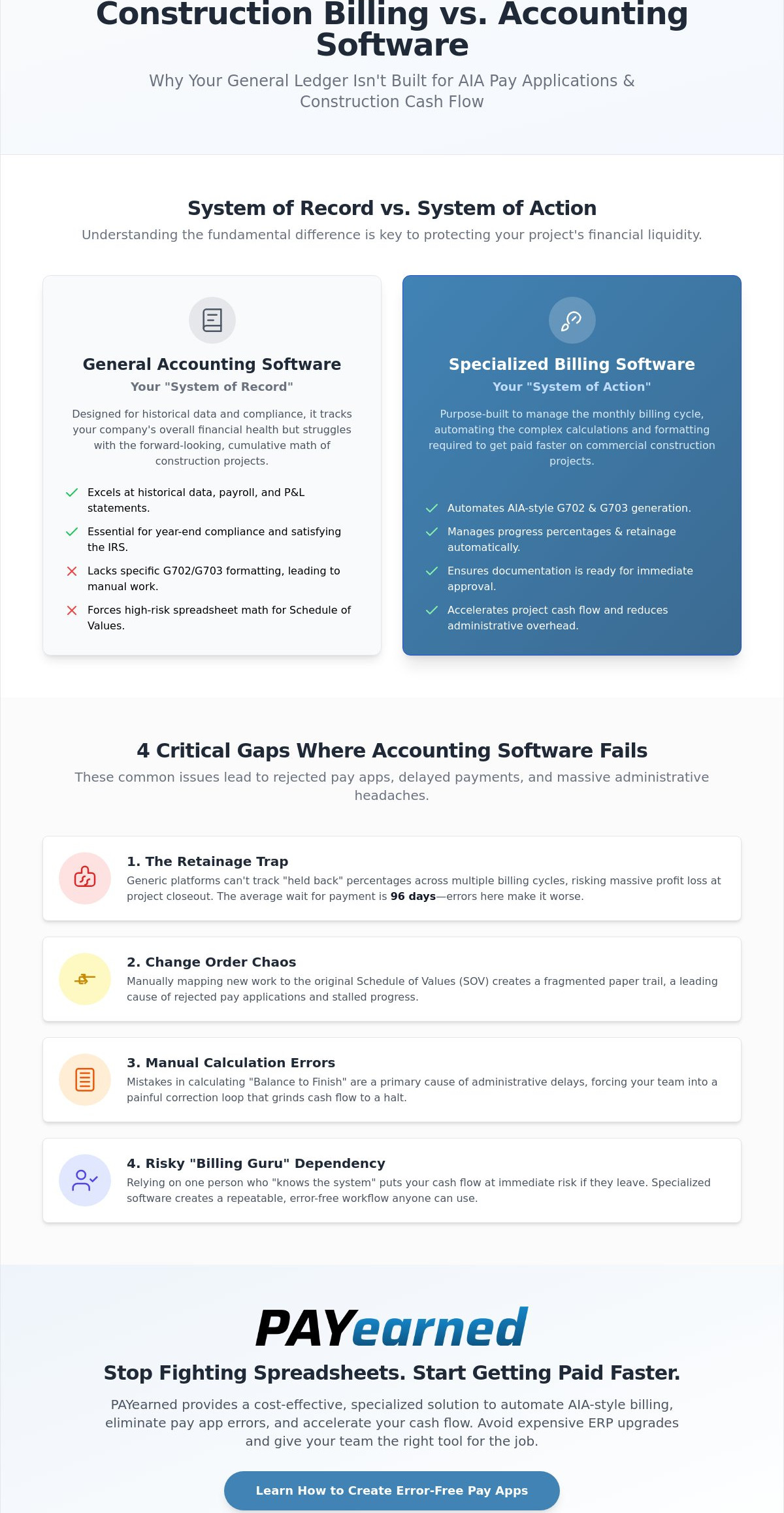
Your general ledger is the heart of your business, but it isn’t the muscle that moves your project cash flow. The choice between construction billing software vs accounting software comes down to intent. One is your “System of Record,” designed to satisfy the IRS and your bank. The other is your “System of Action,” built to satisfy your General Contractor and get you paid on time. While many turn to off-the-shelf platforms, some firms require a more bespoke “System of Action” developed by API Pilot to handle their unique business logic. Don’t mistake a general ledger for a billing engine. They serve different masters and require different levels of specialized math.
A standard invoice is a simple request for payment based on a flat fee or hours worked. In contrast, a construction pay application is a legal certification of progress. It must account for cumulative work completed, materials currently stored on-site, and the precise calculation of retainage. Using the wrong tool for these multi-layered calculations leads to “billing lag.” This happens when your application is rejected because the math on your continuation sheet doesn’t square with the previous month’s submission.
The Role of General Accounting
General accounting tools excel at historical data and year-end compliance. They track your overhead, manage payroll, and generate your P&L statements with precision. They’re essential for seeing the big picture of your company’s health. However, they often lack the specific formatting required for a G703 Continuation Sheet. When you force a general tool to handle a complex Schedule of Values, you’re essentially performing manual spreadsheet math. It’s a high-risk strategy that often leads to administrative bottlenecks.
The Role of Specialized Billing Platforms
Specialized platforms focus entirely on the monthly billing cycle. They automate the heavy lifting of AIA-style G702 and G703 generation. Much like Construction estimating software prepares you for the start of a job, specialized billing software manages the financial liquidity during the project. These systems handle the nuances of progress percentages and “held back” retainage automatically. By using a tool built for the task, you ensure your documentation is ready for approval the moment it hits the architect’s desk.
4 Critical Reasons Your Accounting Software Isn’t Enough for AIA Billing
Standard business tools don’t always cut it in the specialized discipline of construction accounting. When comparing construction billing software vs accounting software, the most dangerous gap is the “Retainage Trap.” Generic accounting platforms often treat payments as simple transactions. They don’t have the architecture to track “held back” percentages across dozens of billing cycles, especially with new regulations like California’s 5% retainage cap effective January 1, 2026. This leads to massive headaches during final closeout when you try to recover your profit.
Change order management presents another hurdle. Mapping new work to an original Schedule of Values (SOV) is where manual accounting breaks down. If your software can’t automatically update the G703 continuation sheet to reflect these adjustments, you’re left with a fragmented paper trail. This disconnect often results in rejected pay applications and stalled progress billing.
Automating the Math of G702 & G703
Manual calculations of “Balance to Finish” are a leading cause of administrative errors. These mistakes force your team into a loop of corrections that delays your construction cash flow. Automated systems use built-in search engines and real-time totals to eliminate this “fix-it” time entirely. Automated retainage tracking prevents profit leaks on long-term projects by ensuring every cent is accounted for until the final release.
Risk Mitigation and Personnel Independence
Many firms rely on a single “billing guru” who understands the nuances of AIA-style forms. If that person leaves, your cash flow is at immediate risk. Specialized billing platforms remove this dependency; they allow any back-office team member to generate accurate, professional documents. You can create error-free workflows that protect your business from staff turnover. This ensures every submission is accurate, efficient, and automated regardless of who hits the send button.
Maximizing Cash Flow: When to Specialize for Less
Choosing between construction billing software vs accounting software doesn’t have to be an expensive “either-or” decision. Many contractors believe they must upgrade to a six-figure ERP suite just to automate their progress billing. This is a costly misconception. Specialized billing platforms offer a high-utility alternative that focuses on one critical task: getting you paid faster. By specializing, you avoid the bloat of unused features while gaining the precision required for high-stakes commercial projects.
This strategy of avoiding software bloat should extend to your entire tech stack; for instance, LicenseIQ helps companies discover and recover wasted spend on Microsoft 365 licenses, ensuring that your operational overhead remains as lean as possible.
Speed is the primary driver of financial liquidity. When your field and office teams collaborate on pay apps in real-time via the cloud, you eliminate the back-and-forth that stalls submissions. Submitting an error-free AIA-style application on day one reduces your Days Sales Outstanding (DSO). It also positions your firm as a professional, organized partner. General contractors value subcontractors who provide standardized, accurate documentation because it makes their own billing cycle easier to manage.
Choosing a Practical Solution
Don’t buy a software package based on a list of 100 features you’ll never use. Evaluate your options based on ease of use and the specific ability to generate G702 and G703 forms. PAYearned provides a direct, cloud-based alternative to manual spreadsheets and complex ERP modules for a fraction of the cost of a full accounting suite upgrade. Check our pricing to see how affordable accurate billing can be for your trade.
Next Steps for Your Back Office
Start with a simple audit of your current processes. Calculate how many hours your staff loses every month to “Continuation Sheet” math and manual entry. If you’re still relying on a “billing expert” to navigate the complexities of progress billing, your cash flow is vulnerable. Transitioning from fragile spreadsheets to a dedicated AIA-style billing workflow creates a repeatable, secure system for your business. Watch our tutorials to see the platform in action and learn how to stabilize your monthly billing cycle.
Stabilize Your Cash Flow with Precision Billing
The choice between construction billing software vs accounting software is ultimately a choice between administrative chaos and financial control. General accounting tools are necessary for your taxes and payroll, but they don’t provide the specialized math required to move money through a complex project. By adopting a dedicated “System of Action,” you protect your business from the personnel risks and manual errors that lead to rejected pay applications. You don’t need a bloated ERP to achieve professional results; you just need a tool built for the task at hand.
Specializing your billing workflow allows your team to generate automated AIA-style G702 and G703 documents without needing a dedicated “billing guru.” With cloud-based storage and real-time access, your field and office teams can finally work in sync to eliminate profit leaks and retainage errors. It’s time to move beyond the limitations of generic financial tools and secure the liquidity your firm needs to grow. Accurate documentation is the fastest way to build trust with your GCs and project owners.
Take the next step toward an error-free back office. Stop struggling with manual forms and start your PAYearned subscription today. Your projects move fast, and your billing should keep up.
Frequently Asked Questions
Can I use general accounting software like Sage or QuickBooks for AIA billing?
Yes, but it’s often inefficient because these tools aren’t built for the high-stakes math of subcontractor billing. Most general platforms lack the specific architecture for cumulative retainage tracking and stored materials. You often end up relying on external spreadsheets to calculate the math for your AIA G702 and G703 forms. This disconnect between your ledger and your billing forms increases the risk of mathematical discrepancies that lead to payment delays.
What is the biggest difference between an invoice and a construction payment application?
An invoice is a simple request for payment, while a payment application is a certified summary of work completed to date relative to the total contract. Standard construction invoicing usually covers a specific set of hours or items. A pay application must account for previous payments, current work, and retainage held back by the owner. When evaluating construction billing software vs accounting software, remember that pay apps require a cumulative history that standard invoicing tools don’t track.
Does construction billing software replace my accountant?
No, it acts as a specialized tool that simplifies the high-stakes documentation your accountant or bookkeeper manages. While your accountant focuses on the “System of Record” like taxes and general ledgers, billing software handles the “System of Action” required to trigger payments. It reduces the administrative burden on your financial team by automating the complex math of progress billing. This allows your staff to focus on higher-level financial strategy rather than manual spreadsheet entry.
Why do general contractors reject my G702 and G703 forms?
Rejections usually stem from mathematical errors on the continuation sheet or a mismatch between current and previous billing cycles. If your “Work Completed This Period” doesn’t align with the “Balance to Finish,” the GC’s system will flag the error immediately. Other common reasons include incorrect retainage calculations or missing change order documentation. Using specialized software ensures your pay applications are always accurate, helping you maintain a professional reputation and steady construction cash flow.
PAYearned is an agnostic workflow platform that helps teams manage pay applications
PAYearned is an independent software product and is not developed, endorsed, approved, sponsored or affiliated with the American Institute of Architects (AIA). AIA®, G702®, G703®