

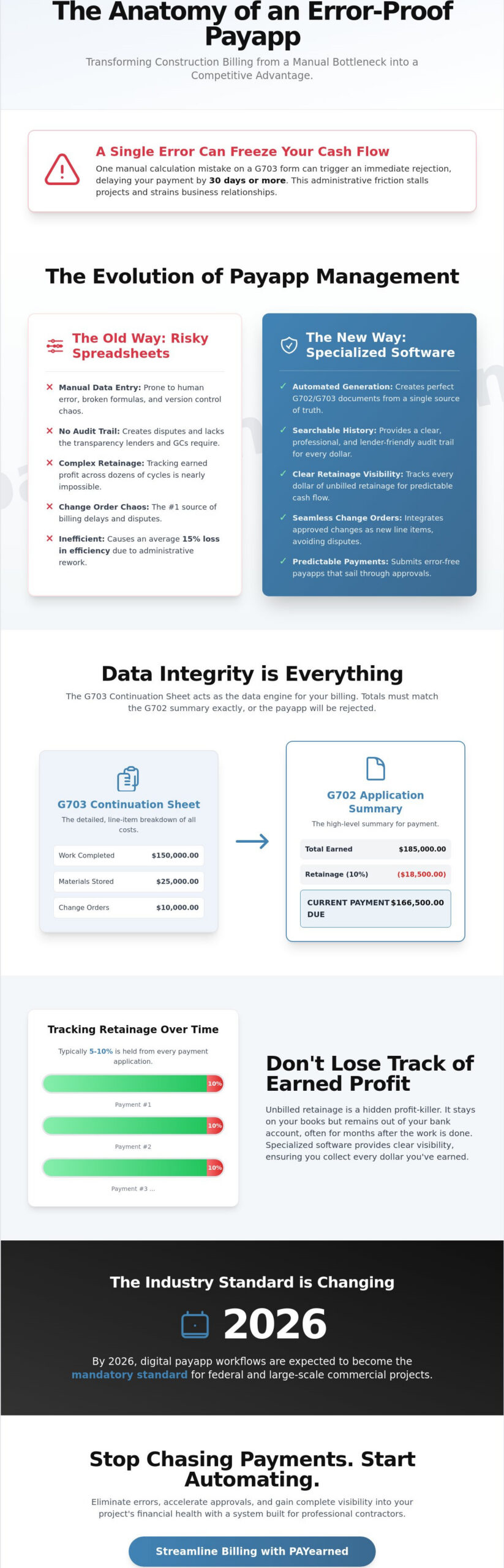
A single manual calculation error on a G703 continuation sheet can freeze your cash flow for 30 days or longer. Relying on risky spreadsheets to manage your monthly payapp is no longer a viable strategy for professional contractors who need to maintain a steady project rhythm. You already know the stress of chasing a project manager for an approval only to find out your work-to-date totals don’t match the previous cycle’s records. It’s a frustrating administrative bottleneck that stalls your business and strains subcontractor relationships.
This guide provides the roadmap to master every complexity of the modern payment application. You’ll learn how to generate zero-error G702 and G703 documents that sail through approval cycles while maintaining clear visibility into your unbilled retainage. We’ll examine the specific workflows required to track change orders across multiple billing cycles. This ensures your 2026 billing process is both predictable and automated. From managing complex retainage percentages to organizing searchable audit trails, you’re about to transform your billing from a liability into a competitive advantage.
Key Takeaways
- Master the formal structure of a payapp to bridge the gap between work performed and revenue received.
- Navigate technical requirements like G702 continuation sheets and unbilled retainage with absolute precision.
- Mitigate financial risk by identifying the hidden costs and calculation errors buried in manual billing spreadsheets.
- Implement a rigorous pre-submission workflow to ensure 100% accuracy and eliminate payment delays.
- Discover how specialized, premium software streamlines progress billing into a predictable, automated process.
What is a Payapp in Construction Billing?
A payapp, or payment application, is the formal document a contractor submits to request payment for work completed during a specific period. It’s the legal and financial bridge between the physical progress on a job site and the cash flow required to keep the project moving. Unlike a simple retail invoice, a payment application provides a comprehensive snapshot of the project’s financial health. Every request is governed by the specific terms laid out in the Construction contract; this document defines the schedule of values and payment milestones that dictate how money moves.
The industry is rapidly moving away from manual entry. By 2026, digital payapp workflows are expected to become the mandatory standard for federal and large-scale commercial projects. This shift aims to mitigate the 15% average loss in efficiency caused by manual billing errors and administrative delays. Three primary parties drive this process. Subcontractors initiate the request. General Contractors (GCs) review and certify the work. Owners or lenders provide the final funding. Each party relies on the accuracy of these documents to mitigate risk and maintain project momentum.
The Anatomy of a Standard Payment Application
The document typically consists of two critical parts. The first is the Summary of Work, often modeled after the AIA G702 style. It provides a high-level overview of the total contract sum, retainage, and the current amount due. The second part is the Continuation Sheet, modeled after the G703 style, which breaks down costs into granular line items. This sheet allows for detailed line-item tracking across different phases of construction. The Schedule of Values serves as the project’s financial roadmap. This detailed tracking ensures that every dollar requested corresponds to a verified percentage of completion, preventing overbilling or front-loading.
Why “Payapps” are the Industry Standard
Standardized forms protect all parties from costly disputes. A standard invoice lacks the depth required to track complex variables like unbilled retainage, change order sheets, or stored materials. Payapps provide a clear, searchable audit trail for lenders. Since lenders fund over 90% of commercial developments, they require these detailed records before releasing funds. This level of transparency reduces financial risk for the GC and the owner. It moves the process away from risky spreadsheets toward a specialized, premium solution. Using a dedicated system ensures calculations remain error-free across the entire project lifecycle, providing peace of mind for the administrative team.
Core Components: G702, G703, and Retainage
Construction billing isn’t just about sending an invoice. It’s about data integrity. A common misconception among subcontractors is that G702 and G703 forms are strictly for multi-million dollar commercial builds. This is a mistake. Standardized documentation is the baseline for projects of all sizes because it provides a clear audit trail for every dollar spent. Modern owners and general contractors demand error-free calculations. A single math error on a payapp can trigger an immediate rejection, delaying your cash flow by 30 days or more. Reliability in your documentation is your best defense against payment delays.
Mastering the G702 and G703 Relationship
The G703 Continuation Sheet acts as the data engine for your billing. It breaks down the Schedule of Values (SOV) into specific line items that feed directly into the G702 Application for Payment summary. You must distinguish between “Work Completed” (labor and installed items) and “Materials Presently Stored” (items on-site but not yet installed). If the totals on your G703 don’t mirror the summary on the G702 exactly, the architect or owner will send it back. Precision is the only way to ensure a Payment documentation and process aligns with federal or commercial standards. Double-check every line item to ensure the math reconciles across both pages.
The Complexity of Retainage Tracking
Retainage is typically 5% to 10% of every payment held back by the GC or Owner to ensure project completion. Tracking “Total Retainage to Date” across 12 or 24 billing cycles is where manual spreadsheets often fail. Unbilled retainage is a hidden profit-killer. It stays on your books but remains out of your bank account, often for months after the work is done. You should clearly highlight unbilled retainage on every cycle. This practice improves long-term cash flow by keeping the eventual payout visible to all parties. Don’t let your earned profit get lost in the shuffle of ongoing monthly costs.
Integrating Change Orders into Your Payapp
Change order management is the #1 source of billing delays in the construction industry. To avoid disputes, add approved change orders as new, individual line items to your Schedule of Values. Billing for unapproved change orders is a high-risk move that usually leads to a full document rejection. You need an executed signature before that work appears on your payapp. If your current manual process feels like a gamble every month, consider using a specialized billing solution to lock in your accuracy. Keeping your change orders organized ensures that your billing reflects the actual scope of work performed on the job site.
Spreadsheets vs. Specialized Payapp Software
Many contractors cling to Excel because it feels familiar and free. It isn’t. The hidden costs of manual entry often outweigh the perceived savings of a spreadsheet. When a firm grows beyond five active projects, manual tracking reaches a breaking point. It stops being a tool and starts being a liability. Moving to a specialized payapp solution is a strategic shift for firms prioritizing reliability and risk mitigation. It transforms a chaotic administrative burden into a professional, predictable workflow.
The Hidden Risks of Manual Billing
Research from the University of Hawaii indicates that 88% of spreadsheets contain errors. In a complex construction workbook, one broken formula in a continuation sheet can miscalculate unbilled retainage across an entire project. These errors often stay hidden until a final audit, leading to massive financial discrepancies. Local files also lack a searchable audit trail. If a value changes, there’s no record of who changed it or why, leaving the firm vulnerable during disputes.
Manual entry also triggers billing fatigue. Administrative staff often spend 10 to 15 hours every month cross-referencing change order sheets and previous applications. This repetitive labor leads to administrative burnout and increases the likelihood of data entry mistakes. When your team is tired, they miss details. In construction finance, missing a detail means missing a payment.
Benefits of Automated AIA-Style Generation
Specialized software like PAYearned provides a premium solution by automating the heavy lifting. We maintain a compatible but independent stance regarding industry standards, allowing users to generate professional G702 and G703 formats in under five minutes. This is a 95% time reduction compared to the two or three hours required for manual preparation. Adhering to AIA payment application best practices requires a level of precision that manual systems simply can’t guarantee.
- Error-Free Calculations: Automation handles the math for retainage, previous payments, and work completed.
- Live US-Based Support: Real humans are available to solve billing bottlenecks immediately.
- Centralized Data: All documents are searchable and stored in one secure location.
- Improved Cash Flow: Faster submissions lead to faster approvals and quicker payments.
By using a dedicated payapp platform, growing firms scale their operations without adding administrative headcount. The software acts as a stabilizing force, ensuring every submission is accurate and professional. This precision builds trust with owners and architects, positioning your firm as a reliable specialist in a competitive market.
Beyond the office, maintaining this level of organization for your personal life is equally important; a digital platform like SafeKeep provides a secure central hub for managing your family’s most critical documents and admin.
Step-by-Step: Submitting an Irrefutable Payapp
Precision is your best defense against payment delays. A single calculation error on a continuation sheet can stall your cash flow for 30 days or more. You need a repeatable, error-free process that leaves no room for architect disputes or owner objections. High-stakes construction finance demands a workflow that prioritizes accuracy over speed, ensuring every line item is defensible before it leaves your desk.
The Monthly Billing Workflow
Establishing a rigid routine prevents the administrative chaos that typically occurs at the end of the month. Follow these three steps to build a solid foundation for your submission:
- Step 1: Update the Schedule of Values (SOV). Base these figures on verified site progress. Don’t estimate; use field reports to confirm the exact percentage of work completed. This transparency builds trust with the project owner.
- Step 2: Reconcile all approved change orders. Only include change orders that have reached “approved” status in the current period. Including pending items is a fast track to a rejected application and creates unnecessary friction.
- Step 3: Calculate retainage. Verify previous balances to ensure the unbilled retainage aligns perfectly with the total contract value. Errors here are common and often lead to immediate rejection by automated accounting systems.
Final Review and Submission
The “pre-submission” check is where you catch the small mistakes that cause big problems. Manual errors often hide in the “Balance to Finish” column. If this figure does not match the remaining contract value exactly, the architect will likely return the document for correction. Accuracy is the only way to maintain a professional reputation and steady cash flow.
Check for required notary seals and signatures. Missing a seal is a common administrative trap that accounts for 65% of payment delays in the industry. Ensure all backup documentation is attached, including material invoices and dated site photos that provide visual proof of progress. This evidence makes your payapp irrefutable.
Resistance to new software usually stems from a fear of complexity. However, manual spreadsheets are the primary source of financial risk. Transitioning to a dedicated payapp system turns a 15-hour monthly ordeal into a 10-minute verification. Timing is your most valuable asset. Missing a submission deadline by just 24 hours can delay your funds by an entire month. Accuracy and speed aren’t optional; they’re the foundation of a healthy construction business.
Streamlining Your Billing with PAYearned
Manual billing is a liability your firm cannot afford. When you rely on manual data entry, you invite the kind of calculation errors that stall cash flow and damage professional reputations. PAYearned functions as a Reliable Specialist, providing a stabilizing force in the often chaotic world of construction finance. By moving away from risky spreadsheets, you eliminate the formula errors that plague 88% of complex workbooks. Our platform isn’t a general-purpose accounting tool; it’s a premium solution built exclusively for pay applications.
We operate on a predictable subscription model. This approach provides contractors with a premium, high-performance tool without the hidden fees or scaling costs found in broader ERP systems. It’s a pragmatic choice for professionals who value specialized knowledge over generic features. You gain a dedicated partner that understands the high-stakes nature of “unbilled retainage” and “continuation sheets,” ensuring your administrative process is as solid as your fieldwork.
Key Features for Modern Contractors
Precision is the baseline for every payapp you submit. PAYearned removes the guesswork through a suite of tools designed for the modern job site. You can generate AIA-Style G702 and G703 documents with one-click accuracy. These formats are the industry standard, and our platform ensures your paperwork remains compatible with architect and owner requirements while maintaining an independent, streamlined workflow. For a detailed breakdown of how manual templates compare to automated tools, see our guide on the AIA payment application: manual templates vs. automated software in 2026.
- Automated Document Generation: Stop fighting with cell formatting. Generate professional G702 and G703 documents instantly.
- Internal Search Engines: Stop digging through paper files. Use built-in search tools to retrieve project data, historical costs, and contract details in seconds.
- Advanced Tracking Modules: Manage your change order sheets and retainage percentages with dedicated tools that prevent over-billing or missed revenue.
Getting Started: No-Risk Implementation
Adopting new technology shouldn’t feel like a gamble. We’ve structured our onboarding to be as transparent and honest as possible. You can access the platform today with a trial that requires no credit card. This allows you to test the automation features on a live project before making a financial commitment. It’s a no-risk way to see exactly how much time your team saves during the monthly billing cycle.
If you have questions during your first setup, you aren’t left to figure it out alone. PAYearned provides live, US-based support to help you navigate your first submission. This human element sets us apart from impersonal global platforms. We act as a supportive expert, ensuring your transition from spreadsheets to automation is seamless and successful. Start your first payapp today with PAYearned and secure your project’s cash flow.
Take Control of Your Construction Cash Flow
Precision in your billing process is the difference between a profitable project and a financial bottleneck. Mastering the nuances of G702 and G703 forms ensures your payapp meets industry standards every time. A 2023 report from Levelset found that 31% of construction companies cite payment delays as their biggest challenge, often due to administrative errors. By digitizing your continuation sheets and tracking unbilled retainage automatically, you eliminate the common errors that cause project owners to reject applications. You don’t have to navigate these complex requirements alone. PAYearned provides a specialized solution built exclusively for AIA-Style G702 and G703 formats. Our platform offers live US-based support to help you maintain accuracy and protect your bottom line. Stop gambling with your business’s stability on outdated tools. Get started today with no credit card required and experience the peace of mind that comes with professional billing software.
Simplify your construction billing and avoid risky spreadsheets with PAYearned
Your path to faster, more reliable payments starts with better documentation.
Frequently Asked Questions
What is the difference between a payapp and an invoice?
A payapp is a comprehensive package documenting progress, while an invoice is a simple request for payment. A standard package includes the G702 summary and G703 continuation sheet to track the schedule of values. Invoices usually lack the detailed breakdown of work completed to date or unbilled retainage required by general contractors. This documentation is vital for transparency on large-scale commercial projects.
Do I need AIA software to create G702 or G703 documents?
You don’t need expensive AIA software to generate documents in the G702 and G703 format. Specialized billing platforms create compatible documents that meet industry standards without the high licensing fees. Using a dedicated tool ensures your formatting is correct and your math is accurate every time. This approach keeps your overhead low while maintaining professional standards required by architects.
How is retainage calculated on a standard pay application?
Retainage is calculated as a fixed percentage, typically 5% or 10%, withheld from the total work completed and materials stored. For example, on a 100,000 dollar progress billing with 10% retainage, the owner holds back 10,000 dollars until project completion. This ensures the contractor finishes the punch list and pays all subcontractors. It’s a security measure that protects the project owner from unfinished work.
What happens if my payapp is rejected by the General Contractor?
If your application is rejected, the General Contractor must provide a specific reason, often related to math errors or missing lien waivers. According to the Prompt Payment Act, a 24 hour delay in correcting these errors can push your payment back by 30 days. You must revise the continuation sheet and resubmit the package immediately to restart the payment clock and ensure liquidity.
Can I manage change orders within a payapp software?
Yes, you can manage change orders directly within specialized payapp software. Approved change orders are added to the schedule of values as new line items to ensure they’re billed correctly. This prevents the 15% to 20% revenue loss often caused by forgotten or unorganized paper change orders. Keeping these updates in one digital location ensures your contract totals always match your billings.
Is specialized payapp software worth the subscription cost for a small firm?
Specialized software is a vital investment for small firms because it eliminates the 2 to 4 hours spent on manual spreadsheet data entry each month. Reducing administrative time allows a small team to focus on field operations rather than fixing broken formulas. Eliminating just one math error can save more than the annual subscription cost. It’s about working smarter with limited staff.
Does PAYearned provide full construction accounting services?
PAYearned focuses exclusively on payment applications and doesn’t provide full construction accounting or payroll services. It’s a specialized tool designed to bridge the gap between your project management and your general ledger. By perfecting one critical task, it ensures your G702 and G703 documents are error-free and professional. This narrow focus allows for a more reliable, user-friendly experience for busy contractors.
How does automated billing improve my firm’s cash flow?
Automated billing improves cash flow by reducing the billing cycle by 5 to 7 days on average. When you use a structured system, you avoid the common 10% payment delays caused by clerical mistakes or missing documentation. Faster approvals mean your firm receives funds sooner, providing the liquidity needed for materials and labor. It turns a chaotic administrative task into a predictable, steady process.
PAYearned is an agnostic workflow platform that helps teams manage pay applications
PAYearned is an independent software product and is not developed, endorsed, approved, sponsored or affiliated with the American Institute of Architects (AIA). AIA®, G702®, G703®