

Your payment application isn’t just an invoice anymore. In 2026, it’s high-stakes legal instrument where one decimal error can leave you eating a 45% spike in steel costs. While 78% of commercial projects use AIA G702 and G703 formats, contractors still fall into common Pay App billing mistakes to avoid 2026. These errors don’t just delay checks; they paralyze momentum while construction price inputs climb at a 12.6% annualized rate. Precision is no longer optional; it is the only way to protect your profit margins.
You know the frustration of a rejected submission because of a miscalculated retainage or a missing change order signature. It’s exhausting to spend hours manually balancing continuation sheets when you should be managing the job site. We’re going to help you master the complexities of AIA-style billing so you can eliminate the errors that choke your project cash flow. This checklist covers everything from the new California SB 61 retainage caps to the 2% monthly interest penalties on late payments. You’ll learn how to achieve zero-error submissions and secure faster approval cycles from GCs and owners.
Key Takeaways
- Eliminate rounding errors and math blunders on stored materials that trigger immediate document rejections from GCs and owners.
- Identify and fix common Pay App billing mistakes to avoid 2026, such as using outdated templates or missing required notary signatures.
- Learn how to properly sync your Schedule of Values with formally executed change orders to ensure every dollar is accounted for on your continuation sheets.
- Replace manual, error-prone spreadsheets with automated workflows that generate accurate, professional AIA-style G702 and G703 documents.
Table of Contents
The High Cost of Construction Pay App Errors in 2026
In the current 2026 construction market, financial precision is your most valuable asset. With construction price inputs rising at a 12.6% annualized rate, you can’t afford a single administrative error. A Payment Application isn’t just a request for funds; it’s a legal certification of work completed. Just as firms like the Law Offices of Michael D. Payne emphasize the importance of legal diligence in Southern California’s complex liability landscape, contractors must treat their billing with the same level of professional scrutiny. General Contractors (GCs) often operate on razor-thin margins and will use any technical discrepancy to justify a payment hold. You don’t want to give them an excuse to keep your cash in their accounts.
Identifying common Pay App billing mistakes to avoid 2026 starts with understanding that your submission is a comprehensive package, not a single page. It requires a detailed Schedule of Values (SOV) to justify every dollar requested. If your math doesn’t align with the project’s physical progress, the entire document gets tossed. This rejection creates a ripple effect that stalls your subcontractors and vendors, potentially halting work on the job site entirely.
To better understand this concept, watch this helpful video:
Why Pay Apps Differ from Standard Invoicing
A standard commercial invoice is a simple request for payment for goods delivered. A Pay App is a progress-based document. You’re billing based on a percentage of completion, which requires precise tracking of "Work Completed" and "Materials Stored." Billing for work not yet performed is a massive compliance red flag. In 2026, with stricter financial auditing and increased regulatory oversight, "front-loading" your billing can lead to more than just a rejection; it can trigger a full-scale audit of your project records.
The Impact of Rejected Applications on Cash Flow
The financial damage of a 30-day payment delay is severe in a high-interest environment. Under new 2026 California laws like SB 61 and Civil Code § 8850, prompt payment is strictly regulated. While you can accrue 2% monthly interest on unpaid undisputed amounts, that protection doesn’t apply if your application was rejected for a valid error. Repeated common Pay App billing mistakes to avoid 2026 destroy the trust you’ve built with your GC. First-time-right submissions are the only way to maintain project liquidity and protect your reputation as a reliable specialist.
Calculation Blunders: Retainage and Math Mistakes
Manual calculation is the single greatest threat to your project’s liquidity. In a high-stakes environment where construction price inputs rose at a 12.6% annualized rate in early 2026, you can’t afford to let a three-cent rounding error stall a six-figure payment. These "pennies" often trigger a full document rejection because the totals on your G702 Summary Sheet must match the G703 Continuation Sheet exactly. If the math doesn’t balance to the cent, the GC’s accounting software will flag the submission, sending your application to the bottom of the pile.
Tracking cumulative totals across multiple billing periods is where most manual systems fail. You must accurately carry over "Total Completed and Stored to Date" from the previous month while accounting for new progress. One of the most common Pay App billing mistakes to avoid 2026 is losing track of these rolling balances. When your current period’s work doesn’t align with the historical data of the project, it creates a discrepancy that suggests poor record-keeping or, worse, overbilling. Using a premium solution for automated pay apps eliminates these manual math risks by calculating every line item instantly.
Retainage Tracking Failures and Unbilled Totals
Retainage management has become more complex due to recent legislative shifts. Effective January 1, 2026, California Senate Bill 61 caps retainage at 5% for most private projects. Many contractors still mistakenly bill at the old 10% rate or fail to distinguish between "Total Retainage" (the cumulative amount held) and "Retainage This Period" (the amount withheld from the current invoice). You must also ensure you aren’t billing for the release of these funds before the contractually agreed date. Unbilled retainage represents a significant liability on your balance sheet that must be tracked with absolute precision to ensure eventual collection.
Stored Materials: The Documentation Gap
General Contractors are increasingly skeptical of "Stored Materials" line items in 2026. With project costs escalating by 4% to 6% annually, GCs want proof that the materials you’ve billed for actually exist and are protected. A common error is failing to provide photos or proof of insurance for off-site storage. Mathematical blunders also occur when moving items from "Stored" to "Installed" status. If you don’t subtract the value from the stored column while adding it to the work completed column, you’re effectively double-billing. This mistake is a guaranteed way to lose the trust of the project architect and stall your cash flow.
Documentation and Compliance Gaps in AIA-Style Billing
Precision in paperwork is just as critical as precision on the job site. While the industry standard AIA G702 and G703 forms haven’t seen a version update since 1992, they remain the backbone of 78% of commercial projects according to 2025 usage surveys. One of the most common Pay App billing mistakes to avoid 2026 is using home-made or non-compatible templates that lack the specific fields required by project architects. These "custom" spreadsheets often omit the legal language necessary for a binding payment certification, giving GCs a valid reason to reject your submission immediately.
Compliance also hinges on the "missing signature" trap. In 2026, the regulatory environment requires ironclad audit trails for every progress payment. If your application requires a notary seal or an architect’s approval and you submit it without them, your cash flow stops. Inconsistent project naming or numbering across the project lifecycle also creates administrative friction. If Application #4 has a slightly different project name than Application #3, it can trigger a manual review that delays your payment for weeks. You must ensure your documentation is a mirror image of the original contract requirements.
AIA G702 and G703 Form Compliance
The "Architect’s Certificate for Payment" section on the G702 is a frequent source of errors. If the "Summary of Work" table doesn’t balance to the cent, the architect cannot legally certify the payment. Most discrepancies occur when the "Total Completed and Stored to Date" on the cover sheet fails to match the grand total on the G703 Continuation Sheet. To avoid these manual alignment issues, many contractors are moving toward automated systems. You can learn more about these tools in our guide on AIA Billing Software: The Contractor Guide to G702 & G703 Automation in 2026.
The Role of Lien Waivers and Backup Data
Missing backup data is the #1 reason for administrative rejection in the current market. You must attach every required document, from insurance certificates to photos of stored materials. Choosing the wrong lien waiver is another costly mistake. Submitting an unconditional waiver before receiving funds is a massive legal risk, while submitting a conditional waiver when an unconditional one is required will stall your check. Standardizing your Continuation Sheet to match the original Schedule of Values ensures that every line item remains traceable and undisputed throughout the project duration.
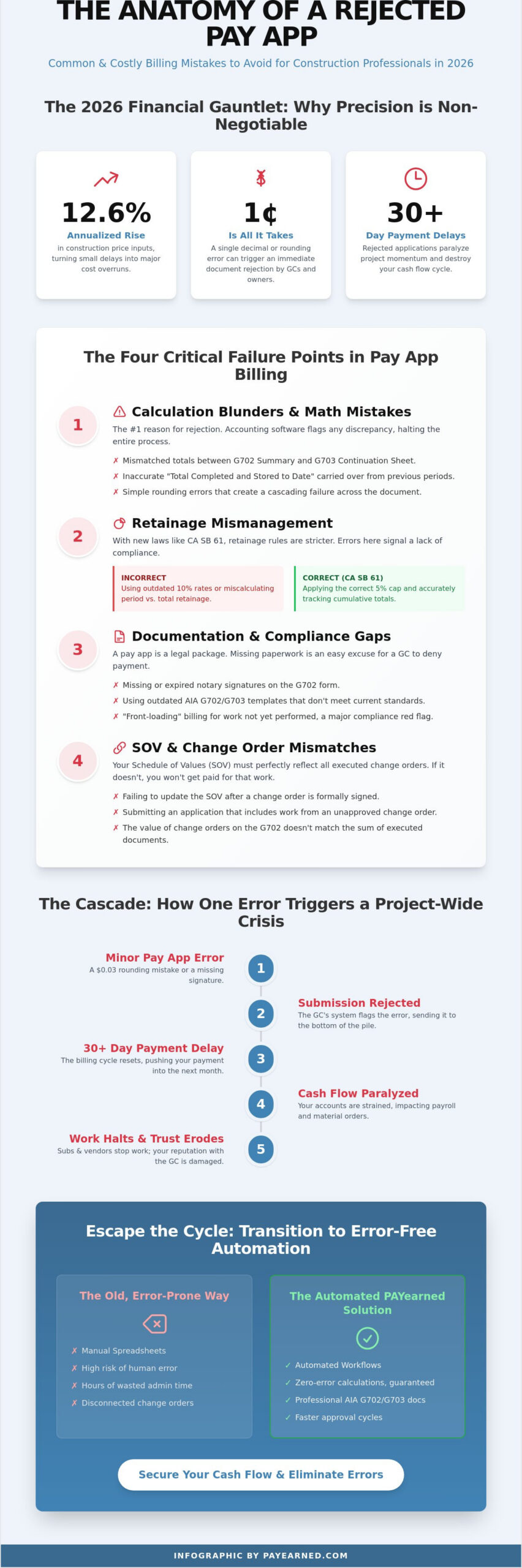
Change Order and Schedule of Values (SOV) Mismatches
Managing the intersection of your original contract and new work is a frequent point of failure. With early 2026 projections estimating project cost escalations between 4% and 6%, General Contractors are under intense pressure to control budgets. They won’t tolerate any ambiguity on your Continuation Sheet. If your Schedule of Values doesn’t align with the approved contract totals, your payment application will be rejected before it even reaches the architect’s desk.
Inaccurate tracking of the "Net Change by Change Orders" on your G702 cover sheet is a high-visibility error. This figure must be the sum of all formally executed changes, not a rough estimate of pending work. One of the common Pay App billing mistakes to avoid 2026 is failing to update the G703 Continuation Sheet immediately after a Change Order is approved. This mismatch creates a "rounding error" feel that suggests your accounting isn’t synchronized with the field operations. To ensure your totals always balance, automate your construction billing with a system built for precision.
Unapproved Change Orders on the Pay App
Billing for "verbal" change orders is a dangerous practice known as hopeful billing. Even if the GC’s project manager gave you a thumbs-up on site, the accounting department cannot release funds without a paper trail. A Change Order must be signed by all required parties before it appears on a G702. Including unapproved line items often results in the rejection of the entire application, not just the disputed portion. You must clearly separate "Pending" from "Approved" changes in your internal tracking to avoid this administrative trap.
Discrepancies in the Schedule of Values
Your billing line items must mirror the contract line items exactly. If the original contract lists "Electrical Rough-in" as a single line, don’t break it into five sub-items on your Pay App without prior approval. This "front-loading" risk triggers audits because it makes it difficult for the architect to verify the actual percentage of completion. Architects look for consistent reporting month-over-month. If your progress jumps from 20% to 80% without a clear justification or matching Change Order, expect a payment hold while they conduct a site inspection to verify the work.
Transitioning to Error-Free Pay App Automation
Manual data entry is a liability your firm can’t afford in the current economic climate. With steel prices having risen nearly 45% since mid-2025 and overall project costs escalating by up to 6% in early 2026, cash flow speed is the difference between profit and loss. Relying on traditional methods to manage your billing cycle is no longer sustainable. When you automate your workflow, you eliminate the common Pay App billing mistakes to avoid 2026 that lead to 30-day payment delays and strained relationships with General Contractors.
Modern project scales require a level of precision that manual tracking can’t provide. Cloud-based G702 and G703 generation ensures that your math is always perfect, from the first line item to the final grand total. Built-in search engines allow your team to retrieve historical project billing instantly, making it easy to defend your progress during an audit or a site inspection. Moving to a premium, specialized solution isn’t just about software; it’s about protecting your liquidity in a market where construction price inputs are rising at a 12.6% annualized rate.
Why Spreadsheets are Your Biggest Risk
Risky spreadsheets are the single biggest threat to your 2026 cash flow. We call it "math rot." It happens when a complex construction workbook develops a broken formula that no one notices until the architect rejects the entire application. Spreadsheets also lack version control. When multiple people edit the same billing sheet, you lose the audit trail necessary for compliance. Manual entry is a slow, error-prone process that consumes hours of administrative time. In an industry where 78% of projects rely on standardized AIA formats, a single typo in a cell can stall a six-figure payment for weeks.
The PAYearned Approach to G702/G703 Accuracy
PAYearned is a reliable specialist built exclusively for pay applications. It handles the heavy lifting by providing automated calculation of retainage and progress totals, ensuring your documents match the 1992 AIA standards that GCs and architects trust. Our platform manages the complexities of the 2026 regulatory environment, including the 5% retainage caps under California SB 61. You get secure, cloud-based storage for all your continuation sheets and change order documentation. If you ever hit a snag, our live, US-based support team is available to provide the human expertise you need for total peace of mind. It’s a professional, no-nonsense partner that lets you focus on the build while we handle the billing.
Secure Your Project Cash Flow for 2026
Precision is your only defense against the financial volatility of 2026. You’ve seen how a single rounding error or a miscalculated 5% retainage under California SB 61 can stall your entire payment cycle. By identifying the common Pay App billing mistakes to avoid 2026, you protect your firm from the 12.6% rise in construction price inputs that threaten your margins. Mastery of your Schedule of Values and Continuation Sheets ensures that every dollar you’ve earned reaches your bank account without administrative delays.
It’s time to retire the risky spreadsheets that endanger your liquidity. PAYearned provides a premium solution built exclusively for Pay Applications. You can generate professional, error-free documents with the peace of mind that comes from live, US-based support. Stop risking your cash flow; start your free trial of PAYearned today. There is no credit card required to start your journey toward zero-error billing. Your expertise belongs on the job site, not buried in billing paperwork. Take control of your progress payments and keep your projects moving forward with confidence.
Frequently Asked Questions
What is the most common reason a G702 Pay App is rejected?
Mathematical discrepancies between the G702 cover sheet and the G703 continuation sheet are the leading cause of rejections. If the "Total Completed and Stored to Date" doesn’t match the grand total on your back page to the cent, the GC’s accounting system will flag it. This is one of the most common Pay App billing mistakes to avoid 2026 because it suggests a lack of financial oversight and forces a manual review of your entire file.
How do I calculate retainage correctly on a G703 continuation sheet?
Calculate retainage by applying the contract percentage to the total work completed and materials stored for each line item. Under California’s SB 61 effective January 1, 2026, this is now capped at 5% for most private projects. You must track "Total Retainage" cumulatively while clearly stating "Retainage This Period" to ensure your unbilled retainage balances remain accurate on your balance sheet and avoid over-withholding errors.
Can I bill for materials stored off-site in 2026?
Yes, you can bill for off-site materials if you provide specific documentation, including proof of insurance and clear photographs. Project owners in 2026 are increasingly strict about these line items because construction price inputs rose at a 12.6% annualized rate earlier this year. You must demonstrate that the materials are fabricated, protected, and legally transferred to the project’s ownership to justify the progress payment and protect the owner’s investment.
Is it better to use an Excel template or Pay App software?
Specialized software is superior to Excel because it eliminates the "math rot" and broken formulas that plague manual spreadsheets. While Excel is a general-purpose tool, premium Pay App software is built exclusively for construction billing with built-in audit trails and automatic version control. This prevents the administrative errors that stall your project cash flow and ensures your documents meet the 1992 AIA standards used on 78% of commercial projects.
What is the difference between a conditional and unconditional lien waiver?
A conditional waiver is effective only after you receive the payment, whereas an unconditional waiver is effective immediately upon signing. Choosing the wrong form is a major legal risk. In 2026, submitting an unconditional waiver before the check clears can waive your lien rights prematurely. Conversely, submitting a conditional waiver when an unconditional one is contractually required for a final payment will likely delay your funds and trigger an administrative rejection.
How do I handle a change order that is still pending approval?
Do not include pending change orders on your G702/G703 forms until they are formally signed and executed by all parties. Including verbal or unapproved changes is one of the common Pay App billing mistakes to avoid 2026. Instead, track these separately in your internal records. Only move them to the "Net Change by Change Orders" line on your cover sheet once you have a signed document to avoid a full document rejection.
Why does the architect need to sign the pay application?
The architect’s signature serves as a legal certification that the work described in the Pay App matches the physical progress on the job site. This signature is required by the majority of commercial contracts to authorize the release of funds. Without this professional verification, lenders and owners won’t release the progress payment because they lack independent proof that the value has been delivered according to the project specifications.
What happens if I over-bill for a percentage of completion?
Over-billing, often called "front-loading," triggers immediate audits and can lead to a complete payment freeze. If an architect discovers you’ve billed 80% for a task that is only 50% complete, you lose credibility and may face penalties under 2026 prompt payment laws. With project costs escalating by 6% annually, owners are hyper-vigilant about paying only for verified work performed to ensure the project remains fully bonded and solvent.
PAYearned is an agnostic workflow platform that helps teams manage pay applications
PAYearned is an independent software product and is not developed, endorsed, approved, sponsored or affiliated with the American Institute of Architects (AIA). AIA®, G702®, G703®