

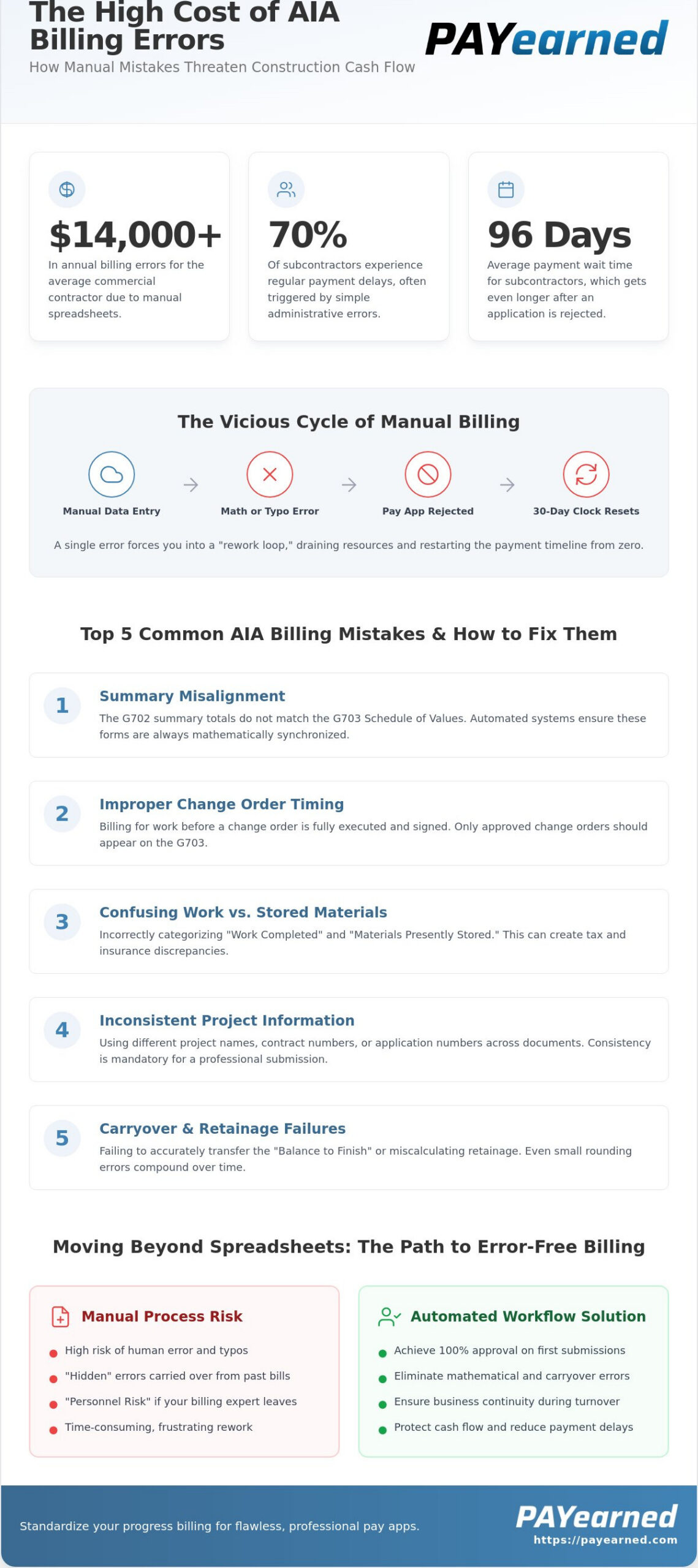
Did you know that manual spreadsheets cause over $14,000 in annual billing errors for the average commercial contractor? It’s a staggering figure that explains why roughly 70% of subcontractors experience regular payment delays. You’ve likely felt the burnout of manual data entry or the anxiety of a rejected pay application because of a single math error in your retainage calculations. These common aia billing mistakes aren’t just administrative hiccups; they’re direct threats to your cash flow that can extend payment wait times to an average of 96 days.
We believe your time is better spent on the job site than fighting with complex spreadsheets. This article identifies the most frequent errors found in construction pay applications and explains how to implement a streamlined, automated workflow. You’ll learn the steps to achieve a 100% approval rate on first-time submissions while drastically reducing the hours spent on administrative tasks. We’ll show you how to maintain precise tracking of change orders and retainage, ensuring your financial documentation is as professional as your craftsmanship.
Key Takeaways
- Understand how a single administrative error on a G702 form can restart your 30-day payment clock and drain resources through the “rework loop.”
- Identify the most common aia billing mistakes, specifically the mathematical misalignment between the G702 Summary and the G703 Schedule of Values.
- Learn the precise method for accounting for approved versus pending change orders to prevent rejections and maintain project transparency.
- Discover how shifting to an automated, cloud-based workflow ensures business continuity and protects historical billing data during personnel turnover.
- Implement standardized progress billing practices to achieve a 100% approval rate on first-time submissions and protect your construction cash flow.
The High Cost of AIA Billing Errors in Construction
A single typo on a G702 form can be devastating. When an architect or owner identifies an error, they don’t just ask for a quick correction; they often reject the entire submission. This restarts your 30-day payment clock from zero. For a subcontractor already waiting an average of 96 days for payment, this administrative delay can trigger a severe liquidity crisis. Avoiding common aia billing mistakes is not just about clean paperwork; it’s about protecting your survival.
Administrative teams often fall into a “rework loop.” They spend hours digging through folders and old spreadsheets to find historical data. This manual process is inefficient and expensive. Research suggests manual spreadsheets cause over $14,000 in annual billing errors for the average commercial contractor. Much of this stems from the lack of a centralized system. It’s critical to focus on mastering the payment application to break this cycle.
There is also a significant “Personnel Risk.” If your billing expert leaves, your cash flow shouldn’t stop. Many firms rely on one person’s “manual expertise” with complex Excel files. If that person exits, the firm’s ability to generate accurate pay apps disappears. A cloud-based, automated system makes your billing process personnel-independent and secure. Correcting these common aia billing mistakes manually is a recipe for burnout.
Mathematical Discrepancies and Retainage Confusion
Manual retainage calculations are the primary reason for G702 rejections. Even a small rounding error on your Schedule of Values can compound over a 12-month project. By the time you reach the final billing cycle, these pennies grow into significant discrepancies that won’t balance. Automated retainage tracking prevents cumulative errors by calculating every line item with mathematical precision.
The Hidden Danger of Manual Data Entry
Many contractors simply copy and paste data from the previous month’s bill. This practice “stores” errors that might not be noticed for months. Using outdated AIA billing templates in Excel increases this risk. These templates lack the built-in guardrails necessary to catch mistakes before you hit send.
Top 5 Common AIA Billing Mistakes and How to Fix Them
Rejections often stem from simple administrative oversights that are easy to overlook during a busy billing cycle. Identifying these common aia billing mistakes before you submit can save your team weeks of back and forth communication. Precision is mandatory. Missing even a single digit in a contract number can violate proper invoice requirements, leading to an immediate return of your payment application.
- Summary Misalignment: The totals on the G702 summary must exactly match the aggregate totals on the G703 continuation sheet.
- Change Order Timing: Billing for work before a change order is fully executed is a red flag for architects and owners.
- Materials vs. Labor: Confusing “Work Completed” with “Materials Presently Stored” creates tax and insurance discrepancies.
- Inconsistent Information: Using different project names or incorrect application numbers suggests a lack of professional oversight.
- Carryover Failures: Failing to accurately transfer the “Balance to Finish” from the previous period creates a mathematical domino effect.
Synchronizing the G702 and G703 Sheets
The G703 Continuation Sheet is the source of truth for your entire application. Every dollar claimed on the G702 summary must be traceable to a specific line item on the G703. Errors frequently occur in Column E (Previous Applications) and Column F (This Period). If you don’t reconcile these columns against your previous month’s approved application, your totals won’t balance. Ensure every line item matches your original contract or approved AIA-style billing schedule exactly to maintain credibility with the project owner.
Managing Change Orders Within the Billing Cycle
You must distinguish between Construction Change Directives and Approved Change Orders. You can’t bill for a change order until it’s officially signed by all parties. Including pending items in your “Total Completed and Stored to Date” is one of the most common aia billing mistakes that triggers an immediate rejection. Document each approved change order as a separate line item on the G703. This creates a clean audit trail and prevents confusion regarding the revised contract sum. If you want to streamline your pay applications, focus on automating these calculations to ensure your change orders are always in sync with the master contract.
Moving Beyond Manual Forms: Standardizing Your Progress Billing
Relying on manual expertise creates a single point of failure within your accounting department. If the person who manages your billing leaves, your project’s financial momentum shouldn’t stall. Shifting to automated systems protects business continuity by centralizing all historical billing data in one secure location. Instead of digging through hard drives, cloud-based platforms act as a dedicated search engine for your project history. This transition is the most effective way to eliminate the common aia billing mistakes that arise from fragmented, manual record-keeping.
Standardization ensures every submission adheres to the G702 application and certificate for payment standards. By removing manual entry, you strip away the risk of procedural inaccuracies. Your back-office teams gain a workflow rooted in accuracy and efficiency, allowing them to focus on project management rather than mathematical troubleshooting. This systemic autonomy allows your firm to scale without increasing administrative burnout.
The ROI of Automated Document Generation
The return on investment for automation is immediate and measurable. Many subcontractors report reducing the time spent on a single pay app from four hours down to just 15 minutes. This efficiency does more than just save labor costs; it standardizes the process so any team member can step in and generate a professional document. Pay Applications made EASY for LESS directly improves a subcontractor’s bottom line by accelerating the transition from work completed to cash in hand.
Implementing a ‘Human-First’ Billing Workflow
A “human-first” approach means using technology to handle the tedious tasks that lead to common aia billing mistakes. Built-in tools for retainage tracking ensure you never leave money on the table during project closeout. Digital storage provides an unalterable audit trail to defend against payment disputes or discrepancies. This level of organization provides peace of mind and professional credibility with project owners. Streamline your AIA-style billing today with PAYearned to secure your cash flow and modernize your administrative operations.
Take Control of Your Construction Cash Flow
Eliminating common aia billing mistakes is the fastest way to stabilize your firm’s financial health. By prioritizing mathematical precision on your continuation sheets and ensuring every change order is fully executed before billing, you remove the administrative friction that leads to payment rejections. You’ve seen how manual workflows create unnecessary risks; now is the time to implement a system that protects your business continuity and provides total peace of mind. Moving away from outdated spreadsheets is a strategic investment in your firm’s professional reputation.
Standardizing your progress billing doesn’t have to be a complex overhaul. With the right technology, you can move from hours of manual data entry to minutes of automated document generation. PAYearned provides a specialized solution featuring Automated G702/G703 Generation, Cloud-Based Project Storage, and Built-In Change Order Tracking. These features ensure your financial documentation is always accurate, accessible, and ready for immediate approval by architects and owners.
Don’t let simple administrative errors dictate your project’s success or delay your team’s hard-earned payments. Start Your Free Trial of PAYearned – Pay Apps Made EASY for LESS today. You deserve a billing process that works as hard as your crew on the job site.
Frequently Asked Questions
Why was my AIA G702 payment application rejected?
Rejections typically happen due to mathematical discrepancies between the summary and the continuation sheet or missing signatures. Even a small rounding error on the G702 can cause an architect to return the document. Other frequent issues include incorrect project numbers or billing for change orders that aren’t fully executed yet. Ensuring your data matches the original contract exactly is the best way to prevent these costly administrative delays.
How do I calculate retainage on a G702 form correctly?
You calculate retainage by applying the contract’s specified percentage to the total work completed and stored to date. For example, if you have $100,000 in completed work and a 5% retention rate, you must deduct $5,000 to reach your current payment due. It’s critical to track both the variable retainage on labor and the fixed retainage on materials separately if the contract requires specific calculations for each category.
Can I bill for stored materials on the G703 continuation sheet?
Yes, you can bill for materials that are on-site or in an approved off-site warehouse using Column F. You must provide supporting documentation like invoices or insurance certificates to prove the materials are dedicated to the project. Architects will often reject these line items if the materials aren’t properly secured or insured, as this represents a significant financial risk to the project owner.
What is the difference between a pending and an approved change order for billing?
An approved change order is a fully signed legal amendment to the contract, while a pending change order is still under review. You can only include approved change orders in your “Total Completed and Stored to Date” calculations. Billing for pending items is one of the most common aia billing mistakes and will lead to an immediate rejection of your pay application by the general contractor or owner.
Do I need a notary for every AIA-style pay application?
Most commercial contracts require the G702 form to be notarized to verify the contractor’s signature before payment is released. This step confirms the accuracy of the progress billing and the truthfulness of the lien waivers included in the packet. Always check your specific contract documents, as some private owners or state-funded projects may have different verification requirements for their specific payment certificates.
How does automated software prevent math errors in progress billing?
Automated platforms eliminate common aia billing mistakes by using built-in logic to sync the G702 and G703 forms in real time. When you update a line item on the continuation sheet, the software auto-calculates the totals, retainage, and balance to finish. This ensures your summary always matches your itemized work, removing the risk of rounding errors that typically plague manual, spreadsheet-based billing methods.
PAYearned is an agnostic workflow platform that helps teams manage pay applications
PAYearned is an independent software product and is not developed, endorsed, approved, sponsored or affiliated with the American Institute of Architects (AIA). AIA®, G702®, G703®