

82% of contractors report waiting 30 or more days past their expected payment date, often because of minor formatting errors or calculation mistakes. With the average contractor holding only 21.4 days of cash on hand, learning how to streamline construction pay applications is no longer optional; it’s a requirement for project survival. You’ve likely felt the stress of the monthly billing crunch, spending days wrestling with spreadsheets and manually tracking unbilled retainage while hoping your G702 matches your G703 continuation sheets.
This guide reveals the exact steps to eliminate manual entry and adopt specialized workflows that ensure your billing is error-free. We’ll show you how to automate AIA-style documentation, stay compliant with the 2026 5% retainage caps in California and New York, and reduce your billing time from days to hours. By moving away from risky spreadsheets, you’ll gain real-time visibility into your finances and establish a standardized, repeatable process that gets you paid on time.
Key Takeaways
- Eliminate the “monthly billing crunch” by treating pay applications as a continuous financial workflow rather than a stressful end-of-month event.
- Ensure transparency and reduce rejection rates by standardizing your billing with AIA-style G702 Summary and G703 Continuation Sheets.
- Discover how to streamline construction pay applications by replacing risky, error-prone spreadsheets with specialized automation built for construction finance.
- Protect your cash flow by centralizing your Schedule of Values and implementing real-time change order tracking to avoid “catch-up” billing.
- Reduce administrative overhead by choosing a dedicated billing solution that avoids the “feature bloat” and high costs of general project management suites.
The High Cost of Friction: Why Construction Pay Applications Stall
The payment application is the financial heartbeat of any construction project. When this heartbeat skips, the entire job site feels the pressure. For most contractors, the “monthly billing crunch” is a period of high stress where office staff spend 20 to 30 hours wrestling with data entry instead of managing project growth. This friction isn’t just an administrative headache; it’s a drain on your overhead. Understanding how to streamline construction pay applications is no longer a luxury for the back office. It’s a critical survival strategy in a 2026 market where the average contractor has only 21.4 days of cash on hand.
Rejected pay apps carry hidden costs that don’t appear on a balance sheet until it’s too late. When an application is kicked back for a formatting error or a math discrepancy, it triggers a chain reaction. You face interest penalties on unpaid amounts, delayed payments to labor and subcontractors, and a damaged reputation with project owners. In California, the “Private Works Change Order Fair Payment Act” (SB 440) now imposes a 2% per month interest penalty on undisputed amounts that remain unpaid. If your billing process is slow, you aren’t just losing time; you’re losing profit margin.
The ‘Spreadsheet Risk’ in Construction Billing
Manual spreadsheets are the primary source of billing friction. A single broken formula in an Excel-based G703 can lead to cumulative errors in unbilled retainage that take months to discover. Version control becomes impossible when multiple project managers edit the same file, leading to conflicting data and rejected submissions. Spreadsheet Risk is the liability incurred by using non-auditable manual tools for million-dollar billing. These tools lack the specialized logic required to handle complex continuation sheets, making them a “risky” foundation for your company’s cash flow.
Common Bottlenecks in the Approval Workflow
The gap between field progress and office billing is a frequent point of failure. Without real-time visibility, the office often bills for work that hasn’t been verified or misses completed work entirely. This process begins with a clear Schedule of Values, which acts as the roadmap for all subsequent billing. If this roadmap is poorly defined, every subsequent pay app will struggle. Other common bottlenecks include:
- The Missing Documentation Trap: Forgetting to attach updated lien waivers, insurance certificates, or signed change orders.
- Inconsistent Formatting: Switching between different owner requirements without a standardized system.
- Retention Miscalculations: Failing to account for new 2026 laws in New York and California that cap private project retainage at 5%.
Streamlining these touchpoints reduces the average 83-day industry cycle for Days Sales Outstanding (DSO). When you eliminate these bottlenecks, you stop being a bank for your clients and start getting paid for the work you’ve already performed.
Standardizing Your Workflow with AIA-Style G702 and G703 Documents
Standardization is the primary antidote to billing chaos. While many contractors try to reinvent the wheel with custom invoices, AIA-style formats like the G702 and G703 remain the industry gold standard for transparency. These documents provide a predictable framework that architects, owners, and lenders already trust. When you understand how to streamline construction pay applications, you realize that using these standardized documents is about more than compliance; it’s about reducing the learning curve for your team. A project manager who knows how to read a continuation sheet can step into any project and immediately understand the financial health of the job. This level of consistency is even reflected in high-level standards like the Federal Acquisition Regulation (FAR) Part 36, which outlines the rigorous documentation required for federal construction projects.
The relationship between the G702 and G703 is symbiotic. The G702 acts as the cover sheet, providing a high-level summary of the contract’s financial status, while the G703 provides the granular detail. If the numbers on your continuation sheet don’t perfectly support the summary on the G702, the application will be rejected. By adopting these industry-standard formats, you align your company with the expectations of the most professional players in the market, which speeds up the approval cycle and builds long-term trust with your partners.
The Anatomy of a Perfect G702 Summary
The G702 serves as the formal certificate for payment. It distills complex field data into a few critical fields: the original contract sum, net change orders, and the total work completed to date. Accuracy here is non-negotiable. If your “Balance to Finish” calculation is off by even a few cents, the architect will likely flag it for revision. For those looking to move beyond manual entry, using specialized AIA billing software ensures these calculations are handled automatically, protecting your cash flow from simple math errors and ensuring your summary always matches your detail sheets.
Mastering the G703 Schedule of Values
The G703 Continuation Sheet is where you break down your Schedule of Values into line items for approval. To avoid delays, structure these line items in a way that makes sense to the architect. A common pitfall is the “stored materials” trap. You must clearly document materials currently on-site but not yet installed to ensure you’re reimbursed for that overhead. Every line item must be balanced to match the total contract sum exactly. If you find yourself struggling with these technicalities, you might consider a premium billing solution that handles the heavy lifting for you, allowing your team to focus on the build rather than the paperwork.
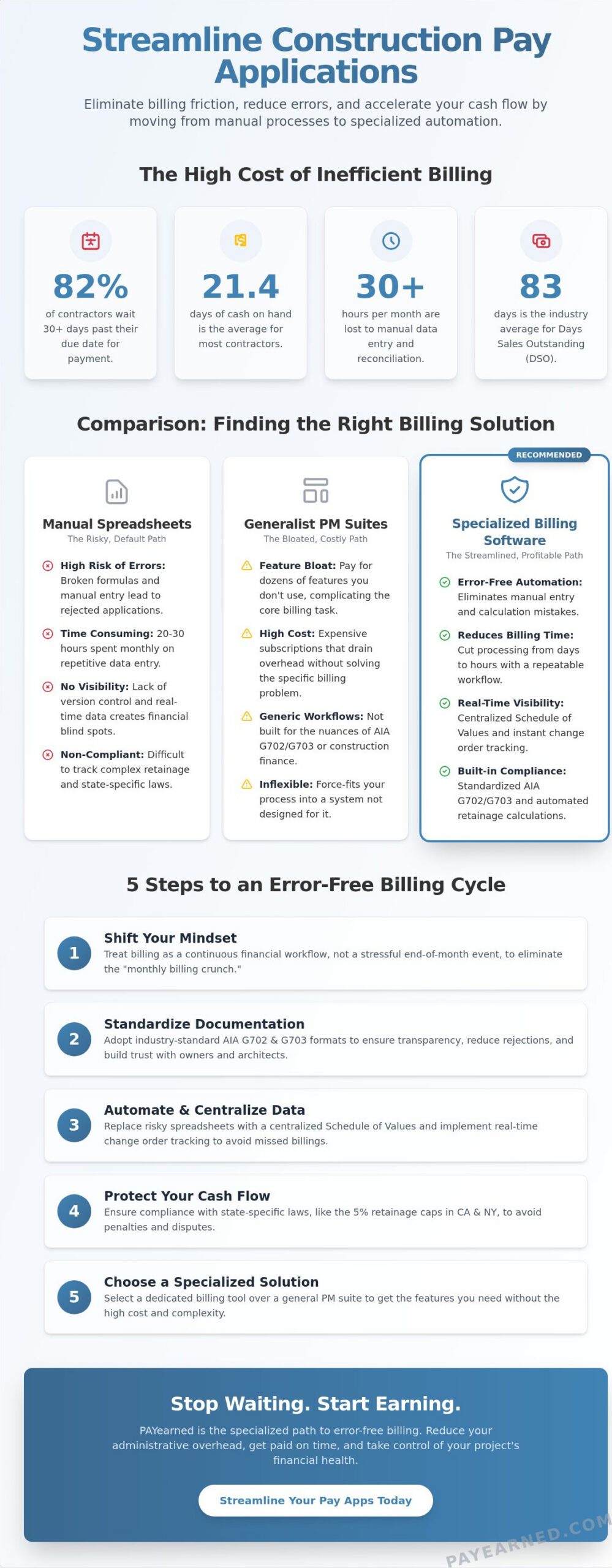
Comparison: Manual Spreadsheets vs. Generalist PM vs. Specialized Billing Software
Choosing the right tool for your billing department usually involves a trade-off between the perceived “zero cost” of spreadsheets and the high implementation fees of massive project management suites. While Excel is the industry default, it’s rarely free in the long run. Manual entry leads to the “spreadsheet risk” where a single broken cell can delay a million-dollar payment. In an industry where 82% of contractors report waiting 30 or more days past their expected payment date, sticking to manual tools is a gamble. Understanding how to streamline construction pay applications requires looking past the sticker price to the actual cost of labor and errors.
Generalist project management platforms aim to be everything for everyone. While these suites excel at field tracking or RFI management, their billing modules are often treated as secondary features. This creates “feature bloat,” where your accounting team must navigate complex menus and field-centric data just to generate a simple continuation sheet. Implementation fees for high-end systems like Premier Construction Software can start at $15,000; a steep price for a firm that just needs accurate billing.
Why Generalist Software Often Fails the Billing Department
The learning curve for “all-in-one” platforms is notoriously steep. For an accounting professional, this creates a “data silo” problem. Critical billing information is buried under daily logs, site photos, and safety reports, making it difficult to extract the clean data needed for an audit-ready pay app. Generalist platforms often lack the specialized logic required for complex “unbilled retainage” calculations or specific state-level compliance. PAYearned offers a premium focus on the financial side of the project, ensuring the office staff isn’t bogged down by field-level complexity or unnecessary features they’ll never use.
The Specialized Advantage: PAYearned’s Focused Approach
Specialized billing automation acts as the “Middle Path” for efficiency. It provides the power of a dedicated database without the unnecessary weight of a full PM suite. This “Compatible but Independent” approach means you can maintain your existing project workflows while using a tool built exclusively for G702 and G703 generation. This focused approach directly addresses the 83-day industry average for Days Sales Outstanding (DSO) by ensuring your applications are submitted correctly the first time. Key advantages of this specialized model include:
- Searchable History: Built-in search engines to retrieve historical project billing data in seconds rather than digging through folders.
- Audit Trails: Automated logs that ensure every change to a line item is tracked and verified.
- Live US-Based Support: Real human assistance to help you through the end-of-month billing rush when every hour counts.
By using a tool designed for one specific task, you eliminate the friction that causes payment delays and administrative burnout.
5 Steps to Streamline Your Billing Cycle for 2026
Establishing a repeatable system is the only way to consistently beat the monthly billing crunch. If you are looking for how to streamline construction pay applications, you must move beyond reactive data entry. A structured workflow ensures that your documentation is ready before the deadline, preventing the panic of last-minute corrections. Follow these five steps to modernize your 2026 billing process.
- Step 1: Centralize your Schedule of Values (SOV). Move your SOV into an automated database rather than a static spreadsheet. This ensures that the baseline for every subsequent application is accurate and tamper-proof.
- Step 2: Implement real-time change order tracking. Stop waiting for the end of the month to reconcile change orders. Link approved changes to your billing workflow as soon as they are signed to avoid “catch-up” billing.
- Step 3: Automate retainage logic. With new 2026 laws in California and New York capping retainage at 5%, your system must handle these specific percentage calculations automatically. Manual math is too risky.
- Step 4: Use auto-populating templates. Your G702 summary should pull data directly from your G703 continuation sheets. Eliminating the need to copy-paste numbers between forms removes the primary source of human error.
- Step 5: Conduct a ‘Pre-Flight’ check. Always perform a final audit to catch math discrepancies or missing signatures before hitting send. This final step prevents the “rejection loop” that stalls your cash flow.
If you want to eliminate these manual steps entirely, start using a specialized billing workflow that handles these steps for you automatically.
Automating Change Order Management
Linking approved change orders directly to your next pay application is the most effective way to maintain cash flow visibility. You should maintain a clear distinction between “pending” and “approved” change orders within your system. This allows you to project future revenue without accidentally billing for work that hasn’t received official sign-off. When documenting these changes, use clear, concise descriptions. Detailed notes help architects approve the line items faster, reducing the time your money stays tied up in the approval cycle.
Retainage Tracking: Protecting Your Profit
Unbilled retainage is often the most common source of lost revenue for contractors. It is easy to lose track of that final 5% or 10% over a multi-year project if you are relying on manual notes. Automated tracking ensures that you never “forget” to bill for retention at project close-out. By preparing your “Release of Retainage” documentation in advance, you can trigger the final payment as soon as the work is accepted. This proactive approach is vital in the 2026 market, where 82% of contractors are already waiting over 30 days for their standard payments. Protecting your retainage is protecting your bottom-line profit.
Implementing PAYearned: The Specialized Path to Error-Free Billing
Transitioning from manual entry to automated workflows is the single biggest productivity win for contractors in 2026. PAYearned is built exclusively for pay applications, solving the specific pains of G702 and G703 generation without the feature bloat found in general project management software. It eliminates the spreadsheet risk mentioned in previous sections by using a secure database that handles technical math for you. Because this platform is focused on a single, critical task, it provides a level of reliability that generic accounting tools simply can’t match. You gain the relief of knowing your unbilled retainage and change order sheets are perfectly synchronized every month.
Reducing implementation friction is a core priority for any busy construction firm. PAYearned offers a “no credit card required” entry point, allowing your team to test specialized billing workflows before making a financial commitment. This transparency reflects a brand that values honesty and competence over high-pressure sales tactics. By moving away from manual entry, you ensure that every continuation sheet and summary is audit-ready, providing peace of mind to both your office staff and your lenders. In a market where subcontractors typically wait 56 days for payment, being the first to submit a perfect, professional pay app is a competitive advantage.
Getting Started with Automation
Setting up your first project is a direct, logical process. You begin by importing your project data and establishing a centralized Schedule of Values. This database serves as the single source of truth for all future billing cycles, ensuring that your “Balance to Finish” always matches the actual project status. PAYearned uses predictable pricing models to help you manage overhead; an unlimited monthly plan costs $89, while the annual plan is $67 per month. We recommend a “pilot project” approach to prove the time savings to internal stakeholders. Most firms see a reduction in billing time from days to hours within the first two cycles, making the return on investment immediate and measurable.
The Future of Construction Billing
The industry is moving toward “Instant Audit” capabilities where transparency is non-negotiable. In this high-stakes environment, how to streamline construction pay applications becomes a question of data integrity. When your billing is consistently error-free and submitted in the trusted AIA-style format, your relationships with General Contractors and Owners improve. You stop being the “problem invoice” and become the reliable partner. This professional edge is critical in an industry where 82% of contractors are willing to adopt digital systems to secure faster cash flow. Simplify your construction billing today with PAYearned and take control of your project’s financial heartbeat.
Modernize Your Billing Workflow for 2026
The transition from manual spreadsheets to specialized automation is the single most effective way to eliminate the “monthly billing crunch.” By standardizing your documentation and centralizing your Schedule of Values, you remove the human error that leads to rejected applications and delayed cash flow. Understanding how to streamline construction pay applications is no longer just an administrative goal; it’s a financial necessity in an industry where 82% of contractors face payment delays. Precision in your billing ensures you stay ahead of the 2% monthly interest penalties established by new 2026 prompt payment laws.
PAYearned provides the stability you need with error-free AIA-style G702 and G703 generation. Our platform includes built-in change order and retainage tracking to ensure you never leave profit on the table. If you hit a roadblock, our live, US-based expert support is ready to guide you through the process. Stop gambling your project’s success on risky manual tools. Start your free trial of PAYearned; no credit card required. You can build with confidence when your billing is as precise as your construction.
Frequently Asked Questions
How do I calculate retainage on a G702 form?
Calculate retainage by applying the contract percentage to the sum of total work completed and stored materials. As of January 1, 2026, new laws in California and New York cap this at 5% for private projects. Subtract this calculated value from the total earned to determine the current payment due. Automated systems perform this math instantly to prevent the “spreadsheet risk” of manual formula errors.
What is the difference between a G702 and a G703?
The G702 serves as the high-level summary and official certificate for payment. It acts as the cover page that owners and architects sign. The G703 is the continuation sheet that provides the granular, line-item detail from your Schedule of Values. These documents must match perfectly. If the totals on your G703 don’t support the summary on your G702, your application will likely be rejected.
Can I use Excel for AIA-style billing in 2026?
You can use Excel, but it’s a high-risk strategy in the current market. Manual spreadsheets lack audit trails and are prone to broken formulas that lead to payment delays. With 82% of contractors already waiting over 30 days for payment, using non-auditable tools is a liability. Learning how to streamline construction pay applications through specialized software is a safer way to ensure accuracy and protect your cash flow.
How do I add a change order to my pay application?
Add approved change orders as new, individual line items on your G703 continuation sheet. Once added, these values automatically update the “Net Change by Change Orders” field on your G702 summary. It’s critical to only bill for change orders that have received official written sign-off. Tracking these in real-time prevents the “catch-up” billing cycle that often causes friction during the final project close-out.
What happens if my pay application is rejected for a math error?
A rejection usually resets your payment clock, potentially delaying your funds by another 30 to 60 days. You must identify the error, correct all affected documents, and restart the signature routing process from the beginning. This delay can be devastating for firms with limited cash on hand. Using automated “Pre-Flight” checks helps you catch these discrepancies before the architect ever sees the application.
Is specialized billing software better than a full project management suite?
Specialized software is often superior for accounting staff because it eliminates “feature bloat.” While massive suites handle field logs and site photos, they often have steep learning curves and implementation fees starting at $15,000. A dedicated billing tool provides a “Middle Path” that focuses exclusively on financial accuracy. It’s a premium solution for firms that want to simplify their back-office without overpaying for unused features.
How does automated software handle stored materials on the G703?
Automated software tracks materials stored on-site in a specific G703 column, ensuring they are included in the current period’s earnings. The system automatically applies the correct retainage to these materials and carries the balance forward to the next cycle. This level of automation prevents the “stored materials trap” where contractors lose out on reimbursement for overhead costs that are already sitting on the job site.
What are the benefits of US-based support for construction software?
US-based support provides localized expertise and alignment with your project’s time zone. When you’re in the middle of a high-stakes billing crunch, you can’t afford to wait 24 hours for a response from a global help desk. Speaking with a human specialist who understands American construction standards provides a critical layer of reliability. It ensures that technical issues don’t stand in the way of your project’s financial heartbeat.
