

How much of your monthly cash flow is currently trapped in a spreadsheet error you haven’t even discovered yet? For many subcontractors and general contractors, the construction billing process is less of a professional workflow and more of a high-stakes gamble with manual data entry. You likely agree that there is nothing more frustrating than having a major pay application rejected because a single change order wasn’t tracked correctly or a retainage calculation was off by a fraction of a percent. These errors don’t just delay a single check; they stall your entire project momentum.
It’s time to stop treating your billing like a chaotic administrative chore. We promise to help you master the complexities of G702 and G703 style progress payments so you can secure faster approvals and maintain a steady, accurate cash flow. This guide provides a clear roadmap for streamlining your documentation, managing the 5% retainage caps now standard in private California projects, and ensuring your billing remains precise despite the 4.75% prompt payment interest rates currently in effect. We will preview the exact steps needed to build a repeatable, error-free system that protects your business from unnecessary delays and eliminates the administrative panic that occurs when specialized staff leave the company.
Key Takeaways
- Understand why standard retail invoices fail in construction and how to transition to a specialized, progress-based billing workflow.
- Master the monthly cycle of the construction billing process by synchronizing daily reports, vendor invoices, and photo documentation for total transparency.
- Eliminate manual data entry errors in G702 and G703 forms by moving away from fragile Excel templates toward automated, cloud-based solutions.
- Secure faster approval cycles and protect project liquidity by maintaining mathematical precision in retainage and change order tracking.
The Architecture of the Construction Billing Process
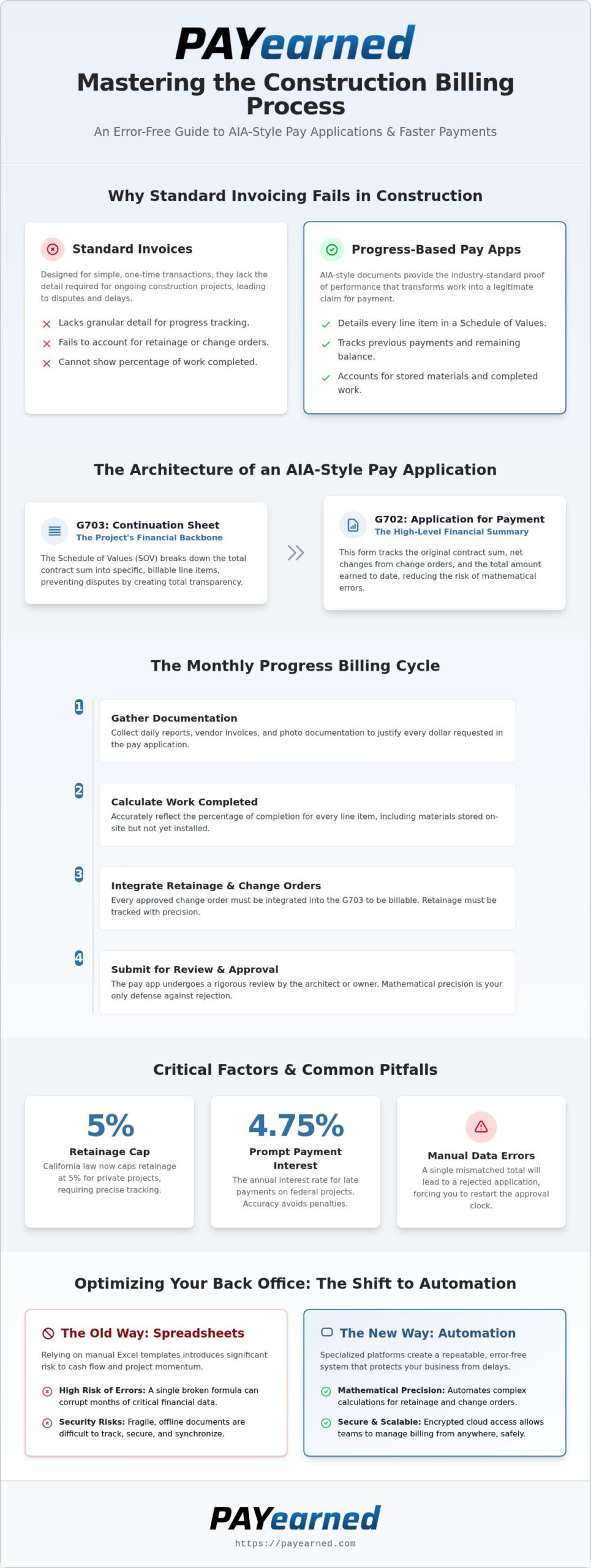
The construction billing process isn’t a simple exchange of goods for cash. It’s a progress-based workflow that mirrors the physical reality of a job site. In retail, you buy a product and receive an invoice. In a commercial project, you provide labor and materials over months or years. Standard invoices fail here because they lack the granular detail required by lenders, owners, and general contractors. They don’t track previous payments, current work completed, or the specific percentage of materials stored on-site.
The Pay Application serves as the industry-standard request for funds. It provides the necessary proof of performance that transforms a stack of receipts into a legitimate claim for payment. By adopting AIA-style billing, you speak the universal language of commercial construction. This creates a foundation of trust within the construction billing process. It ensures every stakeholder understands exactly what they’re paying for and how much of the total contract remains.
The Role of the Schedule of Values (SOV)
The Schedule of Values acts as the backbone of your entire project financial structure. Represented on the G703 Continuation Sheet, this document breaks down the total contract sum into specific line items of work. A detailed SOV prevents disputes during the approval process because it leaves no room for ambiguity. PAYearned organizes this data clearly, making it easy to retrieve and update as the project evolves. When your line items are transparent, your path to payment is clear.
Why AIA-Style Documentation is the Industry Standard
The G702 Application and Certificate for Payment serves as the high-level summary of your financial status. It tracks the original contract sum, net changes from change orders, and the total amount earned to date. Standardized forms provide a steady hand in financial reporting; they reduce the risk of mathematical errors that delay checks. This precision is critical when the prompt payment interest rate is 4.75% per annum for federal projects. For a technical deep dive into these requirements, consult our G702 definitive reference guide. Using these formats signals that your back office is as professional as your field crew.
Step-by-Step: Managing the Progress Billing Cycle
The monthly billing cycle is the heartbeat of your construction cash flow. It dictates when you can pay vendors and how much overhead you can cover. Preparation begins long before the deadline for each construction billing process cycle. You must gather daily reports, vendor invoices, and photo documentation to justify every dollar requested. Once submitted, your pay application typically travels through the architect or owner for a rigorous review. Mathematical precision is your only defense here. A single decimal error or a mismatched total will lead to a rejected application; this forces you to restart the approval clock.
Calculating Work Completed and Stored Materials
Tracking “work completed this period” versus “total work to date” requires constant vigilance. You must accurately reflect the percentage of completion for every line item on your continuation sheet. Billing for materials stored on-site but not yet installed is a common point of friction. To maintain high-end financial liquidity, provide clear evidence of these materials through inventory logs or photos. This transparency helps you meet the legal requirements for payment timing and keeps the project moving forward. If you want to streamline this entire workflow, consider using cloud-based billing tools to automate these complex calculations.
Handling Retainage and Change Orders
Retainage is the percentage held back to ensure you finish the job. In 2026, California law now caps retainage at 5% for private projects. Managing this alongside change orders is where most manual systems fail. Every approved change order must be integrated into your G703 Continuation Sheet to be billable. If a change order isn’t listed, you can’t request funds for it. Accuracy here is vital for your construction billing process. For a deeper look at avoiding common pitfalls, read our guide on mastering payment applications. Keeping these figures synchronized ensures your net payment matches your expectations.
Optimizing Your Back-Office for Accuracy and Speed
The construction billing process relies on a stable back-office to maintain project liquidity. While many firms still cling to manual Excel templates, these documents represent a significant security risk. A single broken formula can corrupt months of data. Automated platforms offer a protective layer through real-time data storage and encrypted cloud access. This allows your team to manage billing from the field or a remote office without losing synchronization. By adopting specialized tools, you can scale your operations and handle larger contracts without the need to increase your administrative headcount.
Moving Beyond Manual G702/G703 Excel Templates
Manual spreadsheets are the primary source of procedural inaccuracies in construction finance. The top three errors found in these files include:
- Mathematical errors in cumulative totals
- Version control issues where old data overwrites current progress
- Missing or incorrectly calculated retainage percentages
Modern subcontractors operate under the mantra that “Pay Applications made EASY for LESS” is the only way to remain competitive. You don’t need a bloated ERP system to achieve mathematical precision. You can view PAYearned tutorials to see how automation eliminates these manual hazards instantly.
Protecting Cash Flow Against Administrative Turnover
The departure of a billing manager often triggers a wave of panic in the front office. When the knowledge of your specific construction billing process exists only in one person’s head, your cash flow is at risk. Automated AIA-style software acts as a stabilizing force by standardizing the workflow. It ensures that any team member can step in and generate a professional pay application with minimal training. This personnel independence prevents payment disruptions and provides long-term peace of mind. To secure your back-office against turnover, explore PAYearned’s affordable pricing and start streamlining your 2026 billing operations today.
Secure Your Financial Future with Precise Billing
Winning the 2026 construction market requires more than just skilled labor in the field. It demands a back office that operates with mathematical precision and surgical efficiency. You’ve seen how a structured approach to the construction billing process transforms chaotic paperwork into a predictable engine for liquidity. By mastering the Schedule of Values and automating your G702 and G703 documentation, you remove the friction that leads to payment delays and rejected applications.
Transitioning to a dedicated platform isn’t just about saving time; it’s about building a resilient business that isn’t vulnerable to manual errors or staff turnover. You can now access your project data from anywhere while maintaining the professional standards that general contractors and owners expect. It’s time to stop fighting with fragile spreadsheets and start focusing on your next big project. High-end financial reporting is no longer a luxury reserved for the largest firms; it’s a necessity for any contractor aiming for stability.
Streamline your billing with PAYearned’s automated AIA-style platform. Our cloud-based solution is the accurate, efficient, and affordable alternative to expensive ERP systems. Take control of your progress payments today and ensure your cash flow remains steady for the long term.
Frequently Asked Questions
What is the difference between a construction invoice and a pay application?
A pay application is a comprehensive package that includes a summary of the contract, work completed to date, and stored materials, whereas a standard invoice is typically a single-page request for a specific set of goods or services. Pay applications are the standard for the construction billing process in commercial work because they provide a cumulative history of the project’s financial status. This detail is necessary for architects and owners to verify progress before releasing funds.
How do I calculate retainage on an AIA G702 form?
You calculate retainage by applying a set percentage, such as 5% or 10%, to the sum of the total work completed and the value of materials currently stored on-site. On a standard G702 form, this figure is subtracted from the total earned to date to determine the current payment due. Modern software automates this math to ensure you don’t exceed statutory caps, such as the 5% limit for private California projects established in 2026.
Can I use Excel for the construction billing process?
While you can use Excel to manage your construction billing process, it is a high-risk method prone to mathematical errors and version control issues. Manual spreadsheets lack the built-in logic required to track cumulative totals and complex change orders accurately over several months. Automated platforms provide a more reliable alternative that protects your cash flow from the administrative panic of a broken formula or a lost file.
What documents are required for a complete progress billing submission?
A complete submission usually requires a signed G702 Application for Payment, a detailed G703 Continuation Sheet, and executed lien waivers for the current period. Depending on the contract, you may also need to provide daily field reports, updated project schedules, and photo documentation of stored materials. Missing just one of these items can stall the approval cycle and delay your payment for several weeks.
How do change orders affect the Schedule of Values?
Change orders modify the original contract sum and must be explicitly added to the Schedule of Values on the G703 form to become billable. Once a change order is fully executed, it appears as a new line item or an adjustment to an existing one; this allows you to request progress payments for that specific work. Failing to update your SOV with approved change orders means you cannot legally bill for that additional labor or material.
Why do general contractors prefer AIA-style billing forms?
General contractors prefer AIA-style forms because they offer a standardized, predictable format that is easy for architects and owners to review and approve. These forms provide a steady hand for financial reporting by clearly showing the project’s total history, including previous payments and remaining balances. Using this industry-standard documentation signals that your firm is professional, organized, and capable of managing the complex financial requirements of large-scale commercial projects.
PAYearned is an agnostic workflow platform that helps teams manage pay applications
PAYearned is an independent software product and is not developed, endorsed, approved, sponsored or affiliated with the American Institute of Architects (AIA). AIA®, G702®, G703®