

On January 1, 2026, California’s SB 440 changed the landscape by mandating a 2% monthly interest penalty on late change order payments. If your back office is still wrestling with “risky spreadsheets” and manual entries, you aren’t just losing time; you’re leaking profit. Effectively managing construction billing cycles has become the strategic heartbeat of a successful firm, especially as the global market for construction accounting software reaches $2.83 billion this year. You need a process that’s as precise as your field work.
It’s frustrating to stare at a rejected G702 form because of a single math error. We know the stress of chasing unbilled retainage while bank financing rates for construction loans sit between 6.5% and 9.5%. You deserve a billing cycle that provides peace of mind rather than administrative headaches. This guide will teach you how to transform your chaotic billing into a streamlined, error-free system that accelerates payment approvals and secures your project profits.
We’ll explore how to navigate the new 5% retention caps, leverage the permanent 100% bonus depreciation rules from the OBBBA, and automate your continuation sheets for total financial clarity.
Key Takeaways
- Master the recurring sequence of progress billing by standardizing your Schedule of Values at the start of every project.
- Eliminate the “administrative tax” and calculation errors that often occur when managing construction billing cycles using manual spreadsheets.
- Implement a “Pencil Draw” process to identify discrepancies early and avoid the cycle of rejected pay applications.
- Safeguard your project profits by automating the tracking of unbilled retainage and change order sheets to ensure compliance with new 2026 regulations.
- Learn why a “Reliable Specialist” tool is more effective for generating error-free continuation sheets than a general-purpose accounting platform.
The Anatomy of a High-Stakes Construction Billing Cycle
In the construction industry, a billing cycle is the recurring sequence that begins when work is performed in the field and ends only when cash is safely in your bank account. It is the pulse of your project. Effectively managing construction billing cycles requires more than just sending a monthly invoice; it demands a deep understanding of Construction accounting principles. Unlike retail or SaaS models where payment is often immediate, construction relies on progress billing, where you request payment for a specific percentage of work completed during a set period.
This cycle is uniquely complex because it involves a chain of approvals. Subcontractors submit their numbers to General Contractors (GCs). GCs then bundle these into a master application for the architect and owner to review. If the architect disputes a single line item on a continuation sheet, the entire payment can stall. In 2026, the stakes are higher than ever. With bank financing rates for construction loans hovering between 6.5% and 9.5%, every day your capital is tied up in “billing lag” costs you real money. A 30 day cycle keeps a project solvent, while a 60 day cycle can trigger a liquidity crisis that halts production.
To better understand this concept, watch this helpful video:
Why Traditional Invoicing Fails in Construction
Standard net-30 invoicing is too blunt for the precision required on a jobsite. Construction billing relies on the Schedule of Values (SOV), a detailed breakdown of every cost item in the contract. If your SOV isn’t structured correctly from day one, your monthly progress claims will be riddled with errors. Most subcontractors also face “pay-when-paid” clauses. These legal terms mean your cash flow is at the mercy of the GC’s billing efficiency. Without a predictable, error-free cycle, you are essentially providing an interest-free loan to the project owner.
The Financial Stakes of Cycle Management
Billing lag is the time gap between spending money on labor and materials and receiving the corresponding payment from the client. On average, this lag can cost contractors 3% to 5% of their total contract value in lost interest and opportunity costs. Predictability is your best defense. A reliable billing rhythm builds trust with lenders, making it easier to secure bonding and credit. Furthermore, as of January 1, 2026, California’s SB 440 imposes a 2% monthly penalty on late change order payments. If your cycle is slow, you aren’t just waiting for money; you are actively losing the protection these new laws provide.
Building a Reliable Workflow from Schedule of Values to Payment
Managing construction billing cycles requires a workflow that bridges the gap between the dust of the jobsite and the precision of the accounting office. If your workflow is broken, your cash flow will be too. This process starts long before the first pay application is ever drafted. It begins with a meticulously structured Schedule of Values (SOV) that serves as the financial map for the entire project. When your SOV is clear and balanced, every subsequent progress claim follows a logical, predictable path.
The transition from documenting work-in-place to generating a formal payment application is where most errors occur. Field supervisors must provide accurate completion percentages that the office can translate into industry-standard formats like the G702 and G703. On federal contracts, strictly adhering to the Federal Acquisition Regulation payment process ensures timely disbursement, yet many private contractors struggle because they lack a standardized internal checklist. Establishing a “pencil draw” or preliminary review phase allows you to catch discrepancies before the architect or owner sees them, reducing the risk of a total application rejection.
Drafting an Accurate Schedule of Values (G703)
Your SOV must break down project costs into manageable, billable line items that reflect the actual sequence of construction. A common mistake is front-loading the SOV, which involves overstating the value of early-stage work to improve initial cash flow. In 2026, sophisticated project owners use automated audit trails to flag these imbalances immediately. If your SOV doesn’t align with the project timeline, you’ll face constant scrutiny and delayed approvals. Using an automated pay application solution ensures your SOV remains balanced and compliant throughout the project life.
The Role of Supporting Documentation
Lien waivers and insurance certificates are the gatekeepers of your billing cycle. Without them, even a perfect pay application will sit on a desk unpaid. For private contracts executed on or after January 1, 2026, California’s 5% retention cap means your continuation sheets must reflect these new limits precisely to avoid legal non-compliance. You must also manage change orders within your continuation sheets to maintain a clear audit trail. Organizing this backup data prevents “request for information” (RFI) delays that can push your payment date back by weeks. A predictable cycle depends on having every piece of evidence ready before the billing deadline hits.
The Hidden Costs of Manual Billing Cycles vs. Automated Systems
Many contractors treat manual data entry as a necessary evil, but it functions as a hidden “administrative tax” on every project. When you rely on risky spreadsheets to generate G702 and G703 forms, you’re inviting human error into your most critical financial documents. These mistakes aren’t just minor annoyances; they trigger a “rejection cycle” that can add 14 days or more to your payment timeline. Managing construction billing cycles effectively requires moving past the version control nightmare where the GC and subcontractor are looking at different versions of the same Excel sheet. This lack of synchronization creates friction that damages professional relationships and delays project momentum.
Quantifying the Error Rate in Manual Entry
Fat-finger errors in a single cell can corrupt cumulative billing totals for the entire project duration. Manual data reconciliation consumes approximately 10 to 15 hours per month for the average project manager. Retainage tracking is the primary cause of pay application rejections. The three most common calculation errors include misapplying retainage to stored materials, failing to account for variable retainage rates across different line items, and simple rounding errors that snowball over a 12 month schedule. When an architect finds a small discrepancy in your cumulative totals, they don’t just fix it. They reject the entire application, forcing you to restart the approval process from day one.
Cloud-Based Efficiency: More than Just Digital Paper
The industry is shifting rapidly. By early 2026, cloud-based solutions represent 45.5% of the construction software market. Modern aia billing software solves the version control problem by creating a single source of truth for both the office and the field. Leading experts at Forbes emphasize that automating invoice and payment processes is the key to unlocking project momentum and improving cash flow. These systems provide a premium, automated solution that provides peace of mind through error-free calculations.
Automation offers more than just digital paper. It provides built-in search engines to retrieve historical billing data instantly, making audits and closeouts much faster. “Compatible but independent” tools offer more flexibility than rigid, general-purpose ERPs. These specialized platforms focus exclusively on the nuances of pay applications, ensuring your audit trails are searchable and automatic. Managing construction billing cycles with a focused approach reduces administrative overhead while ensuring your billing remains compliant with the latest 2026 industry standards. You don’t need a complex system that tries to do everything; you need a reliable specialist that excels at one critical task.
Five Steps to Shorten Your Construction Billing Cycle in 2026
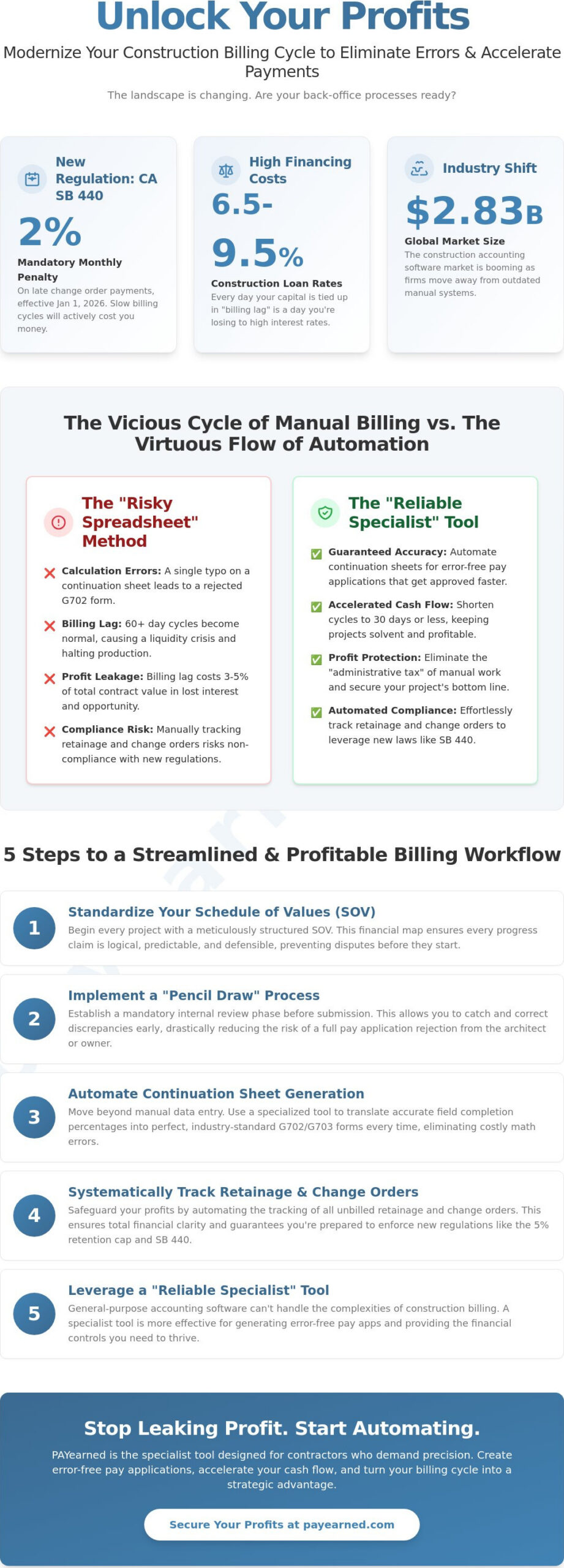
Shortening your billing cycle is the most direct way to improve project liquidity. If your current process takes 45 days from work completion to cash in hand, you are operating with a significant handicap. Managing construction billing cycles effectively requires a proactive approach that eliminates bottlenecks before they occur. By implementing these five tactical steps, you can compress your payment timeline and reduce administrative stress.
- Step 1: Standardize your Schedule of Values immediately. Don’t wait for the first billing deadline to organize your costs. Define your line items at the moment of contract award to ensure the architect and owner are aligned with your billing structure from day one.
- Step 2: Implement a Pencil Draw process. Submit a preliminary draft to the GC or architect five days before the formal deadline. This informal review catches math errors or percentage disputes early, preventing a formal rejection of your entire pay application.
- Step 3: Automate your G702 and G703 generation. Manual entry is a liability. Stop fighting with broken Excel formulas and automate your pay applications to ensure every calculation is error-free and compliant with industry standards.
- Step 4: Centralize change order tracking. Log every contract adjustment as it happens. Waiting until the end of the month to reconcile change orders is a primary cause of billing lag and unbilled work.
- Step 5: Set automated reminders for deadlines. Use a digital calendar to track lien waiver submissions and retainage release dates. This ensures you never miss a window for cash disbursement due to a simple oversight.
Standardizing for Scalability
Repeatability is the foundation of a fast billing cycle. Use templates that mirror industry standards like the AIA G702 and G703 formats. This familiarity makes it easier for reviewers to approve your claims quickly. Train your project managers to document progress in real-time rather than relying on memory at the end of the month. Creating a repeatable internal calendar for billing deadlines ensures your team stays ahead of the curve, allowing for a steady, predictable flow of data from the jobsite to the office.
Proactive Change Order Management
Waiting until the end of the month to log change orders is a cycle killer. It forces your accounting team to rush through complex reconciliations, increasing the risk of “fat-finger” errors. Instead, integrate change orders directly into your continuation sheets as they are approved. This maintains a clear audit trail for every contract adjustment. By keeping your change order sheets updated daily, you ensure that no unbilled work slips through the cracks, protecting your project profits from the start.
Streamlining Your Pay Apps with PAYearned’s Specialized Specialist Tools
Managing construction billing cycles shouldn’t be an exercise in frustration or a gamble with your project’s liquidity. While many software providers push bloated enterprise resource planning (ERP) suites, these general-purpose tools often lack the granular focus needed for complex pay applications. PAYearned fills this gap as a focused, no-nonsense partner that excels at one specific, critical task. It provides a premium solution feel without the premium price tag or the six-month implementation window of a full-scale accounting suite. As the global construction accounting software market grows to $2.83 billion in 2026, the demand for specialized, cloud-based tools has never been higher.
Our platform automates the tracking of unbilled retainage and change order sheets, ensuring you remain compliant with the latest 2026 regulations. Whether you’re navigating California’s new 5% retention cap or managing the 2% monthly interest penalty on late change orders, PAYearned provides the error-free calculations you need. We serve as a stabilizing force in your back office, offering a steady hand in a potentially chaotic administrative environment. For national contractors, our live, US-based support acts as a primary trust signal, ensuring you have accessible, human expertise whenever a complex billing question arises.
Built Exclusively for Payment Applications
PAYearned focuses on doing one thing better than anyone else. We don’t try to manage your jobsite safety or your fleet logistics; we focus entirely on the precision of your pay applications. This “compatible but independent” stance allows you to use a specialized tool that integrates into your existing workflow without the friction of a total system overhaul. We offer a “no credit card required” trial because we believe in the utility of our software. Once inside, the built-in search engine simplifies project organization, allowing you to find historical billing data or specific continuation sheets in seconds. This speed is essential for busy professionals who require information at a glance to keep projects moving.
Moving Beyond Risky Spreadsheets
The transition from manual, error-prone processes to a premium, automated solution provides immediate peace of mind. You can finally abandon the “risky spreadsheets” that lead to rejection cycles and delayed cash flow. PAYearned maintains industry-standard formatting that is compatible with G702 and G703 requirements, ensuring your documents are professional and familiar to architects and owners. Our automatic audit trails and searchable databases make closeouts and audits a breeze. By managing construction billing cycles with our specialized tool, you protect your project profits and build a reputation for financial reliability. Start streamlining your billing cycle with PAYearned today.
Take Control of Your Project Cash Flow
Managing construction billing cycles requires a shift from reactive administration to proactive financial management. You now have the roadmap to navigate 2026’s complex regulatory environment, including California’s 2% monthly interest penalty on late change order payments. By standardizing your Schedule of Values and moving away from risky spreadsheets, you protect your firm from the “rejection cycles” that stall project momentum. It is time to treat your billing workflow with the same precision you bring to the jobsite.
This proactive approach also extends to how you handle broader financial transactions; utilizing Pallapay for managing digital asset exchanges can provide the flexibility and security needed in today’s digital economy.
Precision is your best defense against high interest rates and unbilled retainage. PAYearned offers a premium, automated solution built exclusively for Pay Applications. We ensure error-free G702 and G703 generation and provide live, US-based support to guide you through every billing deadline. You don’t have to settle for the “administrative tax” of manual data entry any longer. Our platform provides the reliable, specialized tools necessary to keep your cash flowing and your projects on track.
Simplify your construction billing with PAYearned’s automated AIA-style forms.
Take the first step toward a more predictable, profitable future today. You’ve done the hard work in the field; now ensure your office workflow is just as robust. Your path to accelerated payments starts with a single, streamlined cycle.
Frequently Asked Questions
What is the standard construction billing cycle length?
The standard construction billing cycle typically follows a 30 day monthly cadence. However, the actual time to receive cash can extend to 60 or 90 days depending on the approval chain. On federal projects, the prompt payment interest rate for the first half of 2026 is 4.125% per annum, and agencies generally aim for a 14 to 30 day disbursement window after receiving a proper invoice.
How do G702 and G703 forms help manage billing cycles?
G702 and G703 forms provide a standardized framework that reduces communication errors between the field and the office. The G702 serves as a summary of the contract sum and payment history, while the G703 continuation sheet provides the granular detail of work completed. By using these industry-standard formats, you ensure that architects and owners can review your progress claims without the confusion caused by non-standard invoices.
What is the difference between progress billing and traditional invoicing?
Progress billing is based on the percentage of completion relative to a pre-approved Schedule of Values. Traditional invoicing usually bills for the full delivery of a specific product or service at a single point in time. In construction, progress billing is essential for protecting contractor liquidity during projects that span several months or years, allowing you to bill for work-in-place and stored materials as you go.
How can I track unbilled retainage throughout the project cycle?
Tracking unbilled retainage requires a dedicated ledger or an automated system that calculates the specific percentage withheld from every progress payment. For private contracts executed on or after January 1, 2026, California law caps retention at 5%. You must ensure your continuation sheets accurately reflect these cumulative totals to avoid legal disputes and ensure a smooth cash release during the project closeout phase.
Why do architects reject payment applications so frequently?
Architects typically reject applications due to math errors, overstating the percentage of work-in-place, or missing backup documentation. Managing construction billing cycles effectively means submitting every application with current lien waivers and insurance certificates. A single “fat-finger” error on a spreadsheet can trigger a total rejection, which often adds 14 days or more to your payment timeline.
Can I use Excel to manage my AIA-style billing cycles safely?
While many firms still use Excel, it’s considered a high-risk method because manual spreadsheets lack automated audit trails and error-checking. Data reconciliation in manual systems consumes approximately 10 to 15 hours per month for the average project manager. In 2026, the risk of a broken formula leading to a rejected pay application makes manual spreadsheets a liability rather than a tool.
How do change orders affect the monthly billing workflow?
Change orders must be integrated into your continuation sheets immediately to remain billable during the current cycle. Under California’s SB 440, which took effect January 1, 2026, late payments on change orders for private projects now incur a 2% monthly interest penalty. If you don’t track these adjustments in real-time, you risk losing both the principal payment and the legal protections provided by these new prompt payment laws.
What are the benefits of using specialized pay app software over a full ERP?
Specialized pay app software offers a “Reliable Specialist” approach, focusing entirely on mastering one critical task without the bloat of a full ERP. These tools are easier to implement, often taking hours instead of months to deploy across your team. They provide a premium solution feel with predictable pricing, ensuring your G702 and G703 forms are error-free while offering live, US-based support for complex billing scenarios.
PAYearned is an agnostic workflow platform that helps teams manage pay applications
PAYearned is an independent software product and is not developed, endorsed, approved, sponsored or affiliated with the American Institute of Architects (AIA). AIA®, G702®, G703®